
window.open(url, "_blank") asks the browser to open a URL in a new browsing context—often a tab, sometimes a separate window—subject to popup blockers, transient activation rules, and vendor defaults. Treat the call as a request, not a guarantee: background tabs may be deferred or denied. When you only need navigation inside the current document, JavaScript redirects or location.assign are usually clearer.
Environment: Node.js v20.18.2. After each runnable snippet, the following paragraph states the expected console output (order and values).
Open New Tab Syntax
window.open(url, target, features);Common values:
url: page to open.target: use"_blank"for a new tab/window.features: use security features such as"noopener,noreferrer".
Method 1: Open a URL in a New Tab
Pass the URL, "_blank", and a features string that includes noopener (and usually noreferrer) so the new browsing context cannot reach back through window.opener.
window.open("https://example.com", "_blank", "noopener,noreferrer");This is the safest basic form for opening a new tab from JavaScript.
The argument builder below was tested in Node.js to keep the sample deterministic:
function openArgs(url, target = "_blank", features = "noopener,noreferrer") {
  return [url, target, features].join("|");
}

console.log(openArgs("https://example.com"));
You should see one line logging https://example.com|_blank|noopener,noreferrer.
Method 2: Open New Tab from a Click Handler
Browsers are more likely to allow new tabs when window.open() runs directly from a user action.
button.addEventListener("click", () => {
  window.open("https://example.com", "_blank", "noopener,noreferrer");
});
Calling window.open() from timers, promises, or automatic page load code may be blocked by popup blockers.
Method 3: Open in the Same Tab
Use window.location.href when you do not need a new tab.
window.location.href = "https://example.com";This navigates the current page instead of requesting a new tab or window.
Security Notes for window.open
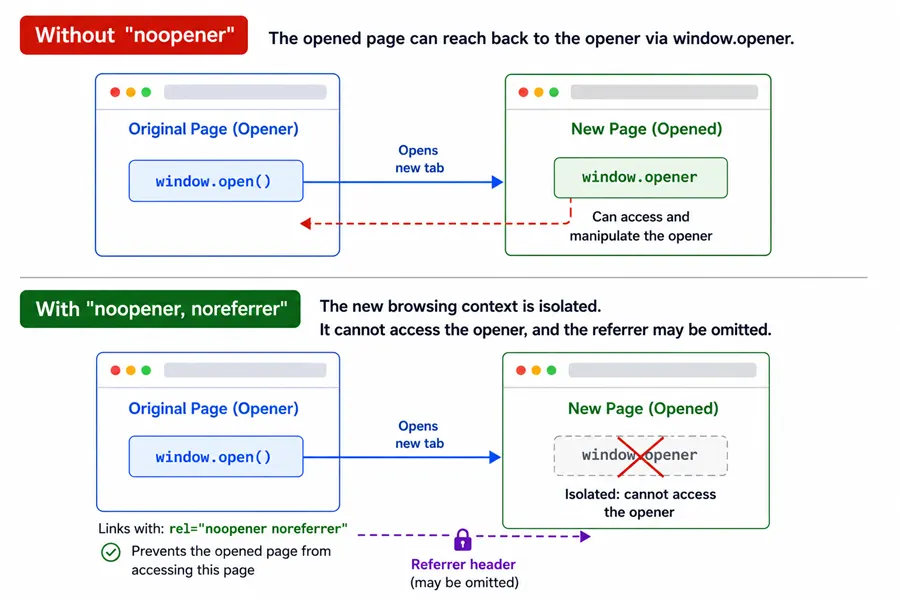
Use noopener to prevent the opened page from controlling the original page through window.opener. Use noreferrer when you also want to avoid sending the referrer header.
window.open(url, "_blank", "noopener,noreferrer");Common Questions About JavaScript Open New Tab
How do I open a new tab in JavaScript?
Use window.open("https://example.com", "_blank", "noopener,noreferrer").
Why is window.open blocked?
Browsers may block it when it is not triggered by a direct user action such as a click.
Does window.open always open a tab?
No. The browser and user settings decide whether it opens as a tab or a separate window.
Summary
JavaScript can request a new tab with window.open(url, "_blank", "noopener,noreferrer"). Use it from a user click handler to avoid popup blockers, and include noopener for safer cross-page behavior. If you want to navigate the current tab instead, use window.location.href. The exact tab-or-window behavior is controlled by the browser, not by JavaScript alone.
