
JavaScript Math.log() returns the natural logarithm of a number. That means it calculates log base e, not log base 10. Use Math.log() for natural logs, Math.log10() for base 10, or a change-of-base formula for other bases.
Environment: Node.js v20.18.2. Each snippet is plain JavaScript; the line after it states the expected console output.
Math.log Syntax
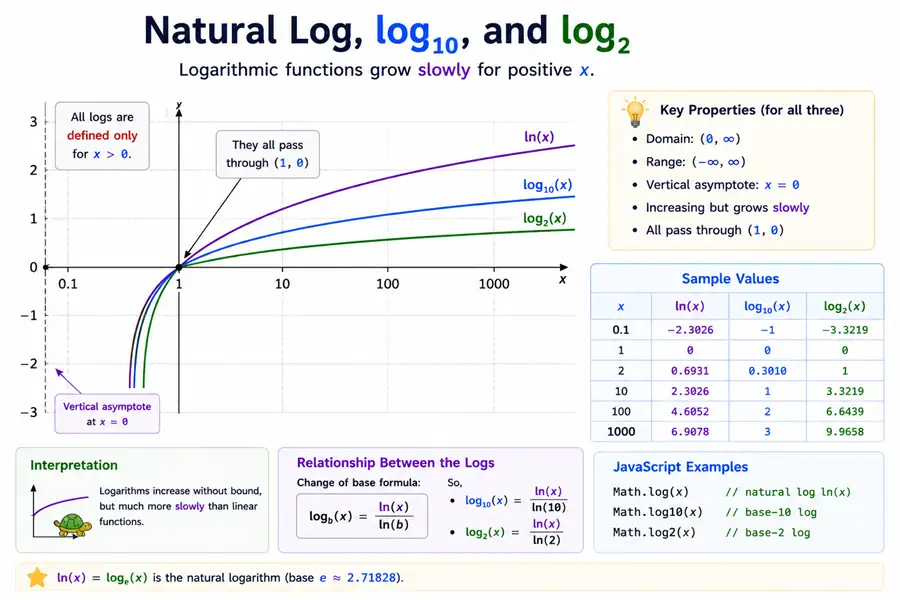
Math.log(x)x should be a positive number. The return value is the natural logarithm of x.
Method 1: Calculate Natural Logarithm
console.log(Math.log(Math.E));
console.log(Math.log(1));You should see 2 lines, in order: 1, 0.
Method 2: Calculate Base-10 Logarithm
console.log(Math.log(100) / Math.log(10));You should see one line logging 2.
For base 10 specifically, Math.log10(100) is clearer.
Method 3: Calculate Logarithm with Any Base
function logBase(value, base) {
  return Math.log(value) / Math.log(base);
}

console.log(logBase(8, 2));You should see one line logging 3.
Method 4: Handle 0 and Negative Inputs
console.log(Math.log(0));
console.log(Math.log(-1));You should see 2 lines, in order: -Infinity, NaN.
Common Questions About JavaScript Math.log
Is Math.log natural logarithm?
Yes. Math.log() returns the natural logarithm, which is log base e.
How do I calculate log base 10 in JavaScript?
Use Math.log10(x) or calculate Math.log(x) / Math.log(10).
Why does Math.log return NaN?
It returns NaN for negative inputs. Use positive numbers for real logarithm results.
Summary
Math.log is natural log (base e); use Math.log10 / Math.log2 when readers expect those bases, and remember log(0) is -Infinity.
JavaScript Math.log() calculates the natural logarithm of a number. Use it for log base e, or divide by Math.log(base) to calculate a custom-base logarithm. Remember that Math.log(0) returns -Infinity, and negative values return NaN.
