| Tested on | Ubuntu 26.04 LTS (Resolute Raccoon) |
|---|---|
| Also applies to | Ubuntu 24.04 LTS using the same official Caddy APT repository workflow |
| Package | caddy 2.11.7 (official Caddy repository)Ubuntu 26.04 Universe: caddy 2.6.2-14Ubuntu 24.04 Universe: caddy 2.6.2-6ubuntu0.24.04.3 (current amd64 updates) |
| Configuration | /etc/caddy/Caddyfile |
| Service | caddy.service |
| Applies to | Ubuntu 26.04 LTS and 24.04 LTS |
| Privilege | sudo or root |
| Scope | Install Caddy from the official APT repository on Ubuntu, verify systemd, serve a static site, enable automatic HTTPS for a public domain, optional reverse proxy and local HTTPS, UFW, update, and uninstall. Does not cover Docker, Snap, source builds, PHP-FPM, or multi-site administration. |
| Related guides | UFW command systemctl command How to remove software on Ubuntu Cannot assign requested address Linux commands cheat sheet |
Caddy is a Go web server with a short Caddyfile format and automatic HTTPS: it obtains and renews a TLS certificate (often called an SSL certificate) through ACME, the protocol Caddy uses to request and renew certificates automatically, without a separate Certbot cron job on most sites. That makes it a practical choice when you want HTTPS by default instead of configuring certificate issuance and renewal separately, as is common with other web-server setups.
This walkthrough on Ubuntu 26.04 (same APT steps on 24.04):
- Installs current stable Caddy from the official Debian/Ubuntu repository
- Confirms systemd and serves a demo static site
- Shows when automatic HTTPS applies (public domain vs
:80/ localhost)
Install and HTTP checks were re-verified on a fresh Ubuntu 26.04 server. Public HTTPS additionally needs a reachable host (or forwarded ports), a domain pointing at it, and TCP 80 and 443 end to end.
Before you start:
- Run commands on the Ubuntu machine where Caddy will run (local terminal or SSH).
- No domain required to install Caddy or test HTTP locally.
- Use
127.0.0.1or a LAN address when you do not have a public IP. - A publicly reachable server and domain are needed only for the public automatic-HTTPS section.
.deb package enables and starts caddy.service at install time. If nginx, Apache, or another process already listens on port 80 or 443, Caddy fails until you free those ports or change the site address in the Caddyfile.
Quick Answer
| Step | What happens |
|---|---|
| Add repository | Add Caddy's official stable APT repository (commands below) |
| Install | sudo apt update, then sudo apt install caddy |
| Verify | Check caddy.service with systemctl |
| Configure | Edit /etc/caddy/Caddyfile for your site |
| Public HTTPS | Use your real domain as the site address in the Caddyfile |
| Firewall | Allow HTTP/HTTPS in UFW and any hosting/provider firewall when needed |
Caddy on Ubuntu 26.04 and 24.04
Ubuntu provides Caddy in Universe on both releases, but the package revisions differ and both trail the current upstream stable release:
| Ubuntu release | Ubuntu repository package |
|---|---|
| Ubuntu 26.04 LTS | 2.6.2-14 |
| Ubuntu 24.04 LTS | 2.6.2-6ubuntu0.24.04.3 (current amd64 updates/security pocket) |
Both are based on the older Caddy 2.6.2 series. This guide uses Caddy’s official Debian/Ubuntu repository because it provides the current stable Caddy release while keeping normal APT upgrades and the packaged caddy.service unit.
The install commands below are the same on 26.04 and 24.04.
Ubuntu Repository vs Official Caddy Repository
| Package source | Advantage | Limitation | Recommendation |
|---|---|---|---|
| Ubuntu Universe | Ubuntu-managed lifecycle | Older Caddy (2.6.2 series) | Fine if 2.6.2 meets your needs |
| Official Caddy repository | Current stable Caddy + apt upgrade |
Adds an external APT source | Recommended for this guide |
This article teaches only the official repository workflow. Custom third-party Caddy plugins require a custom build (xcaddy); the stock package is enough for static sites, reverse proxy, and automatic HTTPS.
Prerequisites
Required for installation:
- Ubuntu 26.04 or 24.04 with terminal or SSH access and sudo.
- Outbound HTTPS to
dl.cloudsmith.iofor the repository setup.
Required only for public automatic HTTPS:
- A domain or subdomain you control, with DNS pointing at this server.
- A and optional AAAA records (see below).
- TCP ports 80 (HTTP) and 443 (HTTPS) reachable from the public internet through Ubuntu UFW and, if applicable, your hosting or cloud provider's external firewall (firewall rules or security groups).
DNS and ports required for automatic HTTPS
- A record — maps the hostname to the server's IPv4 address.
- AAAA record — maps the hostname to IPv6; add one only when this server is reachable over IPv6.
For automatic HTTPS in this guide:
- The hostname in the Caddyfile must resolve to this server.
- TCP 80 (HTTP) and 443 (HTTPS) must be reachable from the internet.
┌─────────────────┐
│   example.com   │
└────────┬────────┘
         ↓
┌─────────────────┐
│   DNS A record  │
└────────┬────────┘
         ↓
┌─────────────────┐
│  203.0.113.10   │
└────────┬────────┘
         ↓
┌─────────────────┐
│  Ubuntu server  │
└────────┬────────┘
         ↓
┌─────────────────┐
│      Caddy      │
└─────────────────┘
If you publish an AAAA record, it must reach this same Caddy instance over IPv6. AAAA pointing elsewhere while clients prefer IPv6 can break certificate validation or connections.
Install Caddy on Ubuntu from the official repository
Add the Caddy repository
Refresh Ubuntu's package index before adding repository helpers (especially on a freshly installed server):
sudo apt updateInstall the packages Caddy’s install docs use for signed HTTPS repositories and curl:
sudo apt install --yes debian-keyring debian-archive-keyring apt-transport-https curlImport the stable signing key:
curl -1sLf 'https://dl.cloudsmith.io/public/caddy/stable/gpg.key' | sudo gpg --dearmor -o /usr/share/keyrings/caddy-stable-archive-keyring.gpgRegister the APT source list:
curl -1sLf 'https://dl.cloudsmith.io/public/caddy/stable/debian.deb.txt' | sudo tee /etc/apt/sources.list.d/caddy-stable.listMake the key and list readable to unprivileged apt (matches upstream docs):
sudo chmod o+r /usr/share/keyrings/caddy-stable-archive-keyring.gpgRepeat for the source list file:
sudo chmod o+r /etc/apt/sources.list.d/caddy-stable.listInstall Caddy
After the Caddy repository is added, run apt update again so APT loads the new source, then install:
sudo apt updateInstall the caddy package from the new repository:
sudo apt install --yes caddyThe package enables caddy.service and drops a starter Caddyfile under /etc/caddy/.
Verify the installed version
Check the binary reports the Cloudsmith build:
caddy versionv2.11.7 h1:yj0Y4fYZGPkSvibBJ1sTWE33xC0fxztVyXEW5iIdUT4=Verify the Caddy systemd service
Ubuntu runs Caddy in the background as a systemd service named caddy.service. The service starts the web server at boot and lets you control it with systemctl.
Confirm the unit is enabled (configured to start at boot):
systemctl is-enabled caddyenabledEnabled means Caddy is set to start at boot. Check whether it is active (running now):
systemctl is-active caddyactiveFor the full unit picture, use systemctl status:
sudo systemctl status caddy --no-pager● caddy.service - Caddy
Loaded: loaded (/usr/lib/systemd/system/caddy.service; enabled; preset: enabled)
Active: active (running) ...
Main PID: ... (caddy)
└─ ... /usr/bin/caddy run --environ --config /etc/caddy/CaddyfileFix port 80 or 443 already in use
When another web server owns the ports, Caddy may exit with address already in use. A process listening on a port has already claimed that network port; only one normal web-server listener can usually own the same IP and port at a time.
Check listeners on 80 and 443:
sudo ss -ltnp | grep -E ':(80|443)\b'┌──────────────────────────────┐
│ nginx / Apache / other Caddy │
└──────────────┬───────────────┘
↓
┌──────────────────────────────┐
│ already owns port │
└──────────────┬───────────────┘
↓
┌──────────────────────────────┐
│ Caddy cannot bind │
└──────────────────────────────┘If nginx is already listening on port 80, Caddy cannot use the same address and port. Stop the conflicting service only if Caddy is replacing it permanently:
sudo systemctl stop nginxDisable it at boot only when you do not plan to run nginx on this machine again:
sudo systemctl disable nginxThen start Caddy:
sudo systemctl start caddyPort and bind issues on other stacks are covered in Cannot assign requested address.
Understand the default Caddyfile
The Caddyfile is Caddy's human-readable configuration file. On this Ubuntu package, the main file is /etc/caddy/Caddyfile.
The package ships a default :80 site and the welcome page under /usr/share/caddy:
:80 {
	root * /usr/share/caddy
	file_server
}:80— Caddy accepts HTTP on port 80 for any hostname reaching this server; no public hostname, so no normal public automatic HTTPS.root— directory where site files live.file_server— serves files such asindex.htmlfrom that directory.
The packaged service runs as the unprivileged caddy user and stores runtime data under /var/lib/caddy.
With Caddy listening on port 80, HTTP should return the bundled Caddy works! page. 127.0.0.1 is the server's loopback address, so this first request checks Caddy locally on the Ubuntu machine itself:
curl -sI http://127.0.0.1/ | head -4HTTP/1.1 200 OK
Accept-Ranges: bytes
Content-Length: 18753
Content-Type: text/html; charset=utf-8To test from another machine, use the server's reachable public IP address or hostname instead of 127.0.0.1:
curl -sI http://203.0.113.10/ | head -4HTTP/1.1 200 OK
Accept-Ranges: bytes
Content-Type: text/html; charset=utf-8
Server: CaddyServe a static website with Caddy
Create a web root
A web root is the directory whose files Caddy serves to visitors.
- Caddy only needs read access to static files.
- Prefer the root user or your deployment user as owner, with world read and directory traverse (
a+rX).
Do not put secrets in the web root:
- Application secrets, private keys,
.envfiles, or backups
sudo mkdir -p /var/www/caddy-demoAdd a minimal index.html for the demo:
sudo tee /var/www/caddy-demo/index.html << 'EOF'
<!DOCTYPE html>
<html>
<head><title>Caddy demo</title></head>
<body><h1>Caddy demo site on Ubuntu</h1></body>
</html>
EOF
Leave ownership with root and grant read access to the caddy process:
sudo chown -R root:root /var/www/caddy-demoDirectories need execute permission for traversal:
sudo chmod -R a+rX /var/www/caddy-demo┌─────────────────────────┐
│ deployment / root user │
└────────────┬────────────┘
↓
┌─────────────────────────┐
│ website files │
└────────────┬────────────┘
↓
┌─────────────────────────┐
│ Caddy │
└─────────────────────────┘Edit the Caddyfile
Back up the package default before replacing it:
sudo cp /etc/caddy/Caddyfile /etc/caddy/Caddyfile.bakOpen the file in Nano:
sudo nano /etc/caddy/CaddyfileReplace the contents with this demo site (modern Caddy accepts root without a * matcher):
:80 {
	root /var/www/caddy-demo
	file_server
}
root tells Caddy where the website files are stored. file_server tells Caddy to serve files such as index.html from that directory.
In Nano, press Ctrl+O, then Enter to save, and Ctrl+X to exit.
Validate and reload the Caddyfile
caddy validate checks the configuration before it is applied; systemctl reload applies a valid config without intentionally stopping the running service.
First, format the Caddyfile:
sudo caddy fmt --overwrite /etc/caddy/CaddyfileValidate the syntax:
sudo caddy validate --config /etc/caddy/CaddyfileValid configurationReload Caddy to apply the validated configuration:
sudo systemctl reload caddyConfirm the demo HTML is served:
curl -s http://127.0.0.1/<!DOCTYPE html>
<html>
<head><title>Caddy demo</title></head>
<body><h1>Caddy demo site on Ubuntu</h1></body>
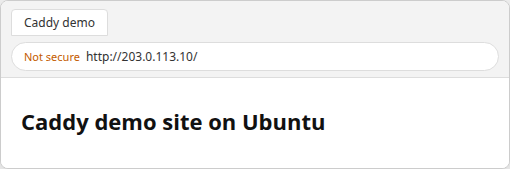
</html>In a browser, open http://<your-server-public-ipv4>/ (or your hostname once DNS points at the server). HTTP shows Not secure until you switch the Caddyfile to your domain and Caddy obtains a certificate:
Enable automatic HTTPS for a public domain
Before you continue
You do not need a domain for installation, local testing, or HTTP testing by IP. A real domain is required only for this public automatic-HTTPS section.
You need:
- A domain or subdomain you control
- A public IPv4 address for the Ubuntu server (and IPv6 if you publish AAAA records)
- DNS pointing the hostname at that address
- TCP ports 80 and 443 reachable from the internet through UFW and any external firewall used by your hosting or cloud provider
example.com is only a placeholder. For your site:
- Replace it with a hostname you control (for example
app.yourdomain.com). - Create a DNS A record pointing that name to your server's public IPv4 address.
- Add an AAAA record as well if you use IPv6.
With a public hostname in the Caddyfile (instead of :80), Caddy obtains and renews a publicly trusted TLS certificate through ACME—normally without Certbot or a separate renewal cron.
Point DNS to the Caddy server
Example record at your DNS provider (field names differ by vendor):
| DNS field | Example |
|---|---|
| Type | A |
| Name / Host | caddy |
| Value / Points to | 203.0.113.10 |
| Resulting hostname | caddy.yourdomain.com |
DNS provider interfaces use different labels such as Name, Host, or Record, but the goal is the same: the hostname must resolve to your server's public IP.
Confirm the name resolves to this server before you change the Caddyfile (replace example.com with the hostname you configured):
dig +short A example.com203.0.113.10Check the dig result:
- It should match your Ubuntu server's public IPv4 address.
- If not, fix the A record at your DNS provider and wait for propagation (TTL sets how long old answers may linger).
- If DNS goes through a CDN or proxy, validation and firewall rules can differ; for this guide, point the hostname directly at the Caddy server while you complete the first HTTPS setup.
Update the Caddyfile
Replace the :80 block with a hostname block once DNS points at this server:
example.com {
	root /var/www/caddy-demo
	file_server
}
Replace example.com with the exact hostname you configured in DNS. For example, if you created an A record for caddy.mydomain.com, use:
caddy.mydomain.com {
	root /var/www/caddy-demo
	file_server
}
First, format the Caddyfile:
sudo caddy fmt --overwrite /etc/caddy/CaddyfileValidate the syntax:
sudo caddy validate --config /etc/caddy/CaddyfileReload Caddy to apply the validated configuration:
sudo systemctl reload caddyAfter reload, Caddy begins obtaining the certificate automatically. Follow the service logs to watch the process:
sudo journalctl -u caddy -fVerify HTTPS
From a client that resolves your domain to this server, request HTTPS (replace example.com with your hostname):
curl -sI https://example.com/ | head -6HTTP/2 200
accept-ranges: bytes
content-type: text/html; charset=utf-8
server: CaddyFrom curl, expect:
HTTP/2orHTTP/1.1200server: Caddy- With Caddy's default automatic HTTPS behavior, HTTP requests to that hostname are redirected to HTTPS
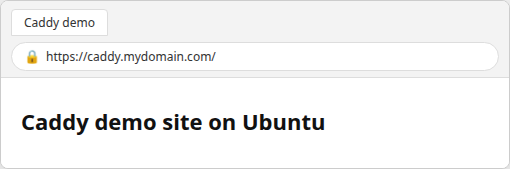
In a browser on your hostname:
- The address bar should show HTTPS and your browser's secure-connection indicator (padlock or equivalent).
- That indicator reflects the certificate Caddy obtained—not text on the page.
The figure uses caddy.mydomain.com as a placeholder URL; substitute the hostname you configured in DNS and the Caddyfile:
Optional: Configure Caddy as a reverse proxy
A reverse proxy accepts the browser request through Caddy and forwards it to an application already running on another local port, such as 8080.
To front an application on another port, keep the domain block and proxy to the upstream:
example.com {
	reverse_proxy localhost:8080
}
Run sudo caddy fmt, sudo caddy validate, and sudo systemctl reload caddy the same way as for a static site.
Optional: Use HTTPS on localhost
For local development on a desktop or lab VM, use localhost as the site address:
localhost {
	root /var/www/caddy-demo
	file_server
}
After validate and reload, test https://localhost/ (not 127.0.0.1 unless you add that name to the Caddyfile). If your shell sets HTTPS_PROXY, bypass it for loopback:
curl --noproxy '*' -sI https://localhost/Before the local CA is trusted, curl may fail with a certificate error (exit code 60 on many systems).
Trust Caddy's local CA
For local HTTPS, Caddy creates its own certificate authority (CA). Your computer must trust that CA before browsers and tools accept Caddy's locally issued certificates without warnings.
The packaged service runs as the unprivileged caddy user, so install the local root into the system trust store with sudo:
sudo caddy trust{"level":"info","msg":"certificate installed properly in linux trusts"}Then HTTPS to localhost should succeed without -k:
curl --noproxy '*' -sI https://localhost/ | head -4HTTP/2 200
content-type: text/html; charset=utf-8
server: CaddySome browsers keep a separate trust store; you may still need to import or trust the local CA in the browser even after sudo caddy trust.
Configure UFW for Caddy
When UFW is active, allow HTTP and HTTPS:
sudo ufw allow 80/tcpAllow HTTPS on TCP as well:
sudo ufw allow 443/tcpKeep SSH (port 22) allowed before sudo ufw enable on remote servers. UFW applies new allow rules immediately; a separate ufw reload is not required.
Optional: Allow HTTP/3
Normal HTTP and HTTPS use TCP on ports 80 and 443. HTTP/3 additionally uses UDP port 443. HTTPS over TCP still works if you skip this rule:
sudo ufw allow 443/udpUpdate Caddy on Ubuntu
Because Caddy is an APT package from Cloudsmith, refresh indexes and upgrade only the caddy package:
sudo apt updateUpgrade only the Caddy package:
sudo apt install --only-upgrade caddyConfirm the version and that the service stayed up:
caddy versionThe unit should still report active:
systemctl is-active caddyUninstall Caddy
Stop the service and remove the package:
sudo systemctl stop caddyRemove the package and its maintainer scripts:
sudo apt purge --yes caddyRemove the Cloudsmith list and key if you no longer want the repository:
sudo rm -f /etc/apt/sources.list.d/caddy-stable.listDelete the signing keyring file as well:
sudo rm -f /usr/share/keyrings/caddy-stable-archive-keyring.gpgLeftover paths after purge:
/etc/caddy— configuration/var/lib/caddy— certificates and PKI state (delete only if you want that material gone)
See how to remove software on Ubuntu for purge vs remove.
Troubleshooting
| Symptom | Likely cause | Fix |
|---|---|---|
address already in use on :80 or :443 |
nginx, Apache, or another listener | sudo ss -ltnp with `grep -E ':(80 |
curl shows wrong Server header |
Traffic hits another web server | Free ports 80/443; confirm systemctl is-active caddy is active |
| HTTPS fails for public domain | DNS or firewall | Fix A/AAAA; allow 80 and 443 on UFW and the provider's external firewall |
Valid configuration but site unchanged |
Config not reloaded | sudo systemctl reload caddy after edits |
| Permission denied reading site files | caddy cannot read the path |
sudo chmod -R a+rX /var/www/yoursite and traverse permission on parent directories |
curl to localhost returns proxy errors |
HTTPS_PROXY set |
curl --noproxy '*' for loopback tests |
Certificate errors on localhost |
Local CA not trusted | sudo caddy trust; trust the CA in the browser if needed |
Follow logs after changes:
sudo journalctl -u caddy -fSummary
Ubuntu 24.04 and 26.04 include an older Caddy 2.6.2 build in Universe (package revisions differ by release), but the official Caddy APT repository installs the current stable release (2.11.7 at test time) with the same curl, gpg, and apt install caddy flow on both releases. The package enables caddy.service, serves the default welcome page from /usr/share/caddy, and keeps the main config in /etc/caddy/Caddyfile.
For your own site:
- Web root:
root:rootwitha+rX;root /pathin the Caddyfile - After edits:
caddy fmt,caddy validate,systemctl reload caddy - Public domain name in the site address for ACME HTTPS when DNS and ports are correct
- localhost plus
sudo caddy trustfor local TLS
If install fails immediately, check whether port 80 or 443 is already taken—the usual blocker when nginx or Apache was installed first.
References
- Caddy install — official Debian/Ubuntu APT commands
- Caddy documentation — Caddyfile, automatic HTTPS, reverse proxy
- Automatic HTTPS — ACME, local HTTPS, and trust
Frequently Asked Questions
Is Caddy available in Ubuntu's default repository?
Ubuntu provides caddy in Universe on both releases: 2.6.2-14 on 26.04 and 2.6.2-6ubuntu0.24.04.3 on current 24.04 amd64 updates. That is not the same as the current upstream stable series from the official Caddy APT repository.
Should I use Ubuntu's Caddy package or the official repository?
Use Ubuntu's package if 2.6.2 meets your needs and you want Ubuntu-only lifecycle management. Use the official Caddy repository when you want the current stable Caddy and normal apt upgrades, which is what this guide installs.
Does Caddy need Certbot?
No for typical automatic HTTPS. When the Caddyfile site address is a public hostname with correct DNS, Caddy obtains and renews certificates through ACME. Certbot is for stacks that do not manage TLS inside the web server.
Where is the Caddyfile on Ubuntu?
/etc/caddy/Caddyfile. After edits, run sudo caddy fmt --overwrite /etc/caddy/Caddyfile, sudo caddy validate --config /etc/caddy/Caddyfile, then sudo systemctl reload caddy.
Does Caddy start automatically after installation?
Yes. The Debian package enables and starts caddy.service. If the unit fails with address already in use, another process is holding port 80 or 443.
Does this guide work on Ubuntu 24.04?
Yes. The official Cloudsmith stable repository and install commands are the same on Ubuntu 24.04 and 26.04; only the Ubuntu Universe package revision differs (2.6.2-14 vs 2.6.2-6ubuntu0.24.04.3).