
insertBefore is called on the parent node: pass the new child and the reference sibling (or null to append at the end). It gives precise ordering control compared with only using Node.appendChild, which always drops the node after the current last child.
The snippets below call document APIs as in a browser. To run them under Node.js, wrap the same DOM calls with jsdom (see the appendChild guide on this site); the public Run control does not provide a DOM, so each runnable block uses {run=false}—use Copy and run locally with jsdom or in DevTools.
Tested on: Node.js v20.18.2 with jsdom for editorial QA. A short note after each snippet describes expected output. Run in-browser where the shown
documentstructure exists.
Quick reference
insertBefore always runs on the parent: you pass the node to insert and the reference child (or null to append). Use this table to pick the right second argument.
| Goal | Call |
|---|---|
Before child ref |
parent.insertBefore(node, ref) |
After child ref |
parent.insertBefore(node, ref.nextSibling) |
| Append last | parent.insertBefore(node, null) or parent.appendChild(node) |
1. Signature: parent.insertBefore(newNode, referenceNode)
The method lives on Node, but you almost always call it on an Element that is the common parent of newNode (after insert) and referenceNode.
parent: the container whose children you are reordering.newNode: the node to insert (may already be in the document—it moves, not copies).referenceNode: an existing child ofparentbefore whichnewNodeis placed, ornullto append at the end ofparent’s children (MDN).
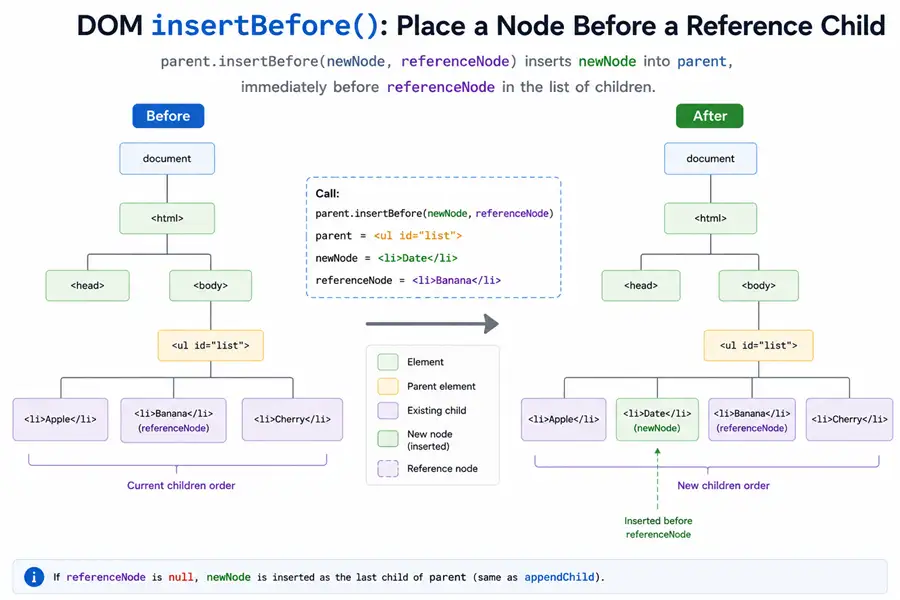
You often obtain parent from someElement.parentNode. The
JavaScript element-selection guide compares
getElementById, querySelector, and live collections when you still
need to locate the parent or reference child. For example:
const gallery = document.getElementById("imagegallery");
const placeholder = document.createElement("div");
placeholder.textContent = "Loading…";
gallery.parentNode.insertBefore(placeholder, gallery);
That inserts placeholder as a sibling before gallery, under their shared parent (assuming #imagegallery exists in the document).
2. Prepend before the first child (often a text node)
firstChild may be text or an element; inserting before it prepends at the top of the subtree’s child list.
The new paragraph uses
JavaScript textContent so its label is
treated as plain text rather than parsed as HTML.
const div = document.getElementById("myDiv");
const newnode = document.createElement("p");
newnode.textContent = "I'm appearing above the content";
div.insertBefore(newnode, div.firstChild);
console.log(div.innerHTML);<p>I'm appearing above the content</p>Content is hereYou should see one line like: <p>I'm appearing above the content</p>Content is here.
3. Insert before the nth element (guard if missing)
getElementsByTagName is live; always check the index exists before using it as the reference node.
const div = document.getElementById("target");
const paras = div.getElementsByTagName("p");
const newPara = document.createElement("p");
newPara.appendChild(document.createTextNode("New paragraph content"));
if (paras[2]) {
  div.insertBefore(newPara, paras[2]);
} else {
  div.appendChild(newPara);
}
console.log(div.innerHTML);<p>a</p><p>b</p><p>New paragraph content</p><p>c</p>You should see one line like: <p>a</p><p>b</p><p>New paragraph content</p><p>c</p>.
Expected markup for #target:
<div id="target">
  <p>a</p>
  <p>b</p>
  <p>c</p>
</div>
4. null reference = append as last child
Pass null when you want “after the last child” behavior without calling appendChild—handy when you already branch on a missing reference. The second argument is still required: pass a child node or null, never omit it.
const p = document.getElementById("p");
const n = document.createElement("span");
n.textContent = "end";
p.insertBefore(n, null);
console.log(p.innerHTML);<span>end</span>You should see one line like: <span>end</span>.
Use <div id="p"></div> (empty) as the starting #p markup.
5. “Insert after” with nextSibling (insertbefore js pattern)
There is no built-in insertAfter: call insertBefore with the next sibling as the reference. If ref is the last child, ref.nextSibling is null, which still places the node after ref.
const x = document.getElementById("x");
const a = document.getElementById("a");
const b = document.getElementById("b");
x.insertBefore(a, b.nextSibling);
console.log(x.innerHTML);<span id="b">B</span><span id="a">A</span>You should see one line like: <span id="b">B</span><span id="a">A</span>.
Starting markup:
<div id="x">
  <span id="a">A</span><span id="b">B</span>
</div>
If b were the last child, b.nextSibling would be null, and a would still move to the end—after b.
6. Moving an existing node (same API)
If newNode is already in the tree, insertBefore moves it—there is no automatic clone.
const r = document.getElementById("r");
const m1 = document.getElementById("m1");
const m2 = document.getElementById("m2");
r.insertBefore(m2, m1);
console.log(r.innerHTML);<span id="m2">2</span><span id="m1">1</span>You should see one line like: <span id="m2">2</span><span id="m1">1</span>.
Starting markup: <div id="r"><span id="m1">1</span><span id="m2">2</span></div>.
7. Omitting the second argument throws
Modern engines throw TypeError when the reference argument is missing; this guards against ambiguous calls.
const x = document.getElementById("x");
const n = document.createElement("i");
try {
  x.insertBefore(n);
} catch (e) {
  console.log(e.name);
}TypeErrorYou should see one line like: TypeError.
Use an empty <div id="x"></div> as #x.
Summary
insertBefore is the low-level primitive for ordered child lists: same parent, explicit reference (or null), and no separate “insert after” API.
parent.insertBefore(newNode, ref)insertsnewNodeas a child ofparentimmediately beforeref, or at the end whenrefisnull.- Use
ref.nextSiblingto emulate insert-after; moving an existing node re-parents it instead of copying. firstChildis often a text node—inserting before it prepends above inline text.- Omitting the second argument throws
TypeError.
References
MDN and WHATWG specifications for Node.insertBefore.
- MDN:
Node.insertBefore() - WHATWG DOM:
insertBefore
Frequently Asked Questions
What is the insertbefore javascript syntax?
Call insertBefore on the parent node: parent.insertBefore(newNode, referenceNode). It inserts newNode as a child of parent, immediately before referenceNode among parent’s children.
Can I omit the second argument to javascript insertbefore?
No. referenceNode is required. Pass null to insert at the end of the child list (similar to appendChild). Omitting the second argument throws TypeError in modern browsers.
How do I insert after an element with insertBefore in javascript?
There is no insertAfter. Use parent.insertBefore(newNode, existingNode.nextSibling). If existingNode is the last child, nextSibling is null and newNode is appended after it.
Why use firstChild with insertBefore js?
For an element like
Does insertBefore copy an existing node?
No. If newNode is already in the document, it is moved from its old parent to the new position.
When should I use appendChild instead of insertBefore?
Use appendChild when you only need to add at the end. For arbitrary positions, use insertBefore—or Element.append with multiple nodes in modern browsers. See also the appendChild guide on this site.
