
Node.prototype.appendChild inserts a node as the last child of a parent element—or moves an existing node from its old parent into the new one, because a node can only have one parent at a time. The usual flow is create with document.createElement, set properties or textContent, then append. SVG shapes need createElementNS in the SVG namespace instead — see create SVG with JavaScript. For sibling-specific ordering or inserting before a known child, pair this with JavaScript insertBefore; for multiple nodes at once, consider a DocumentFragment.
The examples use jsdom so the same document APIs run under Node.js v20.18.2 with jsdom 24.0.0. Install with npm install jsdom@24.0.0, then run each script with node. In a real page, drop the JSDOM bootstrap and run the DOM lines in a <script> or DevTools. The public Run control does not bundle jsdom, so snippets are marked {run=false}—use Copy and run locally, or compare your output to the short descriptions after each block.
Tested on: Node.js v20.18.2 and jsdom 24.0.0. Each example is followed by a short plain-language summary of the console output.
Quick reference
Use this table for javascript appendchild vs append and related DOM moves.
| Goal | API |
|---|---|
| One child at the end; need return value | parent.appendChild(node) |
| Multiple nodes or raw strings | parent.append(...) |
| Batch insert (nodes “lifted” into parent) | DocumentFragment + parent.appendChild(fragment) |
| Insert before a specific sibling | parent.insertBefore(newNode, referenceChild) |
| Keep source subtree in place | cloneNode(true) then append the clone |
1. Basic appendChild (javascript appendchild)
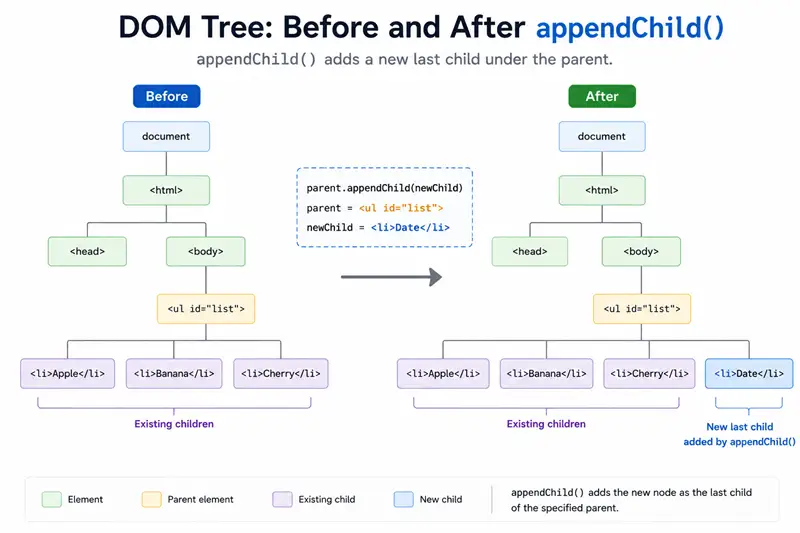
Select a parent (for example with document.getElementById or querySelector), create a child, set its text, then append.
const { JSDOM } = require("jsdom");

const { document } = new JSDOM(
  `<!DOCTYPE html><html><body><div id="parent"></div></body></html>`,
).window;

const parent = document.getElementById("parent");
const child = document.createElement("p");
child.textContent = "Welcome Home";

const returned = parent.appendChild(child);

console.log(parent.innerHTML);
console.log(returned === child);<p>Welcome Home</p>
true2. Append another list item (appendchild on a <ul>)
appendchild javascript tutorials often use a list: new li nodes are added after existing children.
const { JSDOM } = require("jsdom");

const { document } = new JSDOM(
  `<!DOCTYPE html><html><body>
    <ul id="list"><li>HTML</li><li>CSS</li><li>JS</li></ul>
  </body></html>`,
).window;

const list = document.getElementById("list");
const item = document.createElement("li");
item.textContent = "Python";

list.appendChild(item);

console.log(list.innerHTML.replace(/\s+/g, " ").trim());<li>HTML</li><li>CSS</li><li>JS</li><li>Python</li>3. Moving an existing node (not a copy)
If the node already has a parent, appendChild in JavaScript moves it: the old parent loses the subtree at that branch.
const { JSDOM } = require("jsdom");

const { document } = new JSDOM(
  `<!DOCTYPE html><html><body>
    <div id="oldParent"><p id="child">Holder Value</p></div>
    <div id="parent1"></div>
  </body></html>`,
).window;

const parent1 = document.getElementById("parent1");
const child = document.getElementById("child");

parent1.appendChild(child);

const oldParent = document.getElementById("oldParent");

console.log("old:", oldParent.innerHTML.replace(/\s+/g, " ").trim());
console.log("new:", parent1.innerHTML.replace(/\s+/g, " ").trim());old:
new: <p id="child">Holder Value</p>To duplicate instead of move, use cloneNode(true) and append the clone (duplicate id attributes are invalid in real pages—assign a new id when needed).
const { JSDOM } = require("jsdom");

const { document } = new JSDOM(
  `<!DOCTYPE html><html><body>
    <div id="p1"></div><div id="p2"></div>
  </body></html>`,
).window;

const p1 = document.getElementById("p1");
const p2 = document.getElementById("p2");
const span = document.createElement("span");
span.textContent = "x";

p1.appendChild(span);
const copy = span.cloneNode(true);
p2.appendChild(copy);

console.log("p1:", p1.innerHTML);
console.log("p2:", p2.innerHTML);
console.log("same object:", span === copy);p1: <span>x</span>
p2: <span>x</span>
same object: false4. append vs appendChild (js appendchild vs modern append)
For javascript appendchild html-style ergonomics, compare Element.append: it accepts strings (converted to Text nodes) and multiple arguments, while appendChild only accepts one Node.
const { JSDOM } = require("jsdom");

const { document } = new JSDOM(
  `<!DOCTYPE html><html><body><div id="box"></div></body></html>`,
).window;

const box = document.getElementById("box");
const span = document.createElement("span");
span.textContent = "a";

box.appendChild(span);
box.append(" ", "b");

console.log(JSON.stringify(box.innerHTML));"<span>a</span> b"JSON.stringify on innerHTML should print "<span>a</span> b"—a span from appendChild plus a space and b from append.
5. DocumentFragment: several nodes, one appendChild
appendChild js patterns for batch insert: build a DocumentFragment, append multiple children to the fragment, then parent.appendChild(fragment). The fragment empties—its children become the parent’s children.
const { JSDOM } = require("jsdom");

const { document } = new JSDOM(
  `<!DOCTYPE html><html><body><div id="root"></div></body></html>`,
).window;

const root = document.getElementById("root");
const frag = document.createDocumentFragment();

frag.appendChild(document.createElement("span")).textContent = "1";
frag.appendChild(document.createElement("span")).textContent = "2";

root.appendChild(frag);

console.log("fragment children after append:", frag.childNodes.length);
console.log(root.innerHTML);fragment children after append: 0
<span>1</span><span>2</span>6. Inserting before the end — insertBefore
appendChild cannot place a node in the middle; use insertBefore(newNode, referenceNode).
const { JSDOM } = require("jsdom");

const { document } = new JSDOM(
  `<!DOCTYPE html><html><body>
    <ul id="u"><li id="a">A</li><li id="b">B</li></ul>
  </body></html>`,
).window;

const ul = document.getElementById("u");
const li = document.createElement("li");
li.textContent = "mid";

ul.insertBefore(li, document.getElementById("b"));

console.log(ul.innerHTML.replace(/\s+/g, " ").trim());<li id="a">A</li><li>mid</li><li id="b">B</li>7. Security note (javascript appendchild html)
Prefer createElement plus textContent / appendChild for structured UI. Treat innerHTML and insertAdjacentHTML as HTML parsers: unsafe with untrusted strings. After nodes exist, you can wire behavior with addEventListener.
Summary
appendChildadds oneNodeas the last child and returns it; if the node was mounted elsewhere, it moves.- Use
appendfor multiple arguments or string children; useDocumentFragmentto batch several elements in one append. - Use
insertBeforefor ordering; usecloneNode(true)when you must not move the original.
References
MDN entries for appendChild, append, and related node APIs.
Frequently Asked Questions
What does JavaScript appendChild do?
Node.appendChild(child) inserts child as the last child of the parent. If child was already somewhere in the document, it is moved—not copied. The method returns the appended child node, or throws TypeError if the argument is not a Node (for example null).
What is the difference between append and appendChild in JavaScript?
appendChild accepts exactly one Node and returns that node. Element.append can take multiple Node or string arguments; strings become Text nodes. append returns undefined. Use appendChild when you need the return value or maximal older-browser compatibility; use append for ergonomic multi-insert and raw text.
Is appendChild the same as innerHTML for adding children?
No. innerHTML parses HTML strings and replaces or builds markup, which is risky with untrusted input and can drop event listeners when you reassign wholesale. appendChild attaches an existing Node you created with createElement (or moved from elsewhere)—no HTML parser involved.
How do I add a child in JavaScript without moving an existing node?
Call element.cloneNode(true) to duplicate a subtree, then appendChild the clone. Moving still happens if you appendChild the original node while it already has a parent.
Can appendChild add more than one element at once?
Only one Node per call, but you can appendChild a DocumentFragment; its children are transferred into the parent in document order and the fragment becomes empty.
How do I insert a node somewhere other than the end?
Use parent.insertBefore(newNode, referenceChild). appendChild always appends after the current last child.
