
The break statement exits the innermost enclosing for or while loop, skipping the rest of that loop’s body and any later iterations. It is commonly used to end a search when a match is found, a sentinel value appears, or a guard condition is met. The following sections cover break in for and while loops, nested loops, interaction with the loop’s optional else, and how break differs from continue. For loop basics, see Python for loop and Python while loop; for skipping iterations without leaving the loop, see Python continue; for a side-by-side comparison with pass, see pass vs break vs continue.
Tested on: Python 3.13.3; kernel 6.14.0-37-generic.
In sections that include a figure, prose above the image describes the diagram; prose below relates the diagram to the Python listing.
What does the break statement do in Python?
breakmoves execution to the first line after thefororwhilethat contains it. It ends only that loop, not the whole function.- If the loop sits inside a function, execution resumes after the loop body unless
return(or another exit) runs inside the loop. - Only
forandwhilebodies may containbreak. Anifalone is not a loop, sobreakoutside a loop body is a syntax error.
break in a for loop
The flowchart shows the usual for pattern: Python pulls values from an iterable one at a time, and break can exit the loop early so later values never run the body.
- After Start, the
forloop begins: each round binds the next item from the sequence (the diagram’s top of the loop). - The loop body runs for that item—prints, comparisons, and so on—then the diamond Break condition met? (often an
ifthat tests for a match or similar). - Yes → follow the red path:
breakjumps straight to Exit loop. Any remaining iterable values are skipped for this run. - No → control returns to the
forhead and the next item is taken. When the sequence is finished, the normal exit path leads to End.
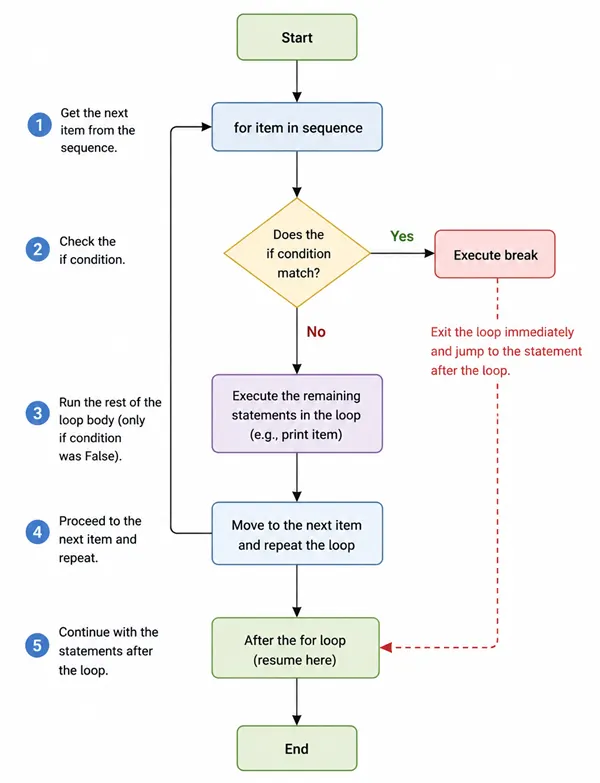
The listing below is the same idea in code. It searches a list of strings for "mango":
fruits = ["apple", "pear", "mango", "kiwi"]
for fruit in fruits:
    if fruit == "mango":
        print("found")
        break
print(fruit)Executing the snippet prints apple, pear, then found, and stops there. That matches the diagram’s red exit: print(fruit) sits after the if/break, so it runs only for items before the match, and "kiwi" never reaches the body.
break in a while loop
The flowchart shows one full while cycle. The diagram reads from top to bottom:
- Initialize / setup runs once, then execution reaches the “while condition true?” diamond. No → leave the loop to End. Yes → enter the body.
- Inside the body, “break condition met?” Yes → follow the red arrow straight out of the loop. On that path the update step is skipped for this pass (the diagram’s important detail).
- If the break test is No, update runs and flow returns to the while condition.
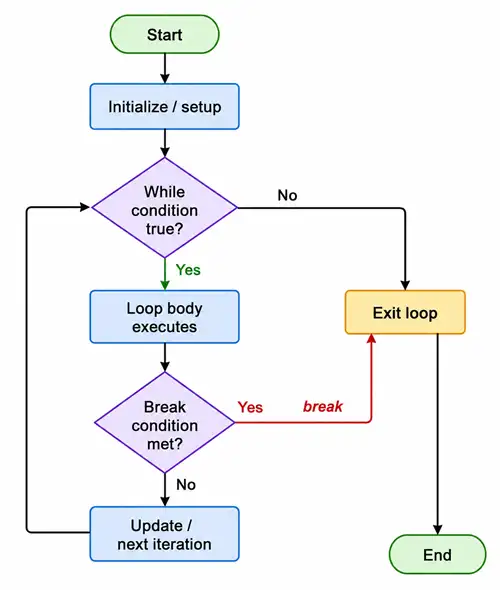
The program below lines up with that picture: each round starts with i < 100, the body may hit if i % 5 == 0 and break, and on the round where i is 5 the red path means i += 1 never runs.
i = 1
while i < 100:
    if i % 5 == 0:
        break
    print(i)
i += 1The while example prints 1 through 4, then stops when i reaches 5 (break runs before print(i) and before i += 1 on that round).
break in nested loops
The diagram uses nested while loops so the two levels stay visible. The main points:
- The outer loop drives repeated “sessions” of the inner loop.
- A
breakinside the inner body follows the red path to “exit inner loop only”—not to End. Control then continues with the outer loop’s next step, so the outer loop can start another inner pass. - So
breaktears down only the innermost loop it sits in; the outer loop keeps going unless extra logic is added (a flag,return, and so on).
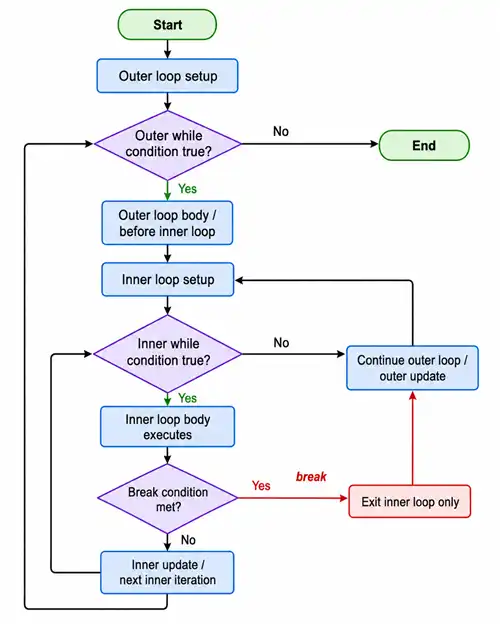
The listing below uses nested for loops to show the same rule in fewer lines. The break sits in the inner loop only, so the output still shows end row after each outer value even when the inner loop exits early at (1, 1).
for row in range(3):
    for col in range(3):
        if row == 1 and col == 1:
            print("break inner")
            break
        print(row, col)
print("end row", row)What to notice in the output:
- The inner
breakstops only the innerfor; the outerforstill prints everyend row. - Stopping all levels at once still requires a flag, a
return, or a redesign—not a secondbreakaimed at the outer loop.
break and the loop else clause
The figure is two panels, same loop shape, different endings:
- Left (red): “break path”—when the target is found,
breakruns, the loop exits at once, and the dashed box says the loopelseis skipped (it does not run). - Right (green): “no break path”—the loop finishes all iterations without
break, then the greenelseblock runs before End.
The yellow banner states the rule in one line: loop else belongs to the for or while, and it runs only when the loop finished without break.
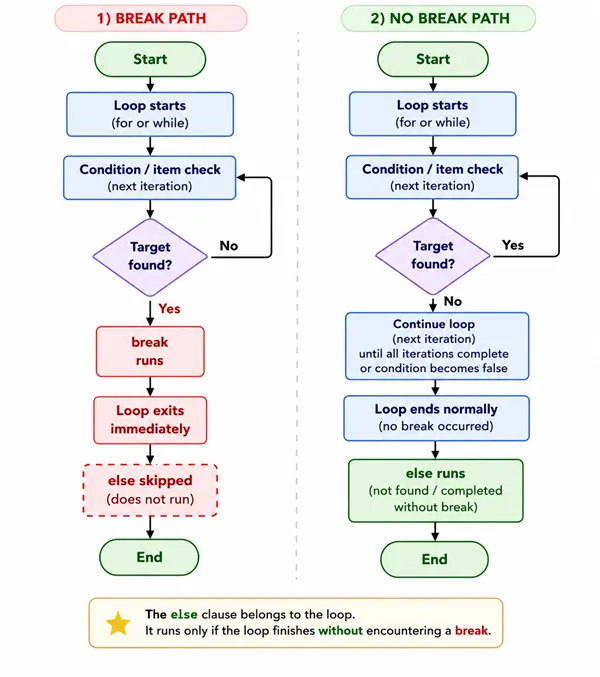
The snippet matches the left panel: when n == 2, break runs, so the else suite never runs. If break is removed, the loop walks all of range(4) and then the else runs, as in the right panel.
for n in range(4):
    if n == 2:
        print("breaking at", n)
        break
else:
print("no break occurred")With break present, only breaking at 2 appears in the output. Without break, no break occurred prints after the loop body completes normally.
break vs continue
Two columns, same inner decision diamond, different exits:
- Green (“Continue path”): the branch runs
continue, the rest of this iteration is skipped, and flow returns to the top of the loop so later iterations can still run. - Red (“Break path”): the branch runs
break, every remaining iteration is dropped, and execution continues after the whole loop.
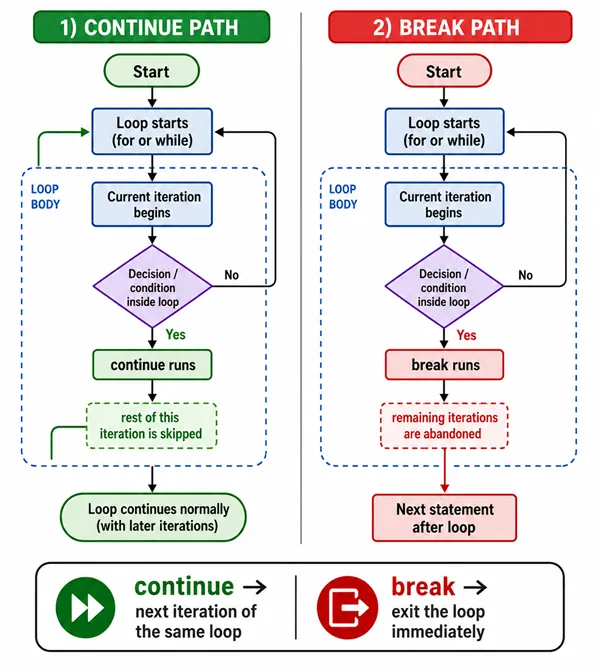
The footer repeats the same contrast with icons.
The code uses one for loop to show both ideas in order: continue skips printing for n == 2 but keeps iterating; break ends the whole loop when n == 4, so 5 never prints.
for n in [1, 2, 3, 4, 5]:
    if n == 2:
        continue
    if n == 4:
        break
print(n)The printed sequence is 1, then 3 (2 is skipped by continue), and the loop stops before 5 is handled.
Breaking out of multiple nested loops
The title on the graphic matches this heading; the subtitle is: break only exits the current loop level. Three strategies appear as columns:
- Red: one
breakstops only the inner loop; a callout notes the outer loop keeps going. - Green: a
foundflag—the inner loop sets the flag when the search condition hits, breaks out of the inner loop, then the outer loop tests the flag and breaks so both levels stop together. - Blue / purple: nested loops inside a function with
return, or insidetry/exceptwith a small custom exception caught above; the figure recommends using exceptions lightly for control flow.
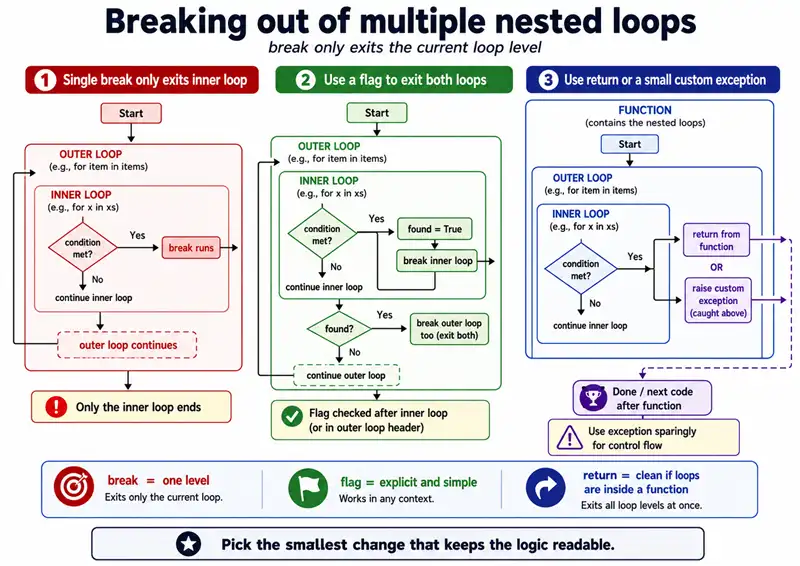
The footer line matches the same guidance: the smallest readable change is usually the best fit.
Example: shared flag
Same idea as the green column: inner break when val == 7, then the found flag triggers an outer break so the rest of the grid is not scanned.
grid = [[0, 0], [0, 7], [0, 0]]
found = False
for r, row in enumerate(grid):
    for c, val in enumerate(row):
        if val == 7:
            print("found at", r, c)
            found = True
            break
    if found:
        break
print("done")Example: return from a helper
Like the blue “return from function” column: nested loops live inside one function, and return exits the whole function as soon as a hit is found—no flag or outer break.
def find_negative(matrix):
    for i, row in enumerate(matrix):
        for j, x in enumerate(row):
            if x < 0:
                return i, j, x
    return None


print(find_negative([[1, 2], [3, -1], [0, 0]]))That prints (1, 1, -1) because the inner loop hits -1 and return leaves the whole function.
Example: exception for deep exit (rare)
Same shape as “raise custom exception (caught above)” in the third column: Found jumps out of both loops at once. For ordinary logic, a flag or return is usually clearer than an exception—exceptions are easier to misread.
class Found(Exception):
    pass


try:
    for r in range(3):
        for c in range(3):
            if r == 2 and c == 2:
                raise Found(r, c)
except Found as e:
print("stopped at", e.args)This pattern fits best when the exception-based form is clearer than a flag or a return; exceptions used as routine control flow are easy for maintainers to misread.
Common mistakes when using break
- Expecting
breakto exit more than one nested loop at once. - Putting
breakoutside afororwhile(syntax error or wrong intent). - Confusing loop
elsewithif/else:elsepairs with the nearestfororwhile, not withifunless indented that way. - Using
breakwhencontinuewould suffice to skip only the rest of one iteration. - Infinite
while Truewithout a guaranteedbreakorreturn, so the program hangs.
Python break statement quick reference table
| Goal | Mechanism |
|---|---|
| Exit current loop | break |
| Skip to next iteration | continue |
| Run code if loop finished normally | for/while … else: (skipped if break) |
| Exit nested loops | Flag, return, or restructure (not multi-level break) |
Summary
breakstops the innermost enclosing loop and resumes execution after that loop.- In nested loops, one
breakdoes not stop outer levels without a flag,return, or similar structure. - Loop
elseruns only if the loop finished withoutbreak. continueskips the rest of one iteration;breakleaves the loop entirely. Neither stops the whole program—use Python exit program when the interpreter must exit.
References
- More on loops (Python tutorial,
break,continue, andelseon loops) - break statement (language reference)
Frequently Asked Questions
What does break do in Python?
break exits the nearest enclosing for or while loop immediately; execution continues after that loop body, skipping any remaining iterations and skipping the loop else block if the loop exited because of break.
Does break exit all nested loops at once?
No; break only leaves the innermost loop it sits in. Stopping outer loops typically requires a flag, a helper function return, or restructuring the logic—not another break keyword targeting the outer loop.
What is the difference between break and continue in Python?
break stops the whole loop; continue skips the rest of the current iteration and moves to the next iteration of the same loop.
When does the else clause on a for or while loop run?
The loop else runs only if the loop finished without break—if break ran, else is skipped.
