
Programs branch on data: run one block when a condition is true, another when it is false, or walk through several alternatives. Python expresses that with if, optional elif chains, and optional else. This guide follows that order—syntax, how conditions are evaluated, flowcharts, practical examples, ordering rules, nesting, one-line forms, else on loops and try, comparison with match / case, mistakes, and a compact table.
Most code blocks below are full scripts: copy into a file or use the site Run control where shown (stdlib only; no input()).
Tested on: Python 3.13.3; kernel 6.14.0-37-generic.
Quick answer: Python if else statement
An if runs a block when its condition is true. Add else for a two-way branch, or elif for extra tests evaluated top to bottom; the first true branch runs and the rest of the chain is skipped. Every if / elif / else line ends with a colon, and the body under each is indented one level.
score = 82

if score >= 90:
    grade = "A"
elif score >= 80:
    grade = "B"
else:
    grade = "C or below"

print(grade)Running it prints the letter grade chosen for score (here B).
Python if statement
Use a plain if when you only need to act when something is true and do nothing otherwise.
user = "guest"

if user == "admin":
    print("Admin tools enabled")

print("after if block")Here the if body is skipped; the last line always runs so you can see control flow after the if.
Python if else statement
Add else for a two-way decision: one block if the condition is true, another if it is false.
n = 4

if n > 5:
    print("greater than 5")
else:
print("not greater than 5")if and else align at the same indentation; only one of the two blocks runs. With n = 4 you should see the else message.
Python if elif else statement
Use elif (short for “else if”) when you have several mutually exclusive tests. Python evaluates the if first; if it is false, each elif is tested in order; if none match, an optional final else runs.
n = 5

if n > 5:
    branch = "gt"
elif n == 5:
    branch = "eq"
else:
    branch = "lt"

print("branch:", branch)Python else if vs elif
Other languages write else if as two words; Python requires the single keyword elif. Writing else if is a syntax error because else must be followed by a colon and a new block, not another if on the same line.
How Python checks conditions from top to bottom
Evaluation stops at the first condition that is true. Later elif and else branches are not tested once a branch has been chosen. If no condition is true and there is no else, nothing in the chain runs.
Python if else flowchart
Pictures are a compact way to remember control flow: one path for “condition true,” another for “false,” and extra paths when elif is present.
if else flowchart
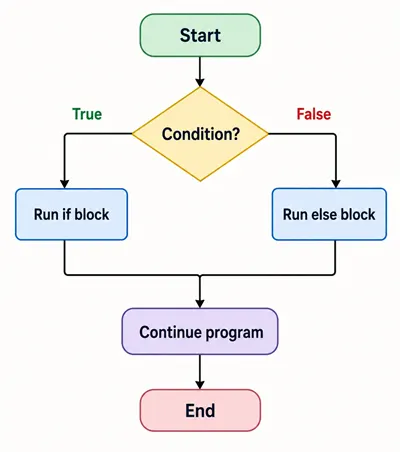
Python if / else (two-way branch).
if elif else flowchart
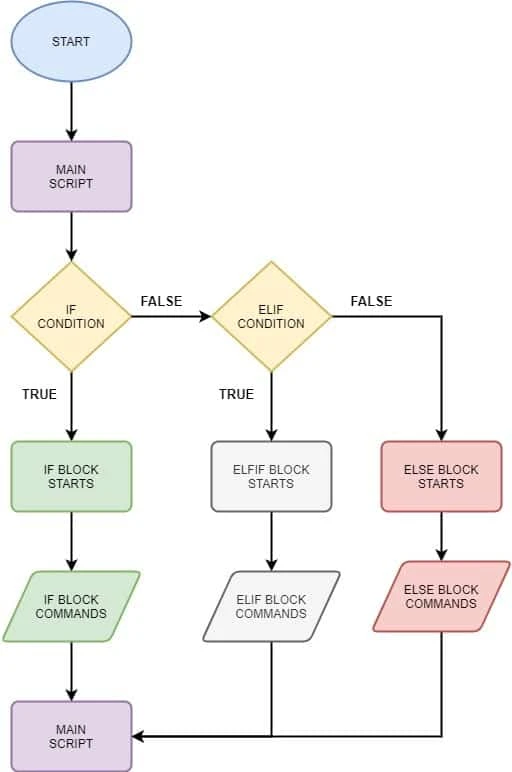
Python if / elif / else (multi-way branch).
Python if else syntax rules
This section is rules-only; runnable demos for if appear in the sections below. Omitting a colon or mis-indenting is easier to see in your editor than in a tiny snippet here.
Colon and indentation
Every if, elif, and else line ends with a colon (:). Omitting it produces SyntaxError.
The statements that belong to a branch are indented under that header, usually by four spaces per level. Python does not use {} to delimit blocks; indentation is meaningful. If the body is empty, use pass as a placeholder.
Aligning if, elif, and else
elif and else line up with the matching if at the same column. Mixing indentation levels or tabs and spaces leads to IndentationError or logic bugs. Nested if bodies add one more indent level under the outer branch.
Conditions used with Python if else
Comparison operators
Operators such as ==, !=, <, >, <=, >=, is, is not, in, and not in are common in conditions; see Python operators for a full reference. For string comparisons, == compares value; is checks object identity and is rarely what you want for ordinary string text.
x = 10
y = 20

if x != y:
    print("x and y differ")

if x < y:
print("x is less than y")and, or, not operators
Combine tests with and, or, and not. Use parentheses when mixing operators so the intent is obvious:
age = 30
vip = True

if age >= 18 and vip:
    print("adult VIP")

if not age < 18:
print("adult (via not)")The same boolean combinations work in a while header when the stop rule depends on more than one fact; see while loop with multiple conditions. For “does any item satisfy this?” checks on an iterable, any() and all() complement or / and chains and short-circuit; see Python any() and all().
Truthy and falsy values
Conditions need a truth value. Values considered “falsy” include None, numeric zero, empty containers ("", [], {}, set()), and False. Everything else is truthy in an if test, so if items: is a common pattern for “non-empty list.”
items = []
if items:
    print("non-empty")
else:
    print("empty list is falsy")

items = [1]
if items:
print("non-empty list is truthy")Python if else examples by scenario
Real programs mix these shapes: a login screen is usually two-way (if / else), a command dispatcher is multi-way (elif), validation often gates work with an early failure path, and pipelines branch on ranges, roles, or filename cues. The patterns below are small but complete; you can paste them into a file or use Run where the button appears.
The same if / elif / else rules apply inside for and while loops and inside function bodies: only the indentation depth changes (one more level under the loop or def). Loops often combine a guard (if n % 2 == 0) with the loop variable. Functions package decisions so callers get a single return value or side effect.
for n in range(5):
    if n % 2 == 0:
print(n, "even")Each pass through the loop re-evaluates the if; here only even indices of range(5) print a line.
def classify(x: int) -> str:
    if x > 0:
        return "positive"
    if x < 0:
        return "negative"
    return "zero"


print(classify(3), classify(0), classify(-2))This function uses two independent if statements before the final return. That is correct when at most one branch can be true (as with disjoint number signs); if the conditions could overlap, use elif or combine tests so only one path runs.
Two-way decision
Use if / else when there are exactly two outcomes and both deserve explicit code—UI toggles, feature flags, or “allowed vs denied” without a long ladder of cases.
logged_in = False

if logged_in:
    label = "Continue"
else:
    label = "Sign in"

print(label)With logged_in set to False, the else branch runs and the printed label is the sign-in string.
Multiple-choice decision
Use if / elif / else when you have three or more named alternatives: subcommands, HTTP-style codes, menu keys, or state enums expressed as strings. Order matters when cases overlap; put the narrowest checks first (see the next main section).
cmd = "help"

if cmd == "help":
    print("show help")
elif cmd == "quit":
    print("exit")
else:
print("unknown command")Changing cmd exercises different branches without changing the structure of the chain.
Range-based decision
Chained comparisons such as low <= value <= high read naturally for scores, ages, percentages, and buffer sizes. They avoid redundant and noise when both bounds matter.
x = 7

if 1 <= x <= 10:
print("between 1 and 10 inclusive")Try setting x to 0 or 11 locally: the message disappears because the whole if body is skipped (add an else if you need feedback for “out of range”).
Input validation
Validation is still branching: reject bad input early, then run the happy path. Length checks, regex matches, numeric bounds, and “required field present” all map cleanly to if / else or if / return inside a function.
name = "Al"

if len(name) < 3:
    print("name too short")
else:
print("ok:", name)Here "Al" fails the rule; swap in a longer string to see the else branch.
Membership or string check
Use in with a set or frozenset when the condition is “one of several allowed values” (roles, MIME types, short command tokens). For paths and extensions, pathlib keeps comparisons readable and case-normalized on the suffix.
role = "editor"

if role in {"admin", "editor"}:
print("can publish")from pathlib import Path
path = Path("data.csv")
if path.suffix.lower() == ".csv":
print("CSV pipeline")Path("data.csv") does not require the file to exist for .suffix; the branch encodes “treat this name as CSV-shaped.” For real disk checks you would still combine this with path.is_file() when you need to open the file.
Why condition order matters
Put the more specific test before a broader one. If you write if x < 100: before if x < 10:, every number below 100 takes the first branch and the tighter < 10 branch never runs.
Because Python stops at the first true condition, overlapping ranges must be ordered from narrowest to widest (or restructure with and / or).
x = 5

# Wrong order: broad branch wins first
if x < 100:
    print("branch A (<100)")
elif x < 10:
    print("branch B (<10)")

# Better order: narrow first
if x < 10:
    print("narrow: x < 10")
elif x < 100:
print("wider: x < 100")Nested if else in Python
You may nest an if inside another branch when the inner decision only applies in that context—for example, extra validation inside else. Keep nesting shallow; deep pyramids are hard to read. Often a flat elif chain, helper function, or early return / continue reads better than many nested levels.
n = 3

if n < 5:
    if n == 3:
        print("three and small")
    else:
        print("small but not three")
else:
print("not small")One-line if else in Python
Python supports a conditional expression (sometimes called a ternary): value_if_true if condition else value_if_false. It is an expression, not a statement, so it fits on the right-hand side of an assignment.
user = "premium"
cap = 100 if user == "premium" else 10
print("premium cap:", cap)

user = "free"
cap = 100 if user == "premium" else 10
print("free cap:", cap)Use it for short, clear choices. Avoid packing complex logic into one line; a normal if / else with a short block is easier to debug. For the inline expression form, see Python ternary operator and Python if else in one line.
else in Python beyond if statements
else with loops
A for or while loop may have an else clause that runs after the loop finishes without break. If break runs, the else is skipped.
for item in [1, 2, 3]:
    if item == 99:
        break
else:
print("no early break")n = 0
while n < 3:
n += 1
else:
print("while completed normally")else with try except
In a try / except / else / finally layout, else runs when the try block finishes without raising an exception. See try / except for fuller patterns.
try:
    value = int("42")
except ValueError:
    print("not an int")
else:
print("parsed:", value)Python if else vs match case
Python 3.10 added match / case for structural pattern matching (match requires Python 3.10+): good when you branch on the shape of a value (enums, classes, nested data) or many exact constants—see Python switch case for menu-style examples. Use if / elif for inequalities, ranges, and arbitrary boolean logic. They can coexist in one codebase; pick the form that reads clearest for each problem.
# if/elif: natural for ranges
score = 85
if score >= 90:
    tier = "A"
elif score >= 80:
    tier = "B"
else:
    tier = "C or below"
print("tier:", tier)

# match/case: natural for discrete constants
cmd = "quit"
match cmd:
    case "help":
        print("matched help")
    case "quit":
        print("matched quit")
    case _:
print("other")Common mistakes in Python if else
- Missing colon after
if conditionorelse:—SyntaxError. - Wrong indentation — body not indented, or
elifnot aligned with itsif—IndentationErroror wrong logic. - Using
=(assignment) instead of==(compare) in a condition — often passes syntax but binds a name instead of comparing. - Putting
elifafterelse— invalid;elsemust be last in the chain. - Always-true conditions such as
if len(items) >= 0:— useless because length is never negative. - Broad
elifbefore a specific one — the specific branch never runs because the broad test matches first.
Python if else quick reference table
| Form | When to use |
|---|---|
if |
Optional action when true |
if / else |
Two mutually exclusive outcomes |
if / elif / else |
Three or more ordered tests; first match wins |
condition and x or y (legacy) |
Avoid; use conditional expression instead |
x if condition else y |
Inline pick between two values |
for / else, while / else |
Run when loop ends without break |
try / except / else |
Run when try completes with no exception |
Summary
Python branching uses if, optional elif, and optional else, with colons and indentation defining blocks. Conditions can combine comparisons and and / or / not; remember truthy and falsy values. Order elif tests from specific to general, prefer shallow nesting, and use the conditional expression for short two-way value picks. else also attaches to for, while, and try with different semantics than if / else. For learning context, see beginner tips for Python.
Frequently Asked Questions
What is the difference between elif and else if in Python?
Python uses the single keyword elif (not else if). elif attaches to the nearest if and must appear before a final else; there is no separate else if token.
Does Python require parentheses around the if condition?
No. Write if condition: with a colon; parentheses are optional and usually omitted unless they help readability for a long expression.
Why does my if block raise IndentationError?
The body of if, elif, and else must be indented consistently (typically four spaces per level); mixing tabs and spaces or misaligning elif with if causes IndentationError.
