
Negating a condition in JavaScript almost always means the logical NOT operator (!), strict inequality (!==), or—when you care about object keys—!(key in obj) combined with the in operator. There is no Python-style not in keyword; membership is expressed with in and then negated if needed.
This page covers ! in conditions, contrasts if (!value) with positive branches, touches != / !==, and shows !(key in object) for “key not present (including prototype chain)”.
Tested on: Node.js v20.18.2. A short note after each runnable snippet describes what you should see in the console.
Logical NOT (!) on booleans
! converts its operand with ToBoolean and returns the opposite boolean.
console.log(!false);
console.log(!(13 > 10));You should see 2 lines, in order: true, false.
if (!condition) (“if not” style)
if (!isActive) runs the block when isActive is a falsy value (false, 0, "", null, undefined, NaN). When isActive is true, the block is skipped—so you must start from the state you actually want to branch on.
const isActive = false;
if (!isActive) {
  console.log("not active");
}You should see one line logging not active.
A common early-return pattern is if (!ok) return; so the rest of the function stays un-nested.
!= / !== are not the same token as !
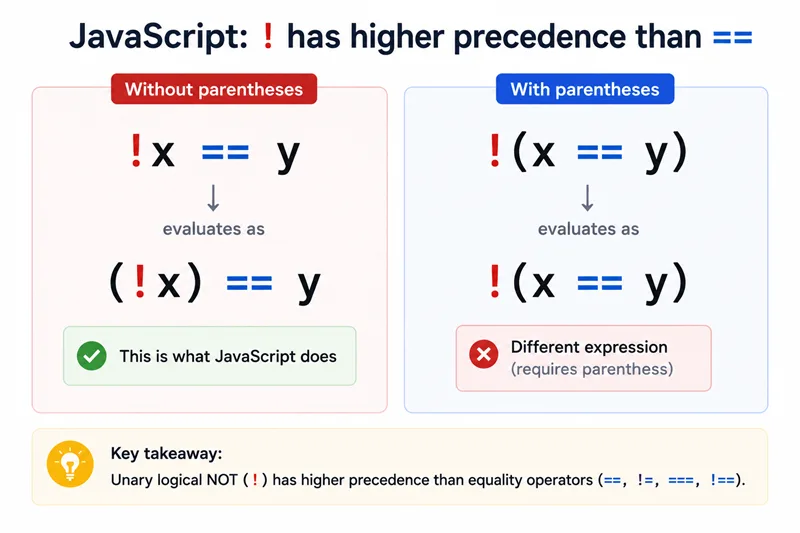
Loose inequality != and strict inequality !== compare values; they are unrelated to unary ! except by spelling.
console.log(1 != "1");
console.log(1 !== "1");You should see 2 lines, in order: false, true.
Prefer === / !== in new code; see JavaScript equality for when loose == still appears in older codebases.
“not in” for object keys: !(key in obj)
Wrap the in expression in parentheses so ! applies to the whole membership test, not just the key:
const obj = { a: 1 };
console.log(!("b" in obj));
console.log(!("a" in obj));You should see 2 lines, in order: true, false.
Remember in consults the prototype chain. For own properties only, use Object.hasOwn from the JavaScript has property guide.
! on other falsy values
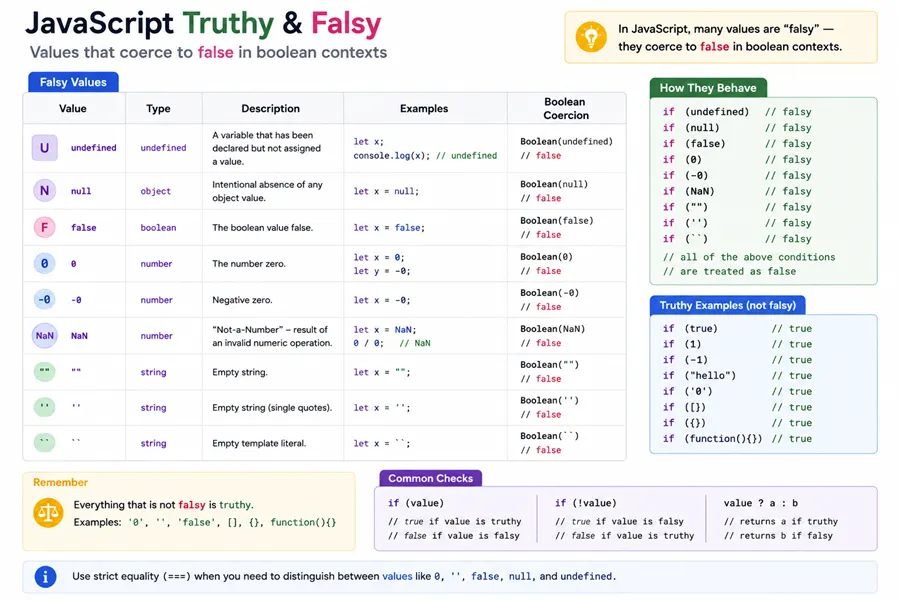
console.log(!0);
console.log(!"");You should see 2 lines, in order: true, true.
To coerce any value to a real boolean without leaving it inverted, use
Boolean(x) or the idiomatic
JavaScript double negation !!x.
Summary
If not javascript patterns almost always mean combining the logical NOT operator with parentheses so the negated expression is unambiguous—whether you are guarding nullish values, flipping feature flags, or expressing if (!(cond1 && cond2)) without dropping a brace by accident. The FAQ twin to “if not” is how to negate includes cleanly: once you know how includes() reports membership, if (!list.includes(x)) reads better than double negatives elsewhere in the expression.
Remember that ! coerces to boolean using the same falsy table as if, so empty strings and zero still flip to true when negated; pair with ?? when you must preserve those values while still testing another part of the condition.
References
- Logical NOT (
!) - MDN if...else- MDN- How to negate code in an
ifstatement in JavaScript - Stack Overflow
