
The SyntaxError: Cannot use import statement outside a module message (often shown in DevTools as Uncaught SyntaxError: Cannot use import statement outside a module) means the runtime is parsing your file as a script, not an ECMAScript module, but you used import / export syntax that is only valid in a module goal. The same wording appears for cannot use import statement outside a module javascript / cannot use import statement outside a module js searches in Node, bundlers, and AWS Lambda (Node-based runtimes).
ES modules let you export values from one file and import them in another. That is different from CommonJS require / module.exports. Whether import is legal is decided by how the file is loaded (module vs script), not only by your editor highlighting. For module resolution failures, see error cannot find module—that is usually a different error than this SyntaxError.
Exports are also the safer way to share values across files without adding
loose names to window; the JavaScript global variable guide
compares module bindings with deliberate globalThis properties.
Tested on: all Node.js command transcripts below were captured with Node.js v20.18.2 unless noted.
Quick reference
Use this table when you hit cannot use import statement outside a module in Node, HTML, or Lambda. It is a cheat sheet: match the symptom to how the runtime is loading your files, then apply the smallest change that makes those files parse as ECMAScript modules (or stop using static import in classic scripts).
| Symptom | Likely fix |
|---|---|
SyntaxError: Cannot use import statement outside a module in Node .js |
"type":"module" in package.json or .mjs for every ESM file in scope |
| Same error in HTML | <script type="module" src="..."> |
require + static import in one CJS file |
Split modules or use import() / createRequire |
Node.js — reproduce the error
Below, greet.js uses a top-level export and index.js uses a static import. That is valid only when Node loads both files as ECMAScript modules. With plain .js and no "type":"module" in a nearby package.json, Node assumes CommonJS and throws before any of your logic runs.
greet.js
export default function greet() {
  return "Hello, World!";
}
index.js
import greet from "./greet.js";

console.log(greet());
Running node index.js in that layout fails at parse time. On Node.js v20.18.2 you typically see a warning about "type": "module" or .mjs, then the fatal error whose first line is SyntaxError: Cannot use import statement outside a module (stack frames omitted here; your line numbers may differ).
If you only need the same printed result in a single classic script (no import / export), you can write it without modules—for example:
function greet() {
  return "Hello, World!";
}
console.log(greet());You should see Hello, World! in the console. That does not replace ESM split files on disk; it shows what does parse when the engine is in script goal.
Node.js — fixes that work (TESTED)
These fixes change how Node classifies your files (or how you invoke the compiler), not the spelling of import itself. Pick one approach per project so every file that uses static import / export is consistently loaded as ESM. The same module goal is required for top-level await—see JavaScript await once import parses cleanly.
A. Set type to module in package.json
Add a package.json next to the files Node loads for your app:
{ "type": "module" }Place it in the package.json that governs your app root, then run node index.js again. With "type": "module", those same .js sources are parsed as ECMAScript modules, so the static import in index.js and the export in greet.js become legal. In a local run you should see Hello, World! on stdout and exit code 0.
B. Use .mjs files (no package.json required)
If you do not want "type": "module", name both the entry and its ESM dependencies with .mjs so Node loads them as modules without touching package.json:
greet.mjs
export default () => "Hello, World!";index.mjs
import greet from "./greet.mjs";

console.log(greet());
Then node index.mjs should print Hello, World! and exit cleanly—the extension tells Node to use the module goal for those paths.
C. One-off evaluation
For a quick REPL-style check without creating files, you can pass module input on the CLI:
node --input-type=module -e "import fs from 'node:fs'; console.log(!!fs.readFile);"That prints true when Node accepts the static import inside the -e string because --input-type=module selects the module goal.
The in-page Run sandbox executes a classic script (no --input-type=module), so the same check using only CommonJS looks like this and should print fs.readFile exists: true:
const fs = require("node:fs");
console.log("fs.readFile exists:", typeof fs.readFile === "function");D. import() from CommonJS (no static import in .cjs)
From a .cjs file, dynamic import() is allowed: it returns a Promise and loads an ES module at runtime. Static import at the top of the same file would still be a syntax error in CommonJS.
mod.mjs
export default 42;main.cjs
import("./mod.mjs").then((m) => console.log(m.default));After node main.cjs with both files on disk next to each other, you should see 42 on stdout. Run cannot load a second virtual file for mod.mjs, so this pair stays copy-and-run in your own directory; the pattern is what matters for the article.
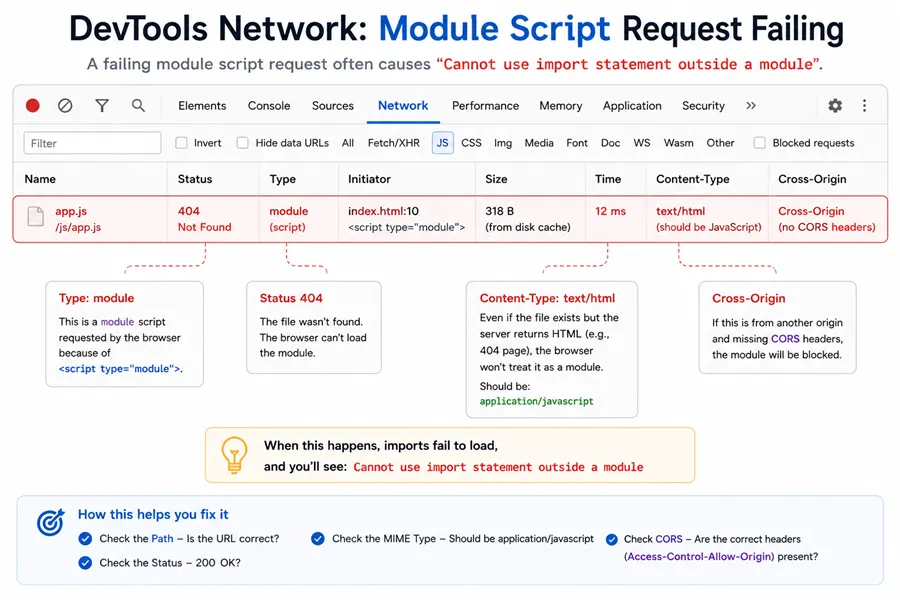
Browsers — <script type="module">
Browsers apply the same script vs module rule as Node: the type of the script element decides the parse goal.
If you load main.js that contains import with a plain tag:
<script src="main.js"></script>the browser parses main.js as a classic script and throws the same SyntaxError: Cannot use import statement outside a module family (often prefixed with Uncaught SyntaxError in the console). Use:
<script type="module" src="main.js"></script>Module scripts are deferred by default and run in strict mode automatically; during local file:// testing you may also hit CORS rules for bare imports—use a dev server or a bundler when that happens.
aws lambda cannot use import statement outside a module
Lambda invokes your handler with Node’s normal rules: whatever you upload is classified the same way as on a laptop. Typical fixes:
- Add
"type": "module"to thepackage.jsonyou upload with the function, or - Use an
.mjshandler filename configured in the function settings, or - Ship CommonJS (or a bundle) if you intentionally stay on
require.
If import appears only inside dependencies, the same rule applies to how those files are published.
Wrong import path ≠ this SyntaxError
A typo such as import { x } from "./helper.js" when the file is helpers.js usually fails after the file is already treated as a module, with ERR_MODULE_NOT_FOUND and a message like Cannot find module '.../helper.js' imported from .../badimport.js. That is a resolution problem, not “import outside a module.”
Bundlers (Babel / Webpack)
If transpiled output still contains raw import but the target environment expects scripts, you will see this error at runtime. Ensure @babel/preset-env (or equivalent) targets your deployment environment, or let your bundler emit ESM vs CJS consistently.
Jest and ESM
Jest historically assumes CommonJS tests. For import in tests or under "type":"module", follow current Jest docs—often NODE_OPTIONS=--experimental-vm-modules with the jest binary until your Jest version’s ESM path is configured.
Summary
- Static
import/exportonly parse in an ECMAScript module; Node.jswithout"type": "module"is treated as CommonJS. - Fix Node with
"type": "module",.mjs,node --input-type=module, or dynamicimport()from CJS. - Fix the browser with
<script type="module">; distinguish this SyntaxError fromERR_MODULE_NOT_FOUND.
References
Official module docs and a control-flow note for loaders.
- Node.js: ECMAScript modules
- MDN: JavaScript modules
- MDN:
import - Stack Overflow: Uncaught SyntaxError… outside a module
Frequently Asked Questions
What does "Cannot use import statement outside a module" mean?
The engine parsed a static import declaration in a file it is treating as a classic script (CommonJS in Node, or a non-module script tag in the browser). Static import is only legal in an ECMAScript module.
How do I fix cannot use import statement outside a module in Node.js?
Add "type": "module" to the nearest package.json, rename the entry file to .mjs, or run one-off code with node --input-type=module. Ensure every file that uses import or top-level export is loaded as ESM.
Why does AWS Lambda show cannot use import statement outside a module?
Lambda uses Node’s module system. If your deployment package lacks type module and your handler or dependencies use static import in .js files, Node treats them as CommonJS and throws this SyntaxError. Use type module, .mjs handlers, or bundle to CJS with your build tool.
Is uncaught syntaxerror cannot use import statement outside a module different in the browser?
Browsers prepend Uncaught SyntaxError in the console, but the message is the same. Add type="module" to the script tag (or use a bundler that outputs a non-module script for legacy targets).
I have a typo in my import path—why is the error different?
A wrong path after the file is already an ES module usually fails with ERR_MODULE_NOT_FOUND, not this SyntaxError.
Can I mix require and import in the same Node file?
Not with static import at the top level in a CommonJS file. Use createRequire in ESM, split modules, or use dynamic import() from CommonJS when you need to load ESM.
