People searching for go fiber tutorial, fiber golang, golang fiber, fiber go, fiber api, fiber routes api, go fiber, or fiber tutorial usually want a small runnable service: fiber.New(), JSON routes, and predictable URLs. This article keeps that hands-on CRUD demo (multi-file layout, in-memory map, Postman screenshots) and tightens the story for fiber routes API style grouping, correct SetupRoute wiring, and links to official docs. Fiber sits on fasthttp and feels familiar if you know Express-style routers—see the Fiber documentation for middleware, static files, and templates beyond this walkthrough.
Tested with Go 1.24 on Linux.
What you will build (fiber golang CRUD demo)
You will implement an Article JSON API backed by a map (no database), wire fiber routes for create/read/update/delete, and exercise it from Postman. Capabilities touched here include HTTP routing, JSON bodies, path params, and status codes—enough to mirror what many fiber api introductions cover before adding persistence.
Prerequisite
- Go 1.22 or newer recommended (modules and Fiber v2)
- Basic Go knowledge like Maps, Structs, Function etc.
- Postman installation and familiarity using Postman
Application structure
The main focus of this article is on how to build a simple RESTful API using Go Fiber, therefore we will keep the application structure as simple as possible. The image below demonstrates how our application will look like.
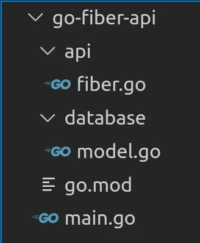
Follow the below steps to create the above application structure.
Create root directory and move into the root directory
$ mkdir go-fiber-api && cd go-fiber-api
Create database package and api package
$ mkdir database api
Create the main entry point
$ touch main.go
To get up and running, we are going to have a taste of Go Fiber. We are going to create a Fiber application, create a home route and make the Fiber application listen on port 3000. We can set the ball rolling by initializing a go module and installing the Fiber package. The next steps will initialize a go module and install Fiber.
Initialize a go module. Ensure you are at the root folder same with the main.go file.
$ go mod init example.com/go-fiber-api
Install Fiber
$ go get github.com/gofiber/fiber/v2
Go Fiber server setup
In this section,we are going to set up the fiber server so that we can test it before we can start building the API. In the main.go file, add the below code.
main.go
package main

import "github.com/gofiber/fiber/v2"

func main() {
   app := fiber.New()

   app.Get("/", func(c *fiber.Ctx) error {
       return c.SendString("Welcome to Go Fiber API")
   })

   app.Listen(":3000")
}In the above code sample, we import Fiber into main, call fiber.New(), and register GET / so a browser request to http://127.0.0.1:3000 returns the welcome string. The app instance exposes HTTP verbs such as Get; here we only register / before you add JSON routes under /api/v1 in the full project.
Running Fiber API
In the terminal, run the server by issuing this command.
$ go run main.go

┌───────────────────────────────────────────────────┐
│                   Fiber v2.39.0                   │
│               http://127.0.0.1:3000               │
│       (bound on host 0.0.0.0 and port 3000)       │
│                                                   │
│ Handlers ............. 2  Processes ........... 1 │
│ Prefork ....... Disabled  PID .............. 8483 │
└───────────────────────────────────────────────────┘
Setting up a data store (CRUD Operation)
Our example is a very simple one, and we are not going to complicate
things. In the database package, we are going to add an Article model
that is made up of a struct. This struct will contain the properties of
an article such as ID, title, author , rating and description. Our Go
Fiber API will import the model and manipulate it as needed. In the
database package add a model.go file and add the below code.
Add models.go file
$ cd database && touch model.go
database/model.go
package database

type Article struct {
   ID          string `json:"id"`
   Title       string `json:"title"`
   Description string `json:"description"`
   Rate        int    `json:"rate"`
}
The above example is a simple article that we will use in our API. An article must have the above attributes. Each attribute has been annotated to json so that data can be more readable while consuming it.
Next we are going to add all the CRUD operations in the API package.
Move to the root folder and move to the api package.
$ cd .. && cd api
Create fiber.go file
$ touch fiber.go
At the beginning of the fiber.go file, import the required code from
the database package, fiber and UUID as shown below. We also initialize
an articles map that has a string key and article as the value. We are
using the map data structure because it is much faster and easy to add,
get , update and delete items from a map.
Create Operation
package api

import (
   "example.com/go-fiber-api/database"
   "github.com/gofiber/fiber/v2"
   "github.com/google/uuid"
)

var (
   articles = map[string]database.Article{}
)
func createArticle(c *fiber.Ctx) error {
   article := new(database.Article)

   err := c.BodyParser(&article)

   if err != nil {
       return c.Status(fiber.StatusUnprocessableEntity).JSON(fiber.Map{
           "errors": err.Error(),
       })

   }

   article.ID = uuid.New().String()

   articles[article.ID] = *article

   c.Status(200).JSON(&fiber.Map{
       "article": article,
   })

   return nil
}
In this section, the goal is to receive data from the client and add the
data into the articles map. We use the createArticle() function that
takes as an argument a fiber context and returns an error if any. We
initialize a new article using article := new(database.Article). This
command returns an article variable as a pointer. Fiber uses pointers
instead of passing by value or making copies of a variable for better performance. The fiber context comes with BodyParser() method that
marshals the incoming data from client and ensures that it matches with
the Article struct . If the data do not match, an error will be
returned. The status code for each returned response can be added by
passing the Status() method and passing it the status code number for
example, 404 for item not found or 200 for successful request.
If there was no error, we add an uuid to the article ID key, using
article.ID=uuid.New().String(). After assigning the ID, we add the
article in the articles map, and return to the caller, all the available
articles.
Read Operation
func readArticle(c *fiber.Ctx) error {
   id := c.Params("id")

   if article, ok := articles[id]; ok {
       c.Status(200).JSON(&fiber.Map{
           "article": article,
       })
   } else {
       c.Status(404).JSON(&fiber.Map{
           "error": "article not found",
       })
   }
   return nil
}
Using the Fiber context, we get the id of the articles to read from our
articles map using the command id := c.Params(“id”) .Please note the
string “id” is part of the URL parameters e.g
http://0.0.0.0:3000/api/v1/articles/1 where 1 is the ID of the
article to read data. We then use the ID to check if it exists in the
articles map. If an article with the id is found , it is returned back
to the caller with status code 200, else an error message will be
returned with a 404 status code.
Read All Articles
func readArticles(c *fiber.Ctx) error {
   c.Status(200).JSON(&fiber.Map{
       "articles": articles,
   })
   return nil
}
This is the simplest and straightforward function. It returns all the articles present to the client with status code 200.
Update Operation
func updateArticle(c *fiber.Ctx) error {
   updateArticle := new(database.Article)

   err := c.BodyParser(updateArticle)

   if err != nil {
       c.Status(500).JSON(&fiber.Map{
           "error": err.Error(),
       })
       return err
   }
   id := c.Params("id")
   if article, ok := articles[id]; ok {
       article.Title = updateArticle.Title
       article.Description = updateArticle.Description
       article.Rate = updateArticle.Rate
       articles[id] = article
       c.Status(200).JSON(&fiber.Map{
           "article": article,
       })
   } else {
       c.Status(404).JSON(&fiber.Map{
           "error": "article not found",
       })

   }
   return nil
}
The update function receives updated articles from the client and
updates the existing articles in our articles map. We initialize an
empty article using updateArticle := new(database.Article) command.
This updateArticle variable is parsed by the context using the command
err := c.BodyParser(updateArticle). If this command is successful , we
proceed to updating the article, else we return an error to the client
with status code 500.
We then get the id of the item to update using the command
id := c.Params(“id”). This id variable is used to get the article to
update from the articles map. We check if the article exists using the
id , and update it if the article with the given id exists. After a
successful update , we return the updated article to the client with
status code 200.
Delete Operation
func deleteArticle(c *fiber.Ctx) error {
   id := c.Params("id")

   if _, ok := articles[id]; ok {
       delete(articles, id)
       c.Status(200).JSON(&fiber.Map{
           "message": "article deleted successfully",
       })
   } else {
       c.Status(404).JSON(&fiber.Map{
           "error": "article not found",
       })
   }

   return nil
}
The deleteArticle function uses id to delete an article from the
articles map if it exists.We first get the id of the article using the
command id := c.Params(“id”) and check if the id exists in the
articles map using the statement _, ok := articles[id]. If the article
is found we use the delete() function from the standard library to
delete the article with the given id from the articles map using the
statement delete(articles, id). After a successful delete operation, we
return to the client a message confirming article deletion with status
code 200. If the article does not exist in the map, we return an error
message to the client with status code 404.
Route handler
func SetupRoute() *fiber.App {
	app := fiber.New()
	v1 := app.Group("/api/v1")
	v1.Post("/articles", createArticle)
	v1.Get("/articles/:id", readArticle)
	v1.Get("/articles", readArticles)
	v1.Put("/articles/:id", updateArticle)
	v1.Delete("/articles/:id", deleteArticle)
	return app
}
The SetupRoute() function is responsible for creating a fiber app and
matching incoming requests to their respective handler functions. The
v1 := app.Group("/api/v1") is the usual fiber routes API pattern: every
handler registered on v1 is automatically prefixed with /api/v1, so
v1.Post("/articles", createArticle) serves POST /api/v1/articles. The
SetupRoute() function starts with capital letter
S meaning it's an exported function and can be accessed from other
packages. We will use it in the main function. The SetupRoute()
function returns a fiber app to the caller.
main.go
package main

import (
   "example.com/go-fiber-api/api"
   "github.com/gofiber/fiber/v2"
)

func main() {
   app := api.SetupRoute()

   app.Get("/", func(c *fiber.Ctx) error {
       return c.SendString("Welcome to Go Fiber API")
   })

   app.Get("/healthz", func(c *fiber.Ctx) error {
       return c.SendStatus(fiber.StatusOK)
   })

   app.Listen(":3000")
}The main function is responsible for booting up the application and
calling the necessary functions such as the SetupRoute() function. We
import the fiber package together with the api package. The fiber
package gives us access to the *fiber.Ctx while the api package
gives us access to the SetupRoute() function.
To initialize the application, we use app:= SetupRoute() statement.
The returned app exposes the CRUD routes defined in the api package.
In the next lines, we add a home route plus a tiny GET /healthz handler that returns HTTP 200 with an empty body—useful when you want a management-style ping separate from your CRUD paths.
To spin up the server, we use the app.Listen(“:3000”) statement. This
means that the server will be accessed on port 3000 which translates
to http://0.0.0.0:3000 or http://127.0.0.1:3000 on your local
machine.
Running the application
Before running the application, we need to ensure that all of our
dependencies have been installed. The go mod tidy ensures that all
dependencies have been installed. In the terminal in your root folder,
issue this command.
$ go mod tidy
To run the application issue the below command.
$ go run main.go

┌───────────────────────────────────────────────────┐
│                   Fiber v2.39.0                   │
│               http://127.0.0.1:3000               │
│       (bound on host 0.0.0.0 and port 3000)       │
│                                                   │
│ Handlers ............. 9  Processes ........... 1 │
│ Prefork ....... Disabled  PID ............. 35437 │
└───────────────────────────────────────────────────┘
Performing CRUD operations using Postman
In this section, we are going to use the famous API testing application called Postman. Please ensure you have it installed in your machine. The first operation that we are going to perform is the POST request.
Create Articles (POST)
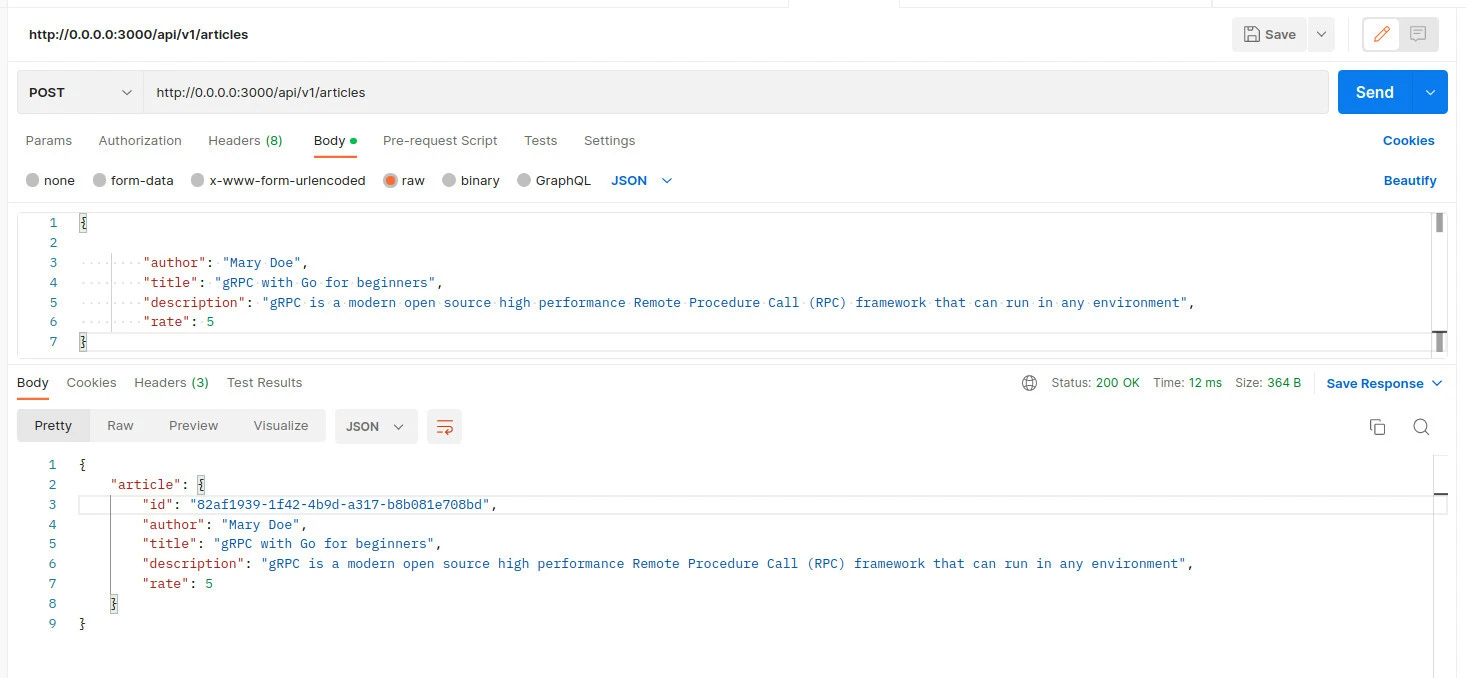
To POST a new article using Postman, ensure that you use the POST HTTP method and add data for the new article, with the Body tab and press the send button. Feel free to perform multiple POST operations so that you can be able to view them in the Read All Articles section
Read Article
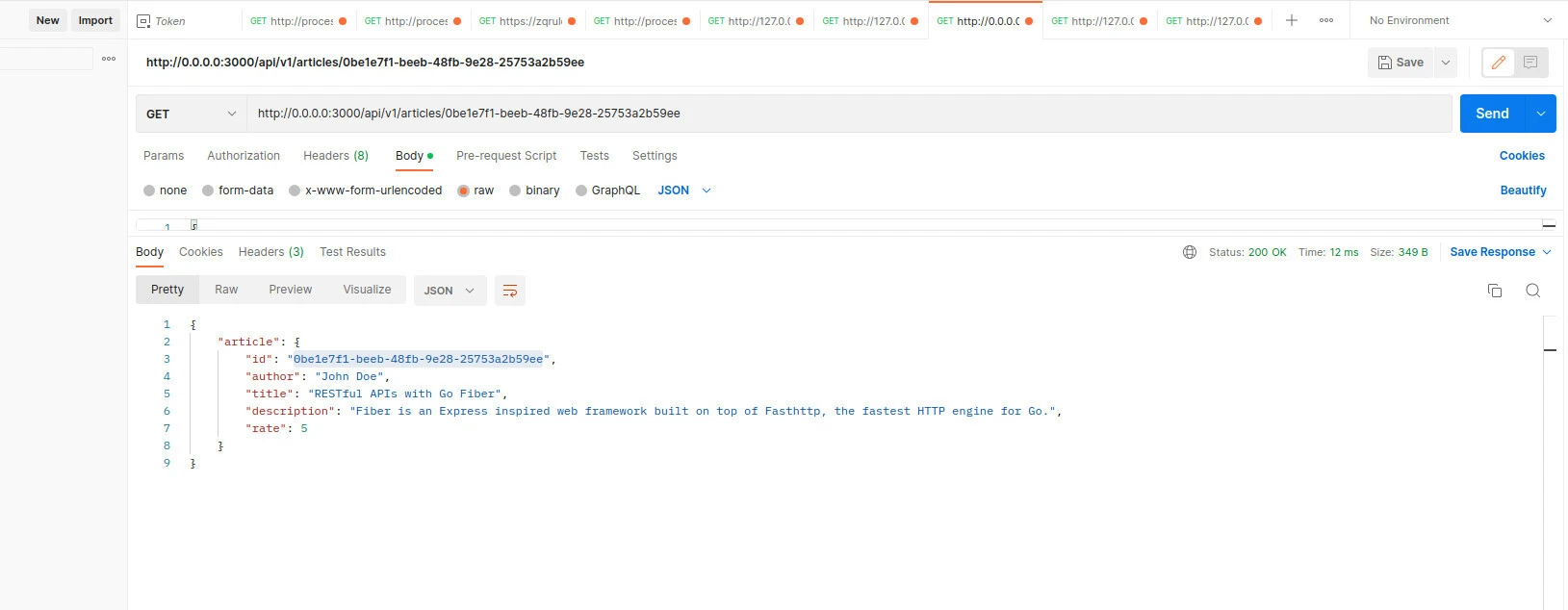
To read a single article, ensure that the GET , use the GET HTTP method
in Postman and add the id of the article in the URL bar i.e
http://0.0.0.0:3000/api/v1/articles/0cd9385e-c982-40d9-9ad0-cefed55a8eb5
and press the Send blue button.
Read All Articles
To read all the articles, use the GET HTTP method in Postman and add http://0.0.0.0:3000/api/v1/articles in the URL bar to get all the articles.
Update Article
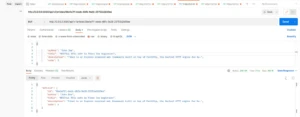
To update an article , use the PUT HTTP method in Postman, and use the id of the articles to update in the URL bar. In the body section, add the content of the updated article ensuring that all fields are valid and press the Send button. At the bottom part an updated article will be returned. Change any field such as title or description and send again.
Delete Article
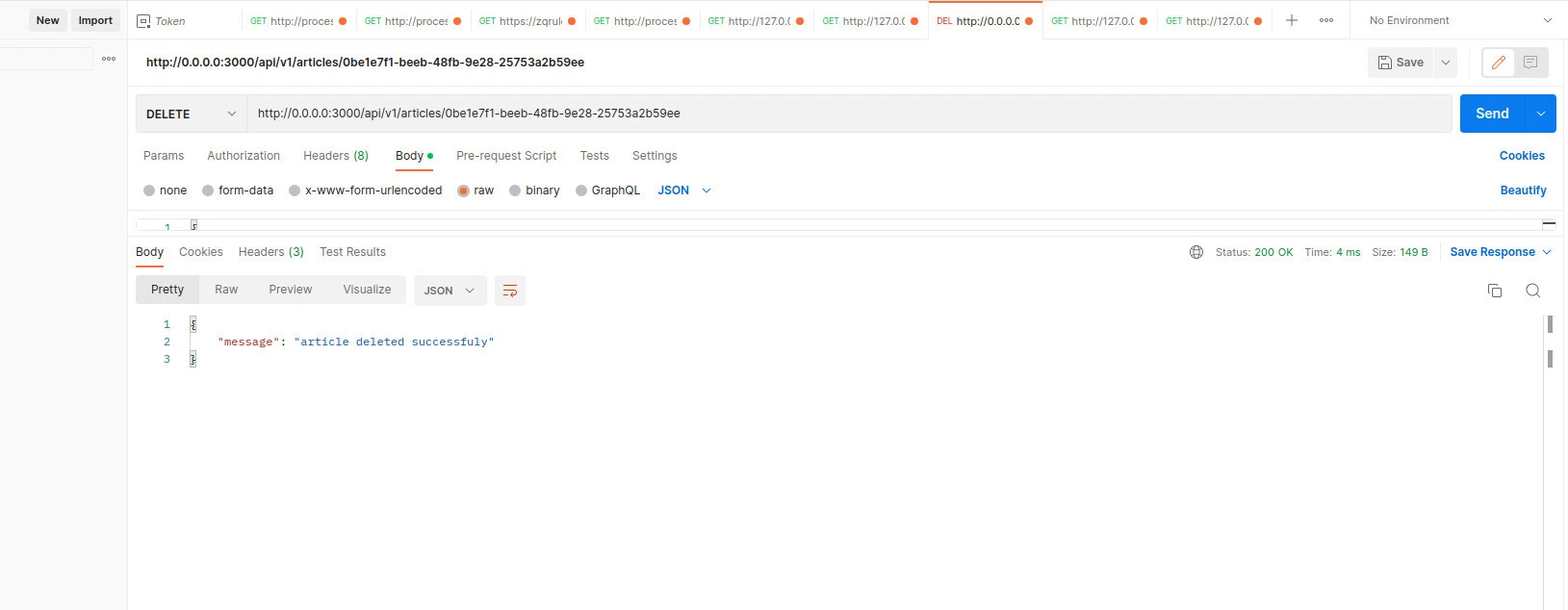
To delete an article, use the DELETE HTTP method in Postman, and add the id of the article to delete in the URL i.e http://0.0.0.0:3000/api/v1/articles/0cd9385e-c982-40d9-9ad0-cefed55a8eb5 and press Send button. A string will be returned back indicating that the article has been deleted if the operation is successful.
Summary
This go fiber tutorial and golang fiber walkthrough keeps the hands-on CRUD demo: in-memory articles, JSON handlers, grouped fiber routes API under /api/v1, Postman screenshots, and a fixed SetupRoute that uses fiber.New() plus app.Group. You also get a minimal GET /healthz probe for lightweight fiber API operations checks. Next steps are persistence (for example SQL, Go Redis client basics, or the full CRUD REST API with Redis) and auth—see the Fiber documentation for middleware.
References
- Fiber documentation
- Fiber GitHub
- Go Fiber by examples (DEV)
Frequently Asked Questions
What is golang fiber or fiber golang used for?
Fiber is a web framework built on fasthttp that provides Express-like routing, JSON helpers, middleware, and static files for HTTP APIs and sites in Go.
How do I define fiber routes API paths in this tutorial?
Handlers are mounted under /api/v1 using a Fiber route group so POST/GET/PUT/DELETE map cleanly to /articles and /articles/:id.
Does this demo use a database?
No; articles live in a map in memory for clarity—swap the store layer when you move to PostgreSQL or Redis following your database tutorials.
Which port does the sample server use?
The final server listens on :3000; use http://127.0.0.1:3000 in Postman for the requests shown in the screenshots.
Where is the official fiber documentation?
See the Fiber documentation for API reference, middleware, and migration notes from Express-style frameworks.