
This guide is for Go developers who want a single, practical path from “what does Ctrl+C do?” to cleanup, graceful shutdown, and container quirks. It walks through os/signal, SIGINT versus SIGTERM, signal.Notify versus signal.NotifyContext, a simple shutdown flow, second Ctrl+C, and Docker—without turning the page into only an HTTP server tutorial.
Tested with Go 1.24 on Linux. On Windows, register
os.Interruptfor Ctrl+C whereos/signaldocuments it and verify behavior on your targets.
Quick answer: Ctrl+C, SIGINT, and os/signal
Pressing Ctrl+C in a terminal usually sends SIGINT to the foreground process. In Go, catch that path with the os/signal package—typically together with SIGTERM, because production shutdowns (docker stop, systemd, Kubernetes, kill without -9) use SIGTERM, not Ctrl+C. After you register notifications, run your cleanup (or cancel a context) before exiting.
What happens when you press Ctrl+C?
When you press Ctrl+C, the terminal driver sends an interrupt to the foreground process. On Linux and other Unix-like systems, that is normally SIGINT (the same idea as kill -INT <pid>).
If your program does not register for the signal, the default is usually immediate termination. That is fine for tiny demos, but long-running programs often need to close files, flush logs, stop workers, finish or roll back database work, release locks, or save partial results—work that benefits from a short, bounded shutdown phase.
Catch Ctrl+C in Go
The standard library os/signal package lets your process receive operating system signals on a channel instead of only the default behavior. For terminal Ctrl+C, the portable registration is os.Interrupt, which maps to SIGINT on many platforms.
The usual shape is: create a buffered channel, call signal.Notify once with the signals you care about, then read from that channel (often in a dedicated goroutine) and trigger cleanup or context cancellation.
package main

import (
	"fmt"
	"os"
	"os/signal"
	"syscall"
	"time"
)

func main() {
	sigCh := make(chan os.Signal, 1)
	signal.Notify(sigCh, os.Interrupt, syscall.SIGTERM)

	go func() {
		s := <-sigCh
		fmt.Println("signal:", s)
	}()

	for i := 0; i < 3; i++ {
		fmt.Println("working…")
		time.Sleep(500 * time.Millisecond)
	}
}
Save the file, run go run ., and press Ctrl+C during the sleep loop; you should see the captured signal name before the process exits. If the loop finishes without a signal, the program exits without printing from the handler.
Handle SIGINT and SIGTERM together
A solid default is to treat terminal interrupts and “polite” process-manager shutdowns the same way.
| Signal | Common source | Meaning |
|---|---|---|
SIGINT |
Ctrl+C in a terminal | User wants to interrupt |
SIGTERM |
docker stop, Kubernetes pod stop, systemd, kill (default) |
Polite request to terminate |
SIGKILL |
kill -9, forced container stop after grace period |
Force kill; cannot be caught or cleaned up |
Use os.Interrupt for Ctrl+C where the docs say it applies, and add syscall.SIGTERM on Unix so the same code path runs for local Ctrl+C and for service shutdown.
signal.Notify vs signal.NotifyContext
Go offers two common styles:
| API | Best when |
|---|
signal.NotifyContext returns a derived context that is canceled when one of the listed signals arrives, plus a stop function you should defer so the runtime stops forwarding to your context when shutdown completes. That often fits servers and workers that already select on ctx.Done().
package main

import (
	"context"
	"fmt"
	"os"
	"os/signal"
	"syscall"
	"time"
)

func main() {
	ctx, stop := signal.NotifyContext(context.Background(), os.Interrupt, syscall.SIGTERM)
	defer stop()

	t := time.NewTicker(300 * time.Millisecond)
	defer t.Stop()
	for {
		select {
		case <-ctx.Done():
			fmt.Println("shutting down:", ctx.Err())
			return
		case <-t.C:
			fmt.Println("tick")
		}
	}
}
Run locally with go run . and press Ctrl+C; you should see shutting down: with a canceled-context error. For HTTP services, combine this with http.Server.Shutdown—see HTTP in Go—so you stop accepting new requests and drain in-flight work.
Run cleanup before exit
The point of catching Ctrl+C is not the channel read itself—it is to run golang cleanup before exit: close files and connections, stop accepting new jobs, flush logs, persist partial state, and tear down resources your operators care about.
| Kind of program | Typical cleanup |
|---|---|
| CLI tool | Save progress, remove temp files, release a lock file |
| File processor | Close files, flush buffers, write partial output |
| HTTP server | Shutdown, drain handlers, close backends |
| Worker or queue consumer | Stop polling, finish or nack the current message |
| Database app | Commit or rollback, close pools |
| Logger | Flush sinks |
Keep shutdown responsive: catch the signal quickly, start cleanup immediately, and avoid blocking forever—use timeouts where I/O might hang.
package main

import (
	"fmt"
	"os"
	"os/signal"
	"syscall"
	"time"
)

func cleanup() { fmt.Println("cleanup done") }

func main() {
	sigCh := make(chan os.Signal, 1)
	signal.Notify(sigCh, os.Interrupt, syscall.SIGTERM)

	go func() {
		<-sigCh
		cleanup()
		os.Exit(0)
	}()

	for {
		fmt.Println("sleeping…")
		time.Sleep(2 * time.Second)
	}
}
If you temporarily want default signal behavior again for a narrow phase, call signal.Stop on the same channel you passed to Notify.
Graceful shutdown flow
Think of shutdown as a sequence, not a single line of code:
- Program runs its normal loop, worker, or server.
- The user presses Ctrl+C, or the platform sends
SIGTERM. - Your signal handling path receives the notification, either from a signal channel or
ctx.Done(). - Stop accepting new work, such as closing listeners, stopping queue reads, flipping a shutdown flag, or canceling a root context.
- Wait for in-flight work to finish, preferably with a deadline.
- Run resource cleanup, such as closing files, flushing logs, releasing locks, or closing database connections.
- Exit normally if shutdown completed, or return a non-zero status if cleanup failed or the program was forced to stop.
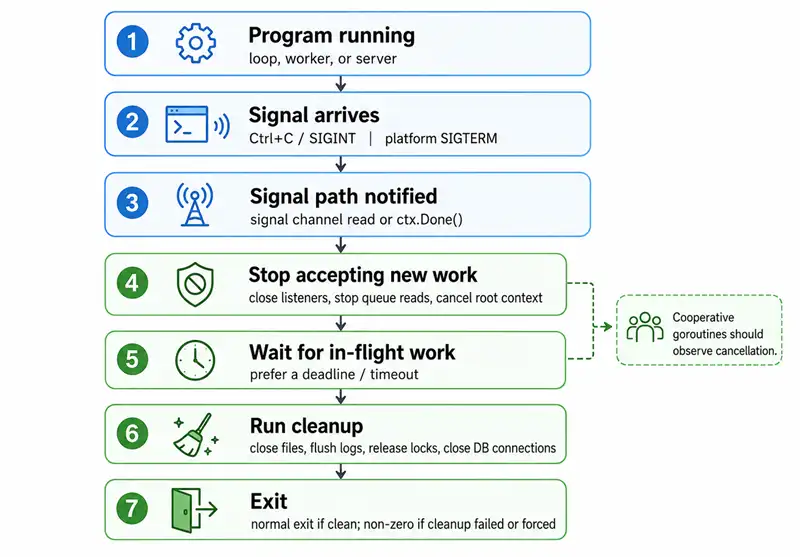
Cooperative goroutines should observe cancellation; for patterns, see stopping goroutines in Go and context.
Handle a Second Ctrl+C
Many users press Ctrl+C again if shutdown feels stuck. A practical pattern is to let the first signal start graceful shutdown, then treat a second signal as a request to exit immediately or shorten the remaining cleanup wait.
This is useful when cleanup blocks on network calls, stuck goroutines, slow file operations, or unresponsive dependencies.
The same idea exists in container platforms too: Docker and Kubernetes first give the process a chance to stop gracefully, then eventually escalate to SIGKILL if it is still running. SIGKILL cannot be caught or handled by a Go program.
Ctrl+C in Docker and Containers
Local Ctrl+C in an interactive docker run -it session often sends SIGINT to the foreground process, but container stop paths usually use SIGTERM first.
| Action | Typical signal behavior |
|---|---|
Ctrl+C in interactive docker run |
Often sends SIGINT to the foreground process |
docker stop |
Sends SIGTERM, then SIGKILL after the grace period |
| Process running as PID 1 | Can handle signals, but child-process signal forwarding and zombie reaping need extra care |
docker run --init |
Adds a small init process to help forward signals and reap child processes |
Treat container shutdown as a first-class path. Handle SIGTERM with the same cleanup logic as Ctrl+C, and finish within the stop grace period when possible.
CLI Tools, Servers, and Workers
The registration point, such as Notify or NotifyContext, is similar across program types. What changes is the cleanup body.
| Program type | Main shutdown focus |
|---|---|
| CLI command | Fast cleanup and exit |
| Long-running worker | Stop dequeuing; finish or abandon the current unit of work based on policy |
| HTTP server | Stop accepting new requests; allow in-flight requests to finish within a timeout |
| Containerized service | Honor SIGTERM within the orchestrator's grace window |
Mistakes to avoid
Listening only for Ctrl+C and not SIGTERM leaves docker stop and systemd without your cleanup path—register both on Unix.
Expecting to handle SIGKILL is impossible; design for bounded shutdown before the platform escalates.
Cleanup that waits forever frustrates operators; use timeouts and log where you gave up waiting.
Ignoring a second Ctrl+C leaves users hammering the terminal with no faster escape—decide what the second signal does.
Assuming Docker behaves like your laptop terminal skips SIGTERM-first shutdown and PID 1 edge cases—test in a real image.
Forgetting signal.Stop when you unregister is rare but matters if you deliberately narrow the window where custom handling applies.
Go Ctrl+C signal cheat sheet
| Situation | Practical handling |
|---|---|
| User presses Ctrl+C | os.Interrupt / SIGINT |
docker stop, systemd, kill |
syscall.SIGTERM on Unix |
| Forced kill | SIGKILL—not catchable |
| Modern context-heavy code | signal.NotifyContext |
| Need per-signal branching | signal.Notify and switch on os.Signal |
| HTTP server | Context cancel + Server.Shutdown |
| Stuck shutdown | Second signal or hard timeout → os.Exit |
| PID 1 / children | Consider --init or proper process layout |
Summary
Ctrl+C in a terminal usually maps to SIGINT; production stops usually send SIGTERM first. In Go, use os/signal: signal.Notify on a buffered channel when you want explicit signal values or custom multi-signal behavior, or signal.NotifyContext when shutdown should flow through context.Context like the rest of your app. Run bounded cleanup—files, logs, DBs, workers, HTTP drains—before exit, plan for a second Ctrl+C, and validate behavior in containers, not only on bare metal.
References
- Package os/signal
signal.NotifyContext- Wikipedia: Control-C
Frequently Asked Questions
How do I catch Ctrl+C in a Go program?
Use package os/signal: register signal.Notify (or signal.NotifyContext) for os.Interrupt and, on Unix, syscall.SIGTERM; read the notification and run cleanup or cancel a context before exiting.
What is the difference between signal.Notify and the default behavior?
Notify delivers the signal to your channel in addition to default handling until you coordinate shutdown; pair it with cleanup, context cancellation, or http.Server.Shutdown instead of only printing.
Should I handle SIGTERM as well as Ctrl+C?
Yes for real services: add syscall.SIGTERM to the same registration so docker stop, systemd, Kubernetes, and kill -TERM share the same shutdown path as SIGINT from the terminal.
Why must the signal channel be buffered?
Delivery is asynchronous; a capacity of at least one avoids dropping a notification if no goroutine is receiving at the exact instant.
How does docker stop relate to Ctrl+C?
Interactive docker run often forwards Ctrl+C as SIGINT to the foreground process; docker stop sends SIGTERM first, then SIGKILL after the grace period—handle SIGTERM in containerized Go apps.
Does Ctrl+C behave the same on Windows?
Register os.Interrupt for Ctrl+C where the signal package documents it; POSIX signal details differ from Windows consoles—test every OS you ship.
