Overview of SQL Transactions
SQL Transactions consists of a sequence of SQL statements and/or queries, the SQL standard specifies that a transaction begins implicitly when an SQL statement is executed, If the transactions execute successfully, it will the propagation of one or more changes to the database
Collections of operations that form a single logical unit of work are called Transactions, A database system must ensure proper execution of Transactions despite failures-either the entire transaction executes, or none of it does.
Properties of SQL Transactions
1. Atomicity:
Either all operations of the transaction are reflected properly in the database, or none are, if the transaction is aborted at the point of failure and all the previous operations are rolled back to their former state
2. Consistency
Execution of a transaction in isolation preserves the consistency of the database
3. Isolation
If multiple transactions may execute concurrently, but the system guarantees that for every pair of transactions finished execution before new transaction started , each transaction is unaware of other transactions executing concurrently in the system
4. Durability
After a transaction completes successfully, the changes it has made to the database persist, even if there are system failures, effect of a committed transaction must be saved permanent in the system
Different Commands of SQL Transactions
1. COMMIT
Commits the current transaction, It makes the updates performed by the transaction become permanent in the database. After transaction is committed, a new transaction is automatically started
2. ROLLBACK
ROLLBACK the currently active Transaction, it undoes all the updates performed by the SQL statements in the transactions so the database state is restored to what it was before the first statement of the transaction was executed
3. SAVEPOINT
SQL Transactions can record , and can be rolled back partially, up to a SAVEPOINT
4. SET TRANSACTION
Set Transaction establish the current transaction as read-only or read/write, establish its isolation level, or assign it to a specified ROLLBACK segment
SQL Transactions Implementation
Consider student result management system database with a table student for performing practical examples of SQL Transactions
| student_id | studentname | admissionno | admissiondate | enrollmentno | date_of_birth | city | class_id | |
|---|---|---|---|---|---|---|---|---|
| 101 | reema | 10001 | 02-02-2000 | e15200002 | 02-02-1990 | reema@gmail.com | surat | 2 |
| 102 | kriya | 10002 | 04-05-2001 | e16200003 | 04-08-1991 | kriya@gmail.com | surat | 1 |
| 103 | meena | 10003 | 06-05-1999 | e15200004 | 02-09-1989 | meena@gmail.com | vadodara | 3 |
| 104 | carlin | 2001 | 04-01-1998 | e14200001 | 04-04-1989 | carli@gmail.com | vapi | 1 |
| 105 | dhiren | 2002 | 02-02-1997 | e13400002 | 02-02-1987 | dhiru@gmail.com | vapi | 2 |
| 106 | hiren | 2003 | 01-01-1997 | e13400001 | 03-03-1887 | hiren@gmail.com | surat | 2 |
| 107 | mahir | 10004 | 06-09-2000 | e15200003 | 07-09-1990 | mahi@gmail.com | vapi | 3 |
| 108 | nishi | 2004 | 02-04-2001 | e16200001 | 03-02-1991 | nishi@gmail.com | vadodara | 1 |
Define an Implicit SQL Transactions
We need to enable theIMPLICIT_TRANSACTIONSoption
SET IMPLICIT_TRANSACTIONS ONDefine an Explicit SQL Transactions
| Steps | Description |
|---|---|
| BEGIN TRANSACTION | The beginning of transaction |
| SQL commands | Any SQL Insert, Update, Delete or Select statements |
| COMMIT TRANSACTION | Permanently stores modification in the database |
| ROLLBACK TRANSACTION | Undo the data modification in the database |
Begin SQL Transactions
It indicates the start point of an explicit or local transaction, @@TRANCOUNT returns the count of open transactions in the current session
BEGIN TRANSACTION transaction_nameExample 1 : Write SQL statement to start new transaction to do operations in student table data
BEGIN TRANSACTION student_transaction
SELECT @@TRANCOUNT AS OpenTransactions- In the above SQL statements, the first statement will start the SQL Transaction named as student transaction
- The SQL select statement will return the status of the currently running transaction
OUTPUT:

COMMIT SQL Transaction
Example 2: Write SQL Transaction update student data set city as ‘surat’ for student ID 107 and print the transaction status
BEGIN TRAN
UPDATE  tblstudent
SET city = 'surat'
WHERE (student_id = 107)
COMMIT
SELECT @@TRANCOUNT AS ActiveTransactions- In the above group of SQL statements, the first statement will begin the transactions
- The second statement will update the record of student table
- The commit command will commit the above transactions so the changes of the current transaction will store permanently in the memory and the current transaction will be closed
- The third statement will check for currently open transaction , it will return 0
OUTPUT:

Example 3: Write SQL Transaction update student data set city as ‘surat’ for student ID 107 ,commit the changes and print the transaction status
BEGIN TRAN
UPDATE tblstudent
SET city = 'surat'
WHERE (student_id = 107)
SELECT @@TRANCOUNT AS ActiveTransactions
COMMIT TRAN- In the above group of SQL statements , The first statement will begin a new SQL Transaction
- The second SQL update statement will update the record of student table,
- The third SQL select statement will return the status of currently open transaction, it will return 1 as current one transaction is open in the console
OUTPUT:

ROLLBACK in SQL Transaction
Example 4:Write SQL Transaction update student data set city as ‘surat’ for student ID 105, print the same record and perform ROLLBACK transaction
BEGIN TRAN
UPDATE tblstudent
SET city = 'surat'
WHERE (student_id = 105)
SELECT * from tblstudent WHERE (student_id = 105)- In the above group of SQL statements , The first statement will begin a new SQL Transaction
- The second SQL update statement will update the record of student table,
- The third SQL SELECT statement will fetch a updated record
OUTPUT:

BEGIN TRAN
UPDATE tblstudent
SET city = 'surat'
WHERE (student_id = 105)
ROLLBACK TRAN
SELECT * from tblstudent WHERE (student_id = 105)- In the above group of SQL statements , The first statement will begin a new SQL Transaction
- The second SQL update statement will update the record of student table,
- The third statement of SQL ROLLBACK command will undo the above transaction’s modifications
- The last SQL select statement will fetch the a record which was modified by the transaction , but the changes has undo my the ROLLBACK command
OUTPUT:

SAVEPOINT in SQL Transactions
SAVEPOINT is used to undo any particular portion of the transaction rather than undo a complete transaction using ROLLBACK command
To Start the SAVEPOINT SAVE TRANSACTION statement is used followed by user defined name of SAVEPOINT
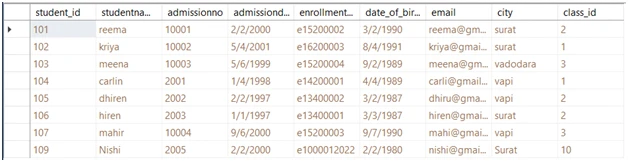
Example 5: Write SQL statements to create the new explicit transaction to perform following tasks
- Insert a new record into student table
- Create SAVEPOINT of insert transaction
- Remove a record from student table
- Roll back insert transaction
- Commit the transaction
- Display all records of student table
BEGIN TRANSACTION
INSERT INTO tblstudent
VALUES(109, 'Nishi','2005','02-02-2000', 'e1000012022','02-02-1980','nishi@gmail.com','Surat',10)
SAVE TRANSACTION BEGIN_SAVEPOINT
DELETE from tblstudent WHERE student_id=101
ROLLBACK TRANSACTION BEGIN_SAVEPOINT
COMMIT
SELECT * FROM tblstudent- In the above group of SQL statements , The first statement will begin a new SQL Transaction
- The second SQL insert statement will insert a the record of student table,
- The third statement of SAVE TRANSACTION will start new SAVEPOINT named BEGIN_SAVEPOINT to store the transaction modification
- The fourth statement of SQL Delete statement will remove a record from student table
- ROLLBACK TRANSACTION BEGIN_SAVEPOINT , will undo the changes mode after the starting of a BEGIN_SAVEPOINT
- COMMIT will permanent save all modifications and SQL select command will retrieve all records of student table
**OUTPUT:
**
Auto ROLLBACK of SQL Transactions
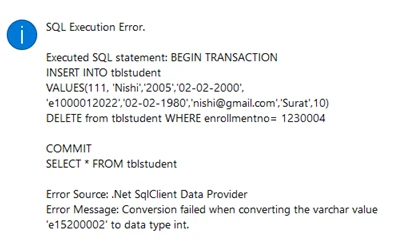
SQL Transactions are set of SQL DML statements, if any of the DML statement return error, the complete SQL Transaction will rollback automatically
Example 6 : Write SQL statements to create the new explicit transaction to perform following tasks
- Insert a new record into student table
- Delete record of student having enrollment number as 1230004
- Commit the transaction
- Display all records of student table
BEGIN TRANSACTION
INSERT INTO tblstudent
VALUES(111, 'Nishi','2005','02-02-2000', 'e1000012022','02-02-1980','nishi@gmail.com','Surat',10)
DELETE from tblstudent WHERE enrollmentno= 1230004
COMMIT
SELECT * FROM tblstudent
OUTPUT:
Above SQL Transaction will not execute, as there is a error in SQL Delete statement ,
To check the SQL Insert statement of above SQL Transaction is executed and add new record in student table , we need to use SQL Select statement
SELECT student_id, studentname, admissionno, admissiondate, enrollmentno, date_of_birth, email, city, class_id
FROM  tblstudent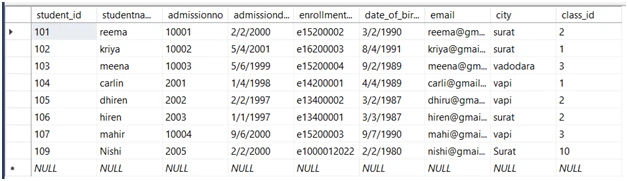
Summary
In this article of SQL Transactions, We have covered Overview of SQL Transactions, properties of SQL Transactions, Commands of SQL Transactions, Types of SQL Transactions implicit and explicit, also discuss the practical examples of how to begin a transaction, COMMIT the Transaction , ROLLBACK a transaction, create a SAVEPOINT and ROLLBACK till the SAVEPOINT transactions, and example of auto ROLLBACK of SQL Transactions