What is SQL RIGHT JOIN
Definition of RIGHT JOIN in SQL
The SQL RIGHT JOIN returns all rows from the right table and the matching rows from the left table. If a row in the right table has no matching row in the left table, the result will contain NULL values for the columns from the left table.
RIGHT JOIN is commonly used when the focus of the query is the right table, but related information from another table may or may not exist.
Example:
SELECT *
FROM employees
RIGHT JOIN departments
ON employees.department_id = departments.department_id;
In this query:
- All rows from the departments table are returned.
- Matching employees are shown if they exist.
- Departments without employees still appear with NULL values for employee columns.
How RIGHT JOIN works internally
Conceptually, RIGHT JOIN works in the following steps:
- SQL compares the join condition between both tables.
- Matching rows from both tables are returned.
- If a row exists in the right table but not in the left table, SQL still includes it.
- Columns from the left table are filled with NULL when no match is found.
Example tables:
Employees
| emp_id | name | dept_id |
|---|---|---|
| 1 | John | 10 |
| 2 | Sarah | 20 |
Departments
| dept_id | dept_name |
|---|---|
| 10 | HR |
| 20 | IT |
| 30 | Finance |
Query:
SELECT e.name, d.dept_name
FROM employees e
RIGHT JOIN departments d
ON e.dept_id = d.dept_id;
Result:
| name | dept_name |
|---|---|
| John | HR |
| Sarah | IT |
| NULL | Finance |
Notice how Finance appears even without an employee.
Difference between RIGHT JOIN and RIGHT OUTER JOIN
In SQL, RIGHT JOIN and RIGHT OUTER JOIN mean exactly the same thing.
The word OUTER is optional.
Both queries below produce identical results:
SELECT *
FROM employees
RIGHT JOIN departments
ON employees.department_id = departments.department_id;SELECT *
FROM employees
RIGHT OUTER JOIN departments
ON employees.department_id = departments.department_id;Because the keyword OUTER is optional, most developers simply write RIGHT JOIN.
When to use RIGHT JOIN in real queries
RIGHT JOIN is useful when you want to ensure that every row from the right table appears in the result, even if no matching record exists in the left table.
Common use cases include:
1. Listing all departments even without employees
SELECT d.dept_name, e.name
FROM employees e
RIGHT JOIN departments d
ON e.dept_id = d.dept_id;
2. Showing all courses even if no student enrolled
SELECT c.course_name, s.student_name
FROM students s
RIGHT JOIN courses c
ON s.course_id = c.course_id;
3. Displaying all products even if they were never sold
SELECT p.product_name, o.order_id
FROM orders o
RIGHT JOIN products p
ON o.product_id = p.product_id;
However, in practice many developers prefer LEFT JOIN, because it often reads more naturally in SQL queries.
SQL RIGHT JOIN Syntax
Basic RIGHT JOIN syntax
The basic syntax of SQL RIGHT JOIN is:
SELECT column_list
FROM table1
RIGHT JOIN table2
ON table1.column = table2.column;
Explanation:
table1→ left tabletable2→ right table- SQL returns all rows from table2
Example:
SELECT e.name, d.dept_name
FROM employees e
RIGHT JOIN departments d
ON e.dept_id = d.dept_id;
RIGHT JOIN with ON clause
The ON clause defines the relationship between the tables.
Example:
SELECT customers.customer_name, orders.order_id
FROM customers
RIGHT JOIN orders
ON customers.customer_id = orders.customer_id;
This query returns:
- All orders
- Matching customer names
- NULL if a customer record is missing
RIGHT JOIN with multiple conditions
RIGHT JOIN can include multiple join conditions.
Example:
SELECT e.name, p.project_name
FROM employees e
RIGHT JOIN projects p
ON e.employee_id = p.employee_id
AND e.department_id = p.department_id;
This ensures the join only occurs when both conditions match.
RIGHT JOIN with table aliases
Aliases make SQL queries easier to read.
Example:
SELECT e.name, d.dept_name
FROM employees AS e
RIGHT JOIN departments AS d
ON e.dept_id = d.dept_id;
Using aliases:
- simplifies long queries
- improves readability
- is common in complex joins
SQL RIGHT JOIN Cheat Sheet
RIGHT JOIN syntax quick reference
| Task | Query Example | Description |
|---|---|---|
| Basic RIGHT JOIN | SELECT * FROM A RIGHT JOIN B ON A.id=B.id |
Returns all rows from table B |
| RIGHT JOIN with filter | SELECT * FROM A RIGHT JOIN B ON A.id=B.id WHERE B.status='active' |
Filters rows after join |
| RIGHT JOIN with GROUP BY | SELECT B.id, COUNT(A.id) FROM A RIGHT JOIN B ON A.id=B.id GROUP BY B.id |
Aggregates results |
| RIGHT JOIN with alias | SELECT a.col, b.col FROM A a RIGHT JOIN B b ON a.id=b.id |
Uses table aliases |
RIGHT JOIN vs LEFT JOIN quick comparison
| Feature | LEFT JOIN | RIGHT JOIN |
|---|---|---|
| Keeps all rows from | Left table | Right table |
| Matching rows | Returned | Returned |
| Non matching rows | NULL on right table | NULL on left table |
| Common usage | Very common | Less common |
| Can replace each other | Yes by swapping tables | Yes by swapping tables |
Visual Explanation of RIGHT JOIN
RIGHT JOIN Venn diagram explained
A RIGHT JOIN returns all rows from the right table and the matching rows from the left table. If a row in the right table has no matching record in the left table, SQL fills the left table columns with NULL values.
The following diagram illustrates how RIGHT JOIN works.
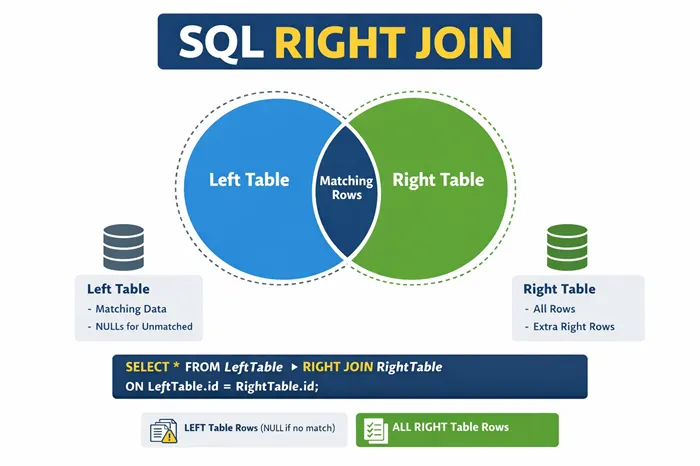
In this diagram:
- The right circle represents the right table
- The left circle represents the left table
- The overlapping section represents matching rows
- The remaining part of the right circle represents rows that exist only in the right table
Unlike INNER JOIN, RIGHT JOIN keeps rows from the right table even when there is no matching data.
Understanding matched vs unmatched rows
RIGHT JOIN produces two types of rows in the result:
1. Matched rows
Rows where the join condition matches values in both tables.
Example:
Employees table
| emp_id | name | dept_id |
|---|---|---|
| 1 | John | 10 |
| 2 | Sarah | 20 |
Departments table
| dept_id | dept_name |
|---|---|
| 10 | HR |
| 20 | IT |
Query:
SELECT e.name, d.dept_name
FROM employees e
RIGHT JOIN departments d
ON e.dept_id = d.dept_id;
Result:
| name | dept_name |
|---|---|
| John | HR |
| Sarah | IT |
These are matched rows.
2. Unmatched rows
Rows that exist in the right table but not in the left table.
Departments table contains:
| dept_id | dept_name |
|---|---|
| 30 | Finance |
Because no employee belongs to department 30, the query result becomes:
| name | dept_name |
|---|---|
| John | HR |
| Sarah | IT |
| NULL | Finance |
The Finance department still appears because RIGHT JOIN preserves all rows from the right table.
How NULL values appear in RIGHT JOIN
When SQL cannot find a matching row in the left table, it inserts NULL values for those columns.
Example query:
SELECT e.emp_id, e.name, d.dept_name
FROM employees e
RIGHT JOIN departments d
ON e.dept_id = d.dept_id;
Example output:
| emp_id | name | dept_name |
|---|---|---|
| 1 | John | HR |
| 2 | Sarah | IT |
| NULL | NULL | Finance |
Explanation:
- HR and IT have matching employees
- Finance has no employee
- SQL fills missing employee columns with NULL
This behavior makes RIGHT JOIN useful for detecting missing relationships between tables.
SQL RIGHT JOIN vs LEFT JOIN
LEFT JOIN vs RIGHT JOIN explained
Both LEFT JOIN and RIGHT JOIN are outer joins that return unmatched rows.
The difference lies in which table keeps all its rows. The SQL LEFT OUTER JOIN guide demonstrates the left-preserving form with NULL handling and filtering examples.
| JOIN Type | Rows preserved |
|---|---|
| LEFT JOIN | All rows from left table |
| RIGHT JOIN | All rows from right table |
Example:
LEFT JOIN
SELECT e.name, d.dept_name
FROM employees e
LEFT JOIN departments d
ON e.dept_id = d.dept_id;
Returns all employees, even if they do not belong to a department.
RIGHT JOIN
SELECT e.name, d.dept_name
FROM employees e
RIGHT JOIN departments d
ON e.dept_id = d.dept_id;
Returns all departments, even if they have no employees.
Why LEFT JOIN is more commonly used
Although RIGHT JOIN works perfectly, LEFT JOIN is used more frequently in real-world SQL queries.
Reasons include:
- Queries usually start from a primary table
- LEFT JOIN reads more naturally
- Many SQL style guides recommend using LEFT JOIN
- RIGHT JOIN can always be rewritten as LEFT JOIN
For example:
RIGHT JOIN version
SELECT e.name, d.dept_name
FROM employees e
RIGHT JOIN departments d
ON e.dept_id = d.dept_id;
Equivalent LEFT JOIN version
SELECT e.name, d.dept_name
FROM departments d
LEFT JOIN employees e
ON e.dept_id = d.dept_id;
Both queries produce identical results.
Converting RIGHT JOIN to LEFT JOIN
To convert RIGHT JOIN to LEFT JOIN:
- Swap the table order
- Replace RIGHT JOIN with LEFT JOIN
- Keep the join condition the same
RIGHT JOIN query
SELECT *
FROM A
RIGHT JOIN B
ON A.id = B.id;
Equivalent LEFT JOIN query
SELECT *
FROM B
LEFT JOIN A
ON A.id = B.id;
This technique is commonly used when working with databases that do not support RIGHT JOIN, such as SQLite.
Performance considerations of LEFT vs RIGHT JOIN
From a performance perspective, LEFT JOIN and RIGHT JOIN behave the same.
Query optimizers in modern databases such as:
- MySQL
- PostgreSQL
- SQL Server
- Oracle
automatically rearrange joins internally.
However, good practices include:
- Index columns used in the join condition
- Avoid joining unnecessary large tables
- Filter data before joining when possible
Example with indexing:
CREATE INDEX idx_dept_id
ON employees(dept_id);
This helps the database engine perform joins more efficiently.
Retrieve All Records From Right Table
Find all departments even without employees
Suppose we want to list all departments, even if no employee works in them.
Query:
SELECT d.dept_name, e.name
FROM employees e
RIGHT JOIN departments d
ON e.dept_id = d.dept_id;
Result:
| dept_name | name |
|---|---|
| HR | John |
| IT | Sarah |
| Finance | NULL |
This query helps detect departments that have no employees.
Display all courses even without students
In an education database we may want to display all courses, including those without enrollments.
Query:
SELECT c.course_name, s.student_name
FROM students s
RIGHT JOIN courses c
ON s.course_id = c.course_id;
Example result:
| course_name | student_name |
|---|---|
| Mathematics | Rahul |
| Physics | Anjali |
| Chemistry | NULL |
This shows courses without students.
Show all products even without customers
RIGHT JOIN is useful in sales analytics when showing all products, even those never purchased.
Query:
SELECT p.product_name, o.order_id
FROM orders o
RIGHT JOIN products p
ON o.product_id = p.product_id;
Result:
| product_name | order_id |
|---|---|
| Laptop | 101 |
| Phone | 102 |
| Tablet | NULL |
The NULL value indicates products that have never been ordered.
Finding Missing Data Using RIGHT JOIN
Detect records missing in the left table
RIGHT JOIN can help detect missing relationships between tables.
Example:
SELECT *
FROM employees e
RIGHT JOIN departments d
ON e.dept_id = d.dept_id
WHERE e.emp_id IS NULL;
This query finds departments that do not have employees.
Identify departments without employees
Query:
SELECT d.dept_name
FROM employees e
RIGHT JOIN departments d
ON e.dept_id = d.dept_id
WHERE e.emp_id IS NULL;
Result:
| dept_name |
|---|
| Finance |
| Marketing |
These departments currently have no employees assigned.
Find products that have no customers
In ecommerce systems, RIGHT JOIN can identify products that have never been purchased.
Query:
SELECT p.product_name
FROM orders o
RIGHT JOIN products p
ON o.product_id = p.product_id
WHERE o.order_id IS NULL;
Result:
| product_name |
|---|
| Tablet |
| Smartwatch |
These products exist in the catalog but have never been ordered.
RIGHT JOIN With Filtering
Using WHERE clause with RIGHT JOIN
A RIGHT JOIN can be combined with a WHERE clause to filter the final result set. The filtering occurs after the join operation has been performed.
Example:
SELECT e.name, d.dept_name
FROM employees e
RIGHT JOIN departments d
ON e.dept_id = d.dept_id
WHERE d.dept_name = 'IT';
Result:
| name | dept_name |
|---|---|
| Sarah | IT |
Explanation:
- The RIGHT JOIN first combines both tables.
- The WHERE clause then filters the rows where the department name is IT.
Filtering joined results correctly
When using RIGHT JOIN, it is important to place the filtering condition on the correct table.
Example:
SELECT e.name, d.dept_name
FROM employees e
RIGHT JOIN departments d
ON e.dept_id = d.dept_id
WHERE d.dept_name IN ('HR', 'IT');
Result:
| name | dept_name |
|---|---|
| John | HR |
| Sarah | IT |
The filter applies only to the right table values, ensuring the correct departments appear.
Avoiding incorrect filtering after JOIN
A common mistake is filtering using columns from the left table, which can accidentally remove unmatched rows.
Incorrect example:
SELECT e.name, d.dept_name
FROM employees e
RIGHT JOIN departments d
ON e.dept_id = d.dept_id
WHERE e.emp_id IS NOT NULL;
This removes rows where the employee is NULL, which defeats the purpose of RIGHT JOIN.
Correct way to detect unmatched rows:
SELECT e.name, d.dept_name
FROM employees e
RIGHT JOIN departments d
ON e.dept_id = d.dept_id
WHERE e.emp_id IS NULL;
This returns departments that do not have employees.
RIGHT JOIN With Aggregations
Count records from the right table
RIGHT JOIN is commonly used to count records while ensuring all rows from the right table are included.
Example:
SELECT d.dept_name, COUNT(e.emp_id) AS employee_count
FROM employees e
RIGHT JOIN departments d
ON e.dept_id = d.dept_id
GROUP BY d.dept_name;
Result:
| dept_name | employee_count |
|---|---|
| HR | 1 |
| IT | 1 |
| Finance | 0 |
Even departments with no employees appear in the result.
Use RIGHT JOIN with GROUP BY
RIGHT JOIN works well with GROUP BY to summarize data.
Example:
SELECT c.course_name, COUNT(s.student_id) AS enrolled_students
FROM students s
RIGHT JOIN courses c
ON s.course_id = c.course_id
GROUP BY c.course_name;
Result:
| course_name | enrolled_students |
|---|---|
| Mathematics | 10 |
| Physics | 8 |
| Chemistry | 0 |
This query displays courses even when no students are enrolled.
Calculate totals using RIGHT JOIN
RIGHT JOIN can also be used to calculate totals such as sales revenue per product.
Example:
SELECT p.product_name, SUM(o.amount) AS total_sales
FROM orders o
RIGHT JOIN products p
ON o.product_id = p.product_id
GROUP BY p.product_name;
Result:
| product_name | total_sales |
|---|---|
| Laptop | 5000 |
| Phone | 3200 |
| Tablet | NULL |
Products without orders still appear in the result.
RIGHT JOIN With Multiple Tables
Joining three tables using RIGHT JOIN
RIGHT JOIN can be used with multiple tables to retrieve related information.
Example:
SELECT s.student_name, c.course_name, m.marks
FROM students s
RIGHT JOIN marks m
ON s.student_id = m.student_id
RIGHT JOIN courses c
ON m.course_id = c.course_id;
This query retrieves:
- Student name
- Course name
- Marks obtained
Even if a course has no student records, it still appears.
RIGHT JOIN with nested joins
RIGHT JOIN can be combined with other joins inside nested queries.
Example:
SELECT d.dept_name, e.name, p.project_name
FROM employees e
RIGHT JOIN departments d
ON e.dept_id = d.dept_id
LEFT JOIN projects p
ON e.emp_id = p.emp_id;
This query retrieves:
- All departments
- Employees assigned to departments
- Projects handled by employees
Combining RIGHT JOIN with INNER JOIN
RIGHT JOIN can also work together with INNER JOIN.
Example:
SELECT e.name, d.dept_name, l.location
FROM employees e
RIGHT JOIN departments d
ON e.dept_id = d.dept_id
INNER JOIN locations l
ON d.location_id = l.location_id;
This query shows:
- Department information
- Employee data
- Location details
Only locations that exist in the locations table will appear.
RIGHT JOIN With Subqueries
RIGHT JOIN with derived tables
A derived table is a subquery used in the FROM clause.
Example:
SELECT d.dept_name, t.total_salary
FROM
(
    SELECT dept_id, SUM(salary) AS total_salary
    FROM employees
    GROUP BY dept_id
) t
RIGHT JOIN departments d
ON t.dept_id = d.dept_id;
This query shows total salaries per department, including departments without employees.
RIGHT JOIN with aggregated subqueries
Aggregated subqueries can summarize information before joining.
Example:
SELECT p.product_name, sales.total_orders
FROM
(
    SELECT product_id, COUNT(*) AS total_orders
    FROM orders
    GROUP BY product_id
) sales
RIGHT JOIN products p
ON sales.product_id = p.product_id;
Result shows all products, even if no orders exist.
RIGHT JOIN using inline views
Inline views are subqueries placed directly inside the query.
Example:
SELECT c.course_name, t.avg_marks
FROM
(
    SELECT course_id, AVG(marks) AS avg_marks
    FROM marks
    GROUP BY course_id
) t
RIGHT JOIN courses c
ON t.course_id = c.course_id;
This query shows the average marks per course, including courses without results.
RIGHT JOIN With Different Databases
RIGHT JOIN in MySQL
MySQL fully supports RIGHT JOIN.
Example:
SELECT e.name, d.dept_name
FROM employees e
RIGHT JOIN departments d
ON e.dept_id = d.dept_id;
MySQL also allows combining RIGHT JOIN with:
- GROUP BY
- ORDER BY
- subqueries
RIGHT JOIN in PostgreSQL
PostgreSQL supports RIGHT JOIN exactly according to the SQL standard.
Example:
SELECT s.student_name, c.course_name
FROM students s
RIGHT JOIN courses c
ON s.course_id = c.course_id;
PostgreSQL's query planner may internally rewrite RIGHT JOIN as LEFT JOIN for optimization.
RIGHT JOIN in SQL Server
Microsoft SQL Server also supports RIGHT JOIN and RIGHT OUTER JOIN.
Example:
SELECT p.product_name, o.order_id
FROM orders o
RIGHT JOIN products p
ON o.product_id = p.product_id;
Both forms below are identical:
RIGHT JOIN
RIGHT OUTER JOIN
RIGHT JOIN support limitations in SQLite
SQLite does not support RIGHT JOIN or FULL OUTER JOIN.
Example that will fail in SQLite:
SELECT *
FROM employees
RIGHT JOIN departments
ON employees.dept_id = departments.dept_id;
Instead, the query must be rewritten using LEFT JOIN by swapping the tables.
Equivalent SQLite query:
SELECT *
FROM departments
LEFT JOIN employees
ON employees.dept_id = departments.dept_id;
This produces the same result as a RIGHT JOIN.
Handling NULL Values in RIGHT JOIN
Replace NULL values using COALESCE
When a RIGHT JOIN returns rows that do not have matching values in the left table, SQL fills the missing columns with NULL values. Sometimes these NULL values should be replaced with meaningful values for better readability.
The COALESCE() function is commonly used for this purpose.
Example:
SELECT d.dept_name,
       COALESCE(e.name, 'No Employee Assigned') AS employee_name
FROM employees e
RIGHT JOIN departments d
ON e.dept_id = d.dept_id;
Result:
| dept_name | employee_name |
|---|---|
| HR | John |
| IT | Sarah |
| Finance | No Employee Assigned |
Here, COALESCE replaces NULL values with the text "No Employee Assigned".
Detect unmatched rows using IS NULL
RIGHT JOIN is often used to detect records that exist in one table but not in another.
Example:
SELECT d.dept_name
FROM employees e
RIGHT JOIN departments d
ON e.dept_id = d.dept_id
WHERE e.emp_id IS NULL;
Result:
| dept_name |
|---|
| Finance |
| Marketing |
This query returns departments that do not have any employees assigned.
The condition:
WHERE e.emp_id IS NULLfilters rows where no matching employee exists.
Avoid unexpected NULL values
Unexpected NULL values can appear when the join condition is incorrect or when the relationship between tables is incomplete.
Example:
SELECT e.name, d.dept_name
FROM employees e
RIGHT JOIN departments d
ON e.dept_id = d.dept_id;
If the employee table contains missing department IDs, SQL may produce NULL values.
To avoid unexpected NULLs:
- Ensure foreign keys are correct
- Validate data relationships between tables
- Use constraints such as FOREIGN KEY
Example:
ALTER TABLE employees
ADD CONSTRAINT fk_dept
FOREIGN KEY (dept_id)
REFERENCES departments(dept_id);
This ensures department relationships remain consistent.
Common Mistakes When Using RIGHT JOIN
Incorrect join condition
One of the most common mistakes is using the wrong join column.
Incorrect example:
SELECT *
FROM employees e
RIGHT JOIN departments d
ON e.emp_id = d.dept_id;
This condition joins unrelated columns.
Correct version:
SELECT *
FROM employees e
RIGHT JOIN departments d
ON e.dept_id = d.dept_id;
The join condition must use related keys between tables.
Filtering results incorrectly
A common mistake is filtering using the left table in the WHERE clause, which removes unmatched rows.
Incorrect example:
SELECT e.name, d.dept_name
FROM employees e
RIGHT JOIN departments d
ON e.dept_id = d.dept_id
WHERE e.emp_id IS NOT NULL;
This effectively converts the RIGHT JOIN into an INNER JOIN.
Correct approach depends on the intended result.
Example:
SELECT e.name, d.dept_name
FROM employees e
RIGHT JOIN departments d
ON e.dept_id = d.dept_id;
Misunderstanding NULL values
Many beginners misunderstand why NULL values appear in RIGHT JOIN results.
Example output:
| name | dept_name |
|---|---|
| John | HR |
| Sarah | IT |
| NULL | Finance |
The NULL values do not indicate an error. They indicate that Finance department has no matching employee.
Understanding this behavior is essential when analyzing join results.
Using RIGHT JOIN when LEFT JOIN is simpler
In many cases, RIGHT JOIN is unnecessary because the same result can be achieved using LEFT JOIN by swapping the tables.
RIGHT JOIN example:
SELECT e.name, d.dept_name
FROM employees e
RIGHT JOIN departments d
ON e.dept_id = d.dept_id;
Equivalent LEFT JOIN:
SELECT e.name, d.dept_name
FROM departments d
LEFT JOIN employees e
ON e.dept_id = d.dept_id;
Most developers prefer LEFT JOIN because it is easier to read.
SQL RIGHT JOIN Performance Tips
Indexing columns used in JOIN
Indexes significantly improve join performance.
Example:
CREATE INDEX idx_employee_dept
ON employees(dept_id);
This helps the database quickly match rows between tables.
Best practice:
- Index foreign key columns
- Index frequently joined columns
Reducing large dataset joins
Joining very large tables can slow queries.
Techniques to reduce dataset size include:
- Filtering records before joining
- Using WHERE clauses
- Selecting only necessary columns
Example:
SELECT d.dept_name, e.name
FROM employees e
RIGHT JOIN departments d
ON e.dept_id = d.dept_id
WHERE d.dept_name = 'IT';
This reduces the number of rows processed.
Optimizing JOIN conditions
Efficient join conditions help improve performance.
Example of optimized join:
SELECT e.name, d.dept_name
FROM employees e
RIGHT JOIN departments d
ON e.dept_id = d.dept_id;
Avoid joining using non-indexed expressions such as:
ON LOWER(e.dept_name) = LOWER(d.dept_name)Such operations prevent index usage.
Using EXPLAIN to analyze JOIN performance
Most databases provide an EXPLAIN command to analyze query execution plans.
Example in MySQL or PostgreSQL:
EXPLAIN
SELECT e.name, d.dept_name
FROM employees e
RIGHT JOIN departments d
ON e.dept_id = d.dept_id;
EXPLAIN shows:
- join type
- index usage
- estimated rows
- query cost
Using EXPLAIN helps identify slow joins and optimize queries.
Frequently Asked Questions
What is SQL RIGHT JOIN?
SQL RIGHT JOIN returns all rows from the right table and the matching rows from the left table. If there is no match, the result contains NULL values for the left table columns.
What is the difference between LEFT JOIN and RIGHT JOIN?
LEFT JOIN returns all rows from the left table and matching rows from the right table, while RIGHT JOIN returns all rows from the right table and matching rows from the left table.
Is RIGHT JOIN the same as RIGHT OUTER JOIN?
Yes. RIGHT JOIN and RIGHT OUTER JOIN are the same. The OUTER keyword is optional in SQL.
Why is LEFT JOIN used more often than RIGHT JOIN?
LEFT JOIN is more common because SQL queries are typically written starting from the primary table. A RIGHT JOIN can usually be rewritten as a LEFT JOIN by swapping the table order.
Does SQLite support RIGHT JOIN?
No. SQLite does not support RIGHT JOIN or FULL OUTER JOIN. These joins must be simulated using LEFT JOIN and UNION queries.
Summary
SQL RIGHT JOIN is used to retrieve all rows from the right table and matching rows from the left table. If a match does not exist, SQL fills the left table columns with NULL values.
Key points to remember:
- RIGHT JOIN preserves all rows from the right table
- NULL values indicate unmatched records
- RIGHT JOIN and RIGHT OUTER JOIN are identical
- RIGHT JOIN can often be rewritten as LEFT JOIN
- Proper indexing improves join performance
RIGHT JOIN is useful in scenarios such as:
- detecting missing relationships
- analyzing incomplete data
- retrieving all records from a reference table
Understanding how RIGHT JOIN behaves helps developers write more accurate and efficient SQL queries when working with relational databases.
Official Documentation
For further reference and deeper understanding of SQL joins and RIGHT JOIN behavior across different database systems, refer to the official documentation below.
These references provide detailed explanations of SQL JOIN operations, query optimization techniques, and examples across different database engines.