SQL LEFT OUTER JOIN Explained
A LEFT OUTER JOIN (commonly written simply as LEFT JOIN) is a SQL operation used to combine rows from two tables while keeping all records from the left table.
If a matching row exists in the right table, SQL returns the combined data from both tables. If no matching row exists, the row from the left table still appears in the result set, but the columns from the right table contain NULL values.
In simple terms:
LEFT JOIN never removes rows from the left table.
This makes LEFT JOIN extremely useful when analyzing incomplete relationships between tables, such as:
- customers who have not placed orders
- employees without assigned departments
- products that have never been purchased
Throughout this tutorial, we will use a simple e-commerce dataset so that every example represents a realistic business scenario.
Quick Answer: What is LEFT OUTER JOIN in SQL?
A LEFT OUTER JOIN returns:
- all rows from the left table
- matching rows from the right table
- NULL values when no match exists
Basic syntax:
SELECT columns
FROM table1
LEFT JOIN table2
ON table1.common_column = table2.common_column;
Example query:
SELECT c.customer_name, o.order_id
FROM customers c
LEFT JOIN orders o
ON c.customer_id = o.customer_id;
Example result:
| customer_name | order_id |
|---|---|
| Alice | 1001 |
| Bob | NULL |
| Charlie | 1003 |
Explanation:
- Alice has an order, so the records match.
- Charlie also has an order, so the records match.
- Bob has no orders, but still appears in the result with NULL values.
This behavior allows analysts to easily identify missing relationships between tables.
When Should You Use LEFT JOIN?
Use LEFT JOIN when you want to keep all rows from the primary table, even if related records do not exist in the joined table.
LEFT JOIN is widely used in real-world business analytics and reporting.
Visual Explanation of SQL JOIN Types
The following illustration shows how different join types return rows from two tables depending on whether matches exist between them.
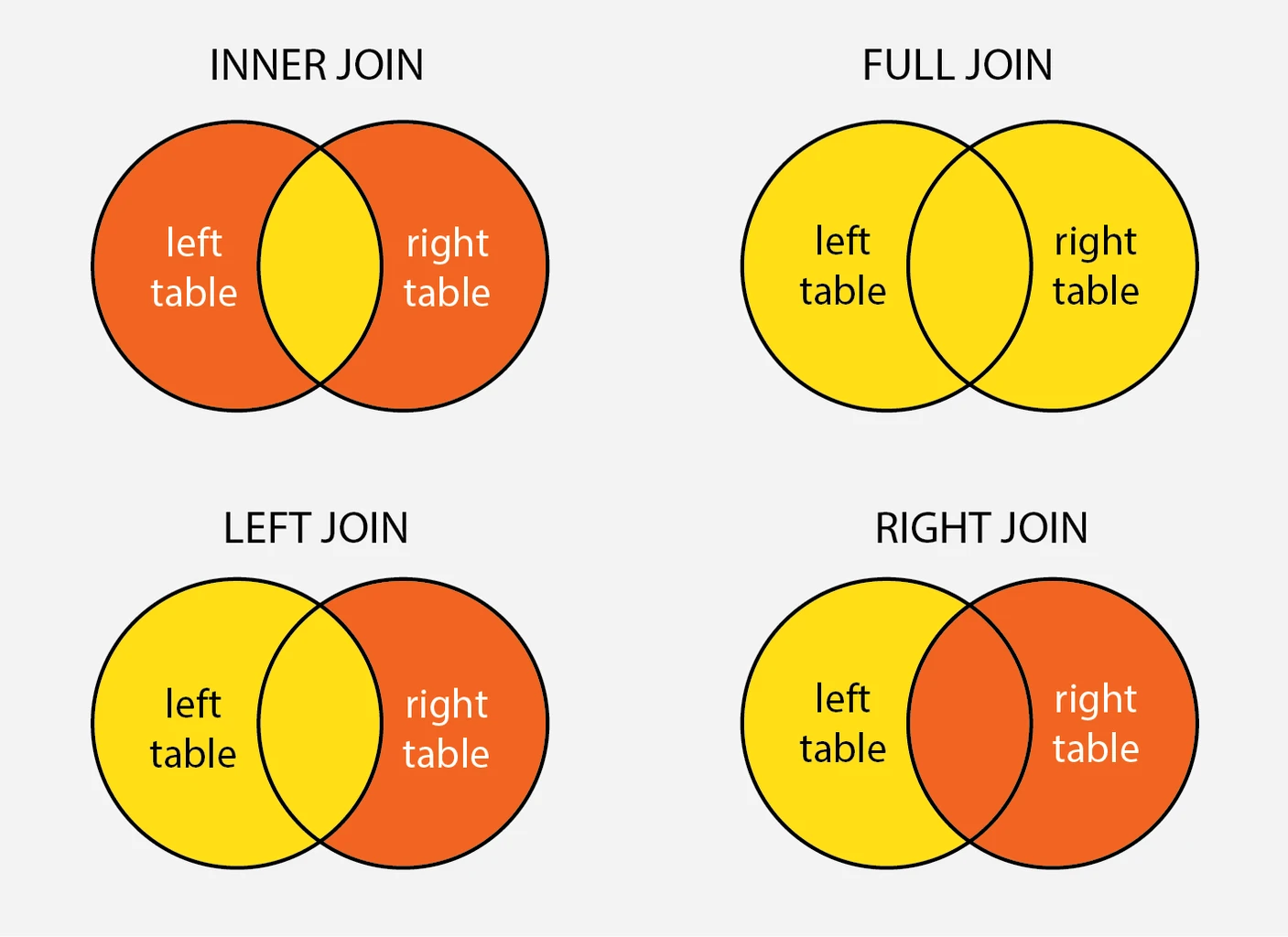
In the diagram:
- Each circle represents a table
- The overlapping region represents matching rows
- The non-overlapping regions represent rows that exist in only one table
The highlighted areas indicate which rows are returned for each JOIN type.
LEFT JOIN Diagram
A LEFT JOIN returns all rows from the left table and only the matching rows from the right table.
If a row in the left table has no match in the right table, SQL still includes the row in the result but fills the right table columns with NULL values.
LEFT JOIN result:
LEFT TABLE + MATCHING ROWS FROM RIGHT TABLEINNER JOIN vs LEFT JOIN Diagram
An INNER JOIN returns only rows that exist in both tables.
A LEFT JOIN, however, keeps all rows from the left table, even when no matching row exists in the right table.
Key difference:
INNER JOIN → Only matching rows
LEFT JOIN → All rows from left table + matches
RIGHT JOIN Diagram
A RIGHT JOIN behaves similarly to a LEFT JOIN but preserves rows from the right table instead of the left table.
RIGHT JOIN result:
RIGHT TABLE + MATCHING ROWS FROM LEFT TABLEIf a row in the right table has no match in the left table, the left table columns will contain NULL values.
FULL OUTER JOIN Diagram
A FULL OUTER JOIN returns all rows from both tables, including unmatched rows from each side.
When no matching row exists, SQL fills the missing columns with NULL values.
FULL OUTER JOIN result:
ALL ROWS FROM LEFT TABLE + ALL ROWS FROM RIGHT TABLESQL LEFT OUTER JOIN Syntax
The LEFT OUTER JOIN syntax is used to combine rows from two tables while preserving all rows from the left table.
When SQL executes the query, it attempts to match rows between the two tables using a specified condition. If a matching row exists in the right table, the result contains values from both tables. If no match exists, SQL returns NULL values for the right table columns.
Basic LEFT JOIN Syntax
The general syntax for a LEFT JOIN is:
SELECT column_list
FROM table1
LEFT JOIN table2
ON table1.common_column = table2.common_column;
Explanation:
table1→ the left table, whose rows are always preservedtable2→ the right table, containing related dataON→ the join condition used to match rows between the tables
Example:
SELECT employees.name, departments.department_name
FROM employees
LEFT JOIN departments
ON employees.department_id = departments.department_id;
In this query:
- Every employee is returned
- If the employee belongs to a department, the department name appears
- If no department exists, the department column contains NULL
LEFT JOIN vs LEFT OUTER JOIN
Many developers wonder whether LEFT JOIN and LEFT OUTER JOIN are different.
In SQL, these two statements are identical.
The keyword OUTER is optional and does not change how the query behaves.
Both queries below produce the same result:
SELECT *
FROM employees
LEFT JOIN departments
ON employees.department_id = departments.department_id;

SELECT *
FROM employees
LEFT OUTER JOIN departments
ON employees.department_id = departments.department_id;
Why both forms exist:
- LEFT JOIN → shorter and commonly used in everyday SQL queries
- LEFT OUTER JOIN → the full ANSI SQL syntax
Most developers prefer using LEFT JOIN, but both are valid.
Sample Tables Used in This Tutorial
To make every example reproducible, we will use the following two tables.
The first table contains employee information, and the second table stores department details.
These tables allow us to demonstrate:
- employees with valid departments
- employees without departments
- employees referencing departments that do not exist
Employees Table
The employees table stores information about employees and the department they belong to.
CREATE TABLE employees (
    employee_id INT PRIMARY KEY,
    name VARCHAR(50),
    department_id INT
);
Insert sample data:
INSERT INTO employees (employee_id, name, department_id) VALUES
(1, 'Aarav', 101),
(2, 'Vivaan', 102),
(3, 'Aditya', 103),
(4, 'Sai', NULL),
(5, 'Diya', 101),
(6, 'Ishaan', 104),
(7, 'Mira', NULL);
Key observations:
- Some employees have NULL department_id
- One employee references a department that does not exist
- Some employees share the same department
This helps demonstrate how LEFT JOIN behaves in different scenarios.
Departments Table
The departments table stores the list of departments in the organization.
CREATE TABLE departments (
    department_id INT PRIMARY KEY,
    department_name VARCHAR(50)
);
Insert sample data:
INSERT INTO departments (department_id, department_name) VALUES
(101, 'Human Resources'),
(102, 'Finance'),
(103, 'IT'),
(105, 'Marketing');
Notice that:
- Department 104 does not exist
- Some employees reference department 104
This will allow us to demonstrate how LEFT JOIN returns NULL values when no matching row exists.
Basic SQL LEFT JOIN Example
Now that our tables are ready, we can perform a basic LEFT JOIN to combine employee and department data.
Retrieve Employees and Departments
The following query returns all employees along with their department names.
SELECT e.name, d.department_name
FROM employees e
LEFT JOIN departments d
ON e.department_id = d.department_id;
This query joins the employees table with the departments table using the department_id column.
Result example:
| name | department_name |
|---|---|
| Aarav | Human Resources |
| Vivaan | Finance |
| Aditya | IT |
| Sai | NULL |
| Diya | Human Resources |
| Ishaan | NULL |
| Mira | NULL |
Understanding the Result
This result demonstrates the key behavior of a LEFT JOIN.
- Employees Aarav, Vivaan, Aditya, and Diya belong to valid departments
- Employees Sai and Mira have no department assigned (
NULL) - Employee Ishaan references department
104, which does not exist
Because we used LEFT JOIN, all employees appear in the result.
If a matching department is not found, SQL fills the department columns with NULL values instead of removing the row.
This behavior makes LEFT JOIN useful when working with incomplete or optional relationships between tables.
How SQL LEFT JOIN Works Internally
Understanding how a LEFT JOIN works internally helps explain why certain rows appear with NULL values and why the left table is always preserved in the result.
Although database engines use different execution strategies, the logical behavior of a LEFT JOIN follows a predictable sequence.
Step-by-step JOIN execution
When SQL executes a LEFT JOIN query, the database logically performs the following steps.
- SQL scans the left table row by row.
- For each row in the left table, SQL searches the right table for rows that satisfy the join condition.
- If a match is found, SQL combines the columns from both tables and adds the row to the result.
- If no match is found, SQL still returns the row from the left table.
- Columns from the right table are filled with NULL values.
Example query:
SELECT e.name, d.department_name
FROM employees e
LEFT JOIN departments d
ON e.department_id = d.department_id;
Conceptual process:
Step 1 → Read employee row
Step 2 → Check department match
Step 3 → If match exists → combine rows
Step 4 → If no match → return employee + NULL values
Because the query begins with the left table, every row from that table appears in the final result.
Why unmatched rows return NULL
When a matching row does not exist in the right table, the database engine cannot retrieve values for those columns.
Instead of removing the row entirely, SQL fills the right table columns with NULL values.
For example, consider the following employee record:
| name | department_id |
|---|---|
| Sai | NULL |
When the join is executed, SQL attempts to find a matching department.
Since no department exists, the result becomes:
| name | department_name |
|---|---|
| Sai | NULL |
Similarly, if a row references a department that does not exist:
| name | department_id |
|---|---|
| Ishaan | 104 |
Since department 104 is missing in the departments table, SQL still returns the employee but fills the department column with NULL.
Result:
| name | department_name |
|---|---|
| Ishaan | NULL |
This behavior allows analysts to easily detect missing or incomplete relationships between tables.
SQL JOIN Comparison
Different types of SQL JOINs return different subsets of rows depending on whether matching records exist in both tables.
Understanding these differences helps determine which join type should be used for a particular query.
LEFT JOIN vs INNER JOIN
The main difference between LEFT JOIN and INNER JOIN is how unmatched rows are handled. The SQL INNER JOIN guide provides complete matching-row examples for the alternative that excludes those unmatched records.
| Feature | LEFT JOIN | INNER JOIN |
|---|---|---|
| Rows from left table | Always returned | Returned only if match exists |
| Rows from right table | Returned only if match exists | Returned only if match exists |
| Unmatched rows | Included with NULL values | Excluded |
Example INNER JOIN:
SELECT e.name, d.department_name
FROM employees e
INNER JOIN departments d
ON e.department_id = d.department_id;
Result behavior:
- Employees without departments are removed
- Only employees with valid departments appear
Example LEFT JOIN:
SELECT e.name, d.department_name
FROM employees e
LEFT JOIN departments d
ON e.department_id = d.department_id;
Result behavior:
- All employees appear
- Missing departments return NULL
LEFT JOIN vs RIGHT JOIN
LEFT JOIN and RIGHT JOIN are similar, but they preserve rows from different tables. See the SQL RIGHT JOIN guide for the mirrored syntax and examples that keep every row from the right-hand table.
| Feature | LEFT JOIN | RIGHT JOIN |
|---|---|---|
| Preserved table | Left table | Right table |
| Matching rows | Included | Included |
| Unmatched rows | Left rows appear with NULL | Right rows appear with NULL |
Example RIGHT JOIN:
SELECT e.name, d.department_name
FROM employees e
RIGHT JOIN departments d
ON e.department_id = d.department_id;
In this case:
- All departments appear
- If a department has no employees, the employee column contains NULL
INNER JOIN vs OUTER JOIN
INNER JOIN and OUTER JOIN differ in how they treat unmatched rows. When unmatched records from both sides are required, the SQL FULL OUTER JOIN guide covers that result set and its database-specific alternatives.
| Join Type | Rows Returned |
|---|---|
| INNER JOIN | Only rows with matching values in both tables |
| LEFT OUTER JOIN | All rows from left table + matching rows |
| RIGHT OUTER JOIN | All rows from right table + matching rows |
| FULL OUTER JOIN | All rows from both tables |
Summary:
INNER JOIN → Only matching rows
LEFT JOIN → All left rows + matches
RIGHT JOIN → All right rows + matches
FULL JOIN → All rows from both tables
Handling NULL Values in LEFT JOIN
When using a LEFT JOIN, rows from the left table always appear in the result.
However, when no matching row exists in the right table, the database fills the right table columns with NULL values.
These NULL values represent missing relationships between tables.
Using the employees and departments tables introduced earlier, we can explore different ways to work with NULL values in LEFT JOIN results.
Replace NULL values using COALESCE
Sometimes displaying NULL values is not ideal, especially when presenting data in reports or dashboards.
The COALESCE function allows you to replace NULL values with a meaningful label.
Example:
SELECT
    e.name,
    COALESCE(d.department_name, 'No Department') AS department_name
FROM employees e
LEFT JOIN departments d
ON e.department_id = d.department_id;
Result example:
| name | department_name |
|---|---|
| Aarav | Human Resources |
| Vivaan | Finance |
| Aditya | IT |
| Sai | No Department |
| Diya | Human Resources |
| Ishaan | No Department |
| Mira | No Department |
Here, the COALESCE function replaces NULL values with "No Department".
Find unmatched rows using IS NULL
LEFT JOIN is commonly used to identify rows that do not have matching records in another table.
Example:
SELECT e.name
FROM employees e
LEFT JOIN departments d
ON e.department_id = d.department_id
WHERE d.department_id IS NULL;
Result example:
| name |
|---|
| Sai |
| Ishaan |
| Mira |
These employees either:
- have no department assigned
- reference a department that does not exist
Find matched rows using IS NOT NULL
To return only rows where a valid relationship exists between the tables, use IS NOT NULL.
Example:
SELECT e.name, d.department_name
FROM employees e
LEFT JOIN departments d
ON e.department_id = d.department_id
WHERE d.department_id IS NOT NULL;
Result example:
| name | department_name |
|---|---|
| Aarav | Human Resources |
| Vivaan | Finance |
| Aditya | IT |
| Diya | Human Resources |
These employees have valid departments that exist in the departments table.
Database-specific NULL functions (IFNULL, NVL)
Different database systems provide their own functions for replacing NULL values.
MySQL example:
SELECT
    e.name,
    IFNULL(d.department_name, 'No Department') AS department_name
FROM employees e
LEFT JOIN departments d
ON e.department_id = d.department_id;
Oracle example:
SELECT
    e.name,
    NVL(d.department_name, 'No Department') AS department_name
FROM employees e
LEFT JOIN departments d
ON e.department_id = d.department_id;
These functions behave similarly to COALESCE and allow you to provide default values when NULL appears in the result.
Common LEFT JOIN Mistakes
Although LEFT JOIN is widely used, small mistakes in query structure can change how the join behaves.
One of the most common issues occurs when filtering conditions are placed in the wrong clause.
LEFT JOIN with WHERE clause (Incorrect filtering)
A frequent mistake is placing conditions in the WHERE clause instead of the JOIN condition.
Example:
SELECT e.name, d.department_name
FROM employees e
LEFT JOIN departments d
ON e.department_id = d.department_id
WHERE d.department_name = 'IT';
At first glance, this query appears correct. However, it changes the behavior of the LEFT JOIN.
Because the WHERE clause runs after the join, rows where department_name is NULL are removed.
As a result:
- employees without departments disappear
- employees with unmatched departments disappear
This effectively converts the query into an INNER JOIN.
Correct filtering using ON clause
To preserve rows from the left table, filtering conditions should be applied inside the JOIN condition.
Correct query:
SELECT e.name, d.department_name
FROM employees e
LEFT JOIN departments d
ON e.department_id = d.department_id
AND d.department_name = 'IT';
Result behavior:
- All employees remain in the result
- Only the IT department is matched
- Other employees appear with NULL values
Example result:
| name | department_name |
|---|---|
| Aarav | NULL |
| Vivaan | NULL |
| Aditya | IT |
| Sai | NULL |
| Diya | NULL |
| Ishaan | NULL |
| Mira | NULL |
This preserves the true behavior of a LEFT JOIN.
Advanced LEFT JOIN Examples
LEFT JOIN with subqueries
A LEFT JOIN can also be performed against the result of a subquery.
Example: count employees in each department while still listing all employees.
SELECT
    e.name,
    dept_stats.employee_count
FROM employees e
LEFT JOIN (
    SELECT department_id, COUNT(*) AS employee_count
    FROM employees
    WHERE department_id IS NOT NULL
    GROUP BY department_id
) dept_stats
ON e.department_id = dept_stats.department_id;
Result example:
| name | employee_count |
|---|---|
| Aarav | 2 |
| Vivaan | 1 |
| Aditya | 1 |
| Sai | NULL |
| Diya | 2 |
| Ishaan | NULL |
| Mira | NULL |
Here:
- department 101 has two employees
- department 102 has one employee
- employees without departments return NULL
Multiple LEFT JOINs in one query
In real-world databases, queries often combine data from several related tables.
LEFT JOIN can be chained to retrieve data from multiple sources while still preserving rows from the main table. The focused guide to LEFT JOIN across multiple tables explains how table order affects each stage of that chain.
Example:
SELECT
    e.name AS employee_name,
    d.department_name,
    m.manager_name
FROM employees e
LEFT JOIN departments d
ON e.department_id = d.department_id
LEFT JOIN managers m
ON d.department_id = m.department_id;
Example result:
| employee_name | department_name | manager_name |
|---|---|---|
| Aarav | Human Resources | Dr. Sharma |
| Vivaan | Finance | Ms. Nair |
| Aditya | IT | Mr. Singh |
| Sai | NULL | NULL |
| Diya | Human Resources | Dr. Sharma |
| Ishaan | NULL | NULL |
| Mira | NULL | NULL |
This technique allows SQL queries to combine information from multiple tables while preserving the complete dataset from the primary table.
Is LEFT JOIN Slower Than INNER JOIN?
Many developers assume that LEFT JOIN is slower than INNER JOIN, but in most modern database systems this is a misconception.
Database query optimizers are designed to evaluate multiple execution strategies and choose the most efficient plan based on available indexes, table statistics, and filtering conditions.
In many cases, a LEFT JOIN and an INNER JOIN can have very similar performance when proper indexing and filtering are used.
Performance myth explained
The belief that LEFT JOIN is slower often comes from misunderstanding how SQL engines process joins.
In reality:
- Both INNER JOIN and LEFT JOIN require comparing rows between tables
- Both rely heavily on indexes and query conditions
- The database optimizer determines the best execution plan
For example:
SELECT e.name, d.department_name
FROM employees e
LEFT JOIN departments d
ON e.department_id = d.department_id;
If the join columns are indexed, the database can locate matching rows quickly.
In most cases, the difference between LEFT JOIN and INNER JOIN performance is negligible.
Query optimizer behavior
Modern databases such as MySQL, PostgreSQL, SQL Server, and Oracle use query optimizers to determine how joins should be executed.
The optimizer may use techniques such as:
- nested loop joins
- hash joins
- merge joins
Depending on the query structure and data distribution, the optimizer may even transform certain LEFT JOIN queries into more efficient execution plans internally.
For example, if the query filters out NULL results, the optimizer may treat the operation similarly to an INNER JOIN.
Example:
SELECT e.name
FROM employees e
LEFT JOIN departments d
ON e.department_id = d.department_id
WHERE d.department_name = 'IT';
In this case, the WHERE clause removes unmatched rows, so the optimizer may treat it as an INNER JOIN.
When LEFT JOIN can impact performance
Although LEFT JOIN is usually efficient, performance may be affected in certain situations.
These include:
- joining very large tables without indexes
- returning large numbers of unmatched rows
- performing multiple joins across many tables
- using functions or calculations in join conditions
Example of a costly join condition:
SELECT *
FROM employees e
LEFT JOIN departments d
ON LOWER(e.department_id) = LOWER(d.department_id);
Applying functions to join columns can prevent the database from using indexes effectively.
To improve performance, avoid unnecessary transformations in join conditions.
Indexing best practices for JOINs
Indexes play a critical role in JOIN performance.
Best practices include:
- indexing columns used in JOIN conditions
- indexing foreign key columns
- avoiding functions on indexed columns
- filtering rows early using WHERE clauses
Example of indexed join columns:
CREATE INDEX idx_employees_department
ON employees(department_id);

CREATE INDEX idx_departments_department
ON departments(department_id);
Proper indexing allows the database engine to locate matching rows quickly and significantly improves query performance.
Troubleshooting LEFT JOIN Issues
When working with LEFT JOIN queries, unexpected results can sometimes occur. These issues are often caused by data relationships, duplicate rows, or incorrect filtering conditions.
Understanding these common problems helps diagnose and fix incorrect query results.
Why LEFT JOIN returns duplicate rows
LEFT JOIN can produce duplicate rows when the relationship between the two tables is one-to-many.
For example, if multiple records in the right table match a single row in the left table, the result will contain multiple rows.
Example:
SELECT e.name, p.project_name
FROM employees e
LEFT JOIN projects p
ON e.employee_id = p.employee_id;
If an employee works on three projects, that employee will appear three times in the result.
Example result:
| name | project_name |
|---|---|
| Aarav | Project A |
| Aarav | Project B |
| Aarav | Project C |
To avoid unexpected duplicates, consider using:
- aggregation functions
- DISTINCT
- grouping queries
Example:
SELECT DISTINCT e.name
FROM employees e
LEFT JOIN projects p
ON e.employee_id = p.employee_id;
Why some rows disappear unexpectedly
Sometimes developers expect a LEFT JOIN to return all rows from the left table, but rows appear to disappear.
This usually happens when conditions are placed in the WHERE clause instead of the JOIN condition.
Example problem query:
SELECT e.name, d.department_name
FROM employees e
LEFT JOIN departments d
ON e.department_id = d.department_id
WHERE d.department_name = 'IT';
Because the WHERE clause filters results after the join, rows with NULL department values are removed.
This effectively converts the LEFT JOIN into an INNER JOIN.
Correct approach:
SELECT e.name, d.department_name
FROM employees e
LEFT JOIN departments d
ON e.department_id = d.department_id
AND d.department_name = 'IT';
This preserves all rows from the employees table.
Understanding NULL values in JOIN results
NULL values in LEFT JOIN results indicate that no matching row exists in the right table.
This can occur when:
- the join key is NULL in the left table
- the referenced record does not exist in the right table
- the join condition does not match any row
Example query:
SELECT e.name, d.department_name
FROM employees e
LEFT JOIN departments d
ON e.department_id = d.department_id;
Possible result:
| name | department_name |
|---|---|
| Aarav | Human Resources |
| Sai | NULL |
| Ishaan | NULL |
In this example:
- Sai has no department assigned
- Ishaan references a department that does not exist
These NULL values help identify missing or incomplete relationships between tables.
SQL LEFT JOIN Cheat Sheet
The following quick reference summarizes the most common patterns used when working with SQL LEFT JOIN queries.
This cheat sheet can help you quickly recall syntax, filtering techniques, and practical join patterns used in analytics and reporting queries.
LEFT JOIN syntax quick reference
Basic LEFT JOIN syntax:
SELECT columns
FROM table1
LEFT JOIN table2
ON table1.column = table2.column;
Example using the employees and departments tables:
SELECT e.name, d.department_name
FROM employees e
LEFT JOIN departments d
ON e.department_id = d.department_id;
Key behavior:
- All rows from the left table appear in the result
- Matching rows from the right table are included
- Missing matches return NULL values
LEFT JOIN unmatched rows
LEFT JOIN is commonly used to identify records that do not have matching rows in another table.
Example: find employees without valid departments.
SELECT e.name
FROM employees e
LEFT JOIN departments d
ON e.department_id = d.department_id
WHERE d.department_id IS NULL;
Result:
| name |
|---|
| Sai |
| Ishaan |
| Mira |
This pattern is widely used to detect:
- customers without orders
- products without sales
- users without activity
LEFT JOIN multiple tables
LEFT JOIN can be used with multiple tables to combine related data while preserving rows from the primary table.
Example:
SELECT
    e.name,
    d.department_name,
    m.manager_name
FROM employees e
LEFT JOIN departments d
ON e.department_id = d.department_id
LEFT JOIN managers m
ON d.department_id = m.department_id;
Result behavior:
- All employees appear
- Department and manager details are included when available
- Missing relationships return NULL values
LEFT JOIN with aggregation
LEFT JOIN can also be combined with aggregation functions such as COUNT, SUM, or AVG.
Example: count employees in each department.
SELECT
    d.department_name,
    COUNT(e.employee_id) AS employee_count
FROM departments d
LEFT JOIN employees e
ON d.department_id = e.department_id
GROUP BY d.department_name;
Example result:
| department_name | employee_count |
|---|---|
| Human Resources | 2 |
| Finance | 1 |
| IT | 1 |
| Marketing | 0 |
Notice that the Marketing department appears even though it has no employees, because LEFT JOIN preserves rows from the departments table.
Summary
SQL LEFT OUTER JOIN (commonly written as LEFT JOIN) is used to combine rows from two tables while preserving all rows from the left table. If no matching row exists in the right table, SQL returns NULL values for the columns from the right table.
Key points to remember:
- LEFT JOIN and LEFT OUTER JOIN are identical; the OUTER keyword is optional.
- All rows from the left table are always returned.
- Rows from the right table appear only when a match exists.
- When no match is found, SQL fills the right table columns with NULL values.
- LEFT JOIN is useful for identifying missing relationships between tables.
- Filtering conditions should generally be placed in the ON clause to avoid unintentionally converting a LEFT JOIN into an INNER JOIN.
- Proper indexing of join columns improves performance when working with large datasets.
LEFT JOIN is widely used in analytics, reporting, and application queries where complete records from a primary table must be preserved, even if related data is missing.
Official SQL Documentation
The following official resources provide more details about SQL JOIN behavior and syntax across different database systems.
- Microsoft SQL JOIN Documentation
- MySQL JOIN Syntax Reference
- PostgreSQL JOIN Documentation
- Oracle SQL JOIN Concepts
Frequently Asked Questions
What does LEFT OUTER JOIN return in SQL?
A LEFT OUTER JOIN returns all rows from the left table and the matching rows from the right table. If no match exists, SQL returns NULL values for columns from the right table.
What is the difference between LEFT JOIN and LEFT OUTER JOIN?
LEFT JOIN and LEFT OUTER JOIN are identical in SQL. The OUTER keyword is optional and both return the same results.
What is the difference between INNER JOIN and LEFT JOIN?
INNER JOIN returns only rows that have matching records in both tables, while LEFT JOIN returns all rows from the left table and matching rows from the right table.
Why does LEFT JOIN return NULL values?
LEFT JOIN returns NULL values when no matching record exists in the right table for a row from the left table.
When should you use LEFT JOIN in SQL?
LEFT JOIN is used when you want to keep all rows from the main table even if related data does not exist in the joined table.
Is LEFT JOIN slower than INNER JOIN?
LEFT JOIN is not inherently slower than INNER JOIN. With proper indexing and query optimization, both joins can perform similarly in most database systems.
How do you find rows without matches using LEFT JOIN?
You can find unmatched rows by filtering for NULL values in the right table using a condition such as WHERE right_table.column IS NULL.
Can LEFT JOIN return duplicate rows?
Yes. If multiple rows in the right table match a single row in the left table, the result will contain duplicate rows for that left table record.