Overview of SQL Exists
SQL Exists is a logical operator used with SQL WHERE clause as the conjunction of the subquery to check whether the result of a subquery (correlated nested query) contains any record or not
The result of SQL Exists is a Boolean value TRUE or FALSE, if the
subquery returns one or more records it returns TRUE otherwise it
returns FALSE
SQL Exists can be used in a SELECT, UPDATE, or DELETE statement
SQL Exists Syntax
SELECT column_name1 | Expression1, column_name2 | Expression2.. FROM table_name
WHERE EXISTS
(SELECT column_name1 | Expression1..  FROM table_name
[WHERE condition]
[ORDER BY column_name]
[GROUP BY column_name]
[HAVING condition]);
Here,
- column_name1 | Expression1:It specifies the list of columns or expressions to be retrieved
- table_name :It is the name of the table from which we want to retrieve data, if we want to retrieve data from more than one table we can specify using SQL joins, There must be at least one table listed in the FROM clause.
- WHERE EXISTS:SQL Exist operator specified with where clause to check for the resulting recordset of subquery
- WHERE condition:It is an optional argument with SQL Select, the records which are satisfied this condition will be retrieved
Return Type of SQL Exists
SQL Exists returns value in Boolean Datatype either TRUE or FALSE
Examples of SQL Exists
Consider the hospital management database with four tables patient,
doctor, laboratory, and bill to perform practical examples of SQL
Exists
Patient Table
| patient_id | name | age | gender | address | disease | doctor_id |
|---|---|---|---|---|---|---|
| 1 | reema | 23 | female | althan,Surat | fever | 21 |
| 2 | kusum | 50 | female | vadodara | heart failure | 22 |
| 3 | carlin | 43 | male | vapi | infection | 23 |
| 4 | rahul | 26 | male | navsari | cancer | 21 |
| 6 | hansha | 55 | female | vapi | diabetes | 22 |
Doctor Table
| doctor_id | name | age | gender | address |
|---|---|---|---|---|
| 21 | asif | 55 | male | baruch |
| 22 | dhawal | 40 | male | Surat |
| 23 | krishna | 39 | female | Surat |
| 24 | lissa | 35 | female | Navsari |
| 25 | leeba | 34 | female | baruch |
| 26 | vini | 33 | female | Surat |
| 27 | Dhiren | 32 | male | Navsari |
Bill Table
| bill_no | patient_id | doctor_id | room_charge | no_of_days |
|---|---|---|---|---|
| 5005 | 1 | 340 | 500 | 4 |
| 5006 | 2 | 600 | 480 | 8 |
| 5008 | 3 | 800 | 340 | 3 |
| 5009 | 4 | 780 | 890 | 6 |
| 5010 | 3 | 400 | 1 | |
| 5011 | 1 | 200 | 300 | 1 |
| 5012 | 2 | 600 | 110 | 2 |
| 5013 | 3 | 330 | 210 | 1 |
| 5014 | 1 | 230 | 340 | 2 |
Laboratory Table
| lan_no | patient_id | doctor_id | date | amount |
|---|---|---|---|---|
| 10 | 1 | 21 | 02-02-2000 | 4000 |
| 20 | 2 | 21 | 09-09-2001 | 300 |
| 30 | 3 | 22 | 03-03-2001 | 600 |
| 40 | 1 | 23 | 02-06-2002 | 800 |
| 50 | 4 | 21 | 05-07-2003 | 900 |
| 60 | 2 | 25 | 10-04-2004 | 550 |
| 70 | 4 | 22 | 03-04-2005 | 900 |
SQL Exists compare with Null value
Example 1: Write SQL query to display patient details with the null condition to be compared with SQL Exists
SELECT patient_id, name, age, gender, address, city, disease, doctor_id FROM patient
WHERE EXISTS
(SELECT NULL AS 'Null value')- In the above query, the subquery returned a result set that contains NULL which causes the EXISTS operator to evaluate to TRUE
- When we execute the above query, the result will contains all records of patient table
OUTPUT:

SQL Exists with subquery returns more than one records
Example 2: Write SQL query to display whose patient details whose data exist in laboratory table
SELECT patient_id, name, age, gender, address, city, disease, doctor_id FROM patient
WHERE EXISTS
(SELECT lab_no, patient_id, doctor_id, date, amount FROM laboratory
WHERE (patient_id = patient.patient_id))- In the above query, the subquery will return each patient’s laboratory records whose patient id matches with the patient table’s patient id
- SQL Exists with where clause in the outer query will check for TRUE and FALSE value as subquery returns more than one record, where exist will be true
OUTPUT:

SQL Exists with SQL JOIN
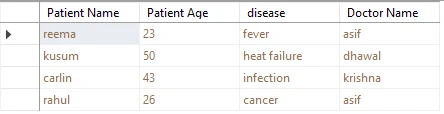
Example 3: Write SQL query to display patient information with their disease and doctor name if that patient record exists in laboratory table
SELECT patient.name AS 'Patient Name', patient.age AS 'Patient Age', patient.disease, doctor.name AS 'Doctor Name'
FROM patient
LEFT OUTER JOIN doctor ON patient.doctor_id = doctor.doctor_id
WHERE EXISTS
(SELECT lab_no, patient_id, doctor_id, date, amount FROM laboratory WHERE (patient_id = patient.patient_id))- In the above query, the subquery will returns each patient’s laboratory records whose patient id is matches with patient table’s patient id
- In the outer query we have use SQL Left outer join is used to get combine record of both the table patient and doctor
- SQL Exists with where clause in the outer query will check for TRUE and FALSE value , subquery will returns record set so the where condition will be true
OUTPUT:
SQL Exists with FALSE condition
Example 4: Write SQL query to retrieve patient information with doctor name if the patient laboratory billing amount is more than 1000
SELECT  patient.name AS 'Patient Name', patient.age AS 'Patient Age', patient.disease, doctor.name AS 'Doctor Name'
FROM patient LEFT OUTER JOIN
doctor ON patient.doctor_id = doctor.doctor_id
WHERE EXISTS
(SELECT lab_no, patient_id, doctor_id, date, amount FROM laboratory WHERE (amount > 1000))- In the above query, the subquery will return patient laboratory details if the lab billing amount is greater than 1000
- In the outer query, we have used SQL Left outer join is used to get combine records of both the table patient and doctor
- SQL Exists will return FALSE value as subquery will not return any record because there is no laboratory billing amount is more than 1000
OUTPUT:

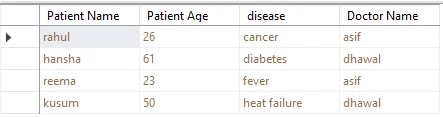
Example 5: Write SQL query to retrieve patient information with their doctor name if the doctor is having more than one patient
SELECT patient.name AS 'Patient Name', patient.age AS 'Patient Age', patient.disease, doctor.name AS 'Doctor Name'
FROM patient LEFT OUTER JOIN doctor ON patient.doctor_id = doctor.doctor_id
WHERE  EXISTS
(SELECT COUNT(*) AS 'Total Patient' FROM  patient AS patient_1
WHERE (doctor_id = doctor.doctor_id) GROUP BY doctor_id HAVING  (COUNT(*) > 1))
ORDER BY patient.disease- In the above query, the SQL Exists operator is used in the conjunction with nested subquery which counts the total number of the doctor who is having more than one patient
- In outer query SQL left join is used to retrieve join records from two tables patient and doctor
- The SQL Exists will return TRUE value as the result of subquery will contain records
OUTPUT:
SQL Exists with Delete Statement
SQL Exist can also be used with SQL Delete statement to conditionally delete the record from the table, if the result of SQL Exists is TRUE then the records will be deleted from the table
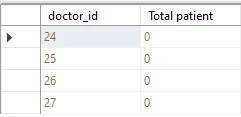
Example 6: Write SQL query to remove those doctor information whose do not having any patient
DELETE FROM doctor
WHERE  EXISTS
(SELECT doctor_1.doctor_id, COUNT(patient.patient_id) AS Expr1
FROM  doctor AS doctor_1 LEFT OUTER JOIN patient
ON patient.doctor_id = doctor_1.doctor_id
GROUP BY doctor_1.doctor_id
HAVING (COUNT(patient.patient_id) = 0))- In the above query, the SQL Exists operator is used in the conjunction with nested subquery which counts the total number of the doctor who does not have any patient
- The SQL Delete statement will remove all doctors information from the doctor table whose data exists in the resulting recordset of the subquery
- When we execute the above query four records will be deleted from the doctor table
OUTPUT:
SELECT doctor_id, name, age, gender, address FROM dbo.doctor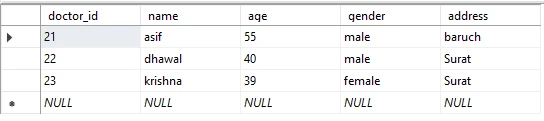
SQL Exists with Update Statement
SQL Exists can be used to conditionally update the records of table based on the TRUE result of where exists condition in the subquery
Example 7: Write SQL query to update patient billing data if the patient admitted for more than a day in hospital than set room charges to 200
update bill set room_charge=200 where exists (SELECT bill_no, patient_id, doctor_charge, room_charge, no_of_days
FROM dbo.bill
WHERE (room_charge < 200) AND (no_of_days > 1))- In the above query, SQL Exists is used to update the patient billing information,
- In the subquery, SQL select statement is used to fetch data from bill table if the no_of_days is greater than 1 and room_charges <200
- SQL where exists will be resulting TRUE value as there is one record where this condition will be true
- When we execute the above update query, it will update room_charges data of one record
OUTPUT:

SELECT bill_no, patient_id, doctor_charge, room_charge, no_of_days
FROM dbo.bill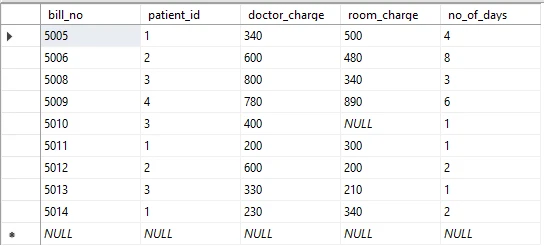
SQL NOT Exists
- SQL NOT EXISTS condition consists of two logical operators: EXISTS and NOT in which NOT is used to negate a Boolean input
- Unlike EXISTS, NOT EXISTS returns TRUE if the result of the subquery does not contain any rows
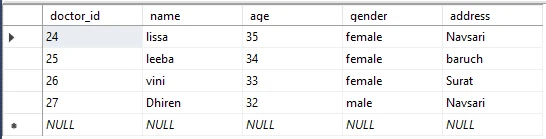
Example 8: Write SQL query to retrieve doctor details whose do not having any patient
SELECT  doctor_id, name, age, gender, address FROM  doctor
WHERE (NOT EXISTS
(SELECT patient_id, name, age, gender, address, disease, doctor_id
FROM patient WHERE
(doctor.doctor_id = doctor_id)))- In the above query, SQL NOT Exists is used to negate the records doctor who has patient record in the patient table
- The subquery will return the list of patient details with doctor id
- SQL NOT Exists will return true for the doctor whose id is not in the patient table doctor id
OUTPUT:
Comparison between EXISTS and IN
- SQL Exists operator evaluates for TRUE or FALSE value, whereas the IN clause compare all records fetched from the given subquery column with the column value of the outer query
- SQL EXISTS operator can only be used with subqueries, whereas we can use the IN operator on subqueries and values both
Example 9: Write an SQL query to display all patient information whose laboratory report data to exist in laboratory table
Using SQL Exists
SELECT  patient_id, name, age, gender, address, disease, doctor_id FROM  patient
WHERE  EXISTS
(SELECT lab_no, patient_id, doctor_id, date, amount FROM laboratory WHERE (patient.patient_id = patient_id))- In the above query, SQL Exists is used to fetch patient records whose laboratory details are present in the laboratory table
- In subquery will return records of lab reports matches with the patient id of the patient table , so the SQL Exists condition will return TRUE value
Using SQL IN
SELECT   patient_id, name, age, gender, address, disease, doctor_id FROM  patient WHERE
(patient_id IN (SELECT patient_id FROM laboratory WHERE (patient.patient_id = patient_id)))- In the above query, SQL IN clause is used to fetch patient data whose laboratory test report records is present in laboratory table
- The subquery will fetch patient id from laboratory table and the resulting patient id will be compared with the patient id of patient table using IN operator, if found records will be display
OUTPUT:

Summary
In this Article on SQL Exists, we have covered the overview of the SQL Exists operator, usage and syntax of how to use SQL Exist with an explanation of each syntax argument, also covered the practical examples of SQL Exists with a NULL value, with a TRUE and FALSE value, with DELETE and UPDATE Statement, SQL NOT Exists example and in the ending section we have explained the difference between SQL Exists and SQL IN with practical example