
JavaScript Math.sqrt() returns the square root of a number. Searches such as javascript square root, javascript sqrt, math sqrt, sqrt javascript, and math.sqrt javascript all refer to this built-in method.
Environment: Node.js v20.18.2. Each snippet is plain JavaScript; the line after it states the expected console output.
Math.sqrt Syntax
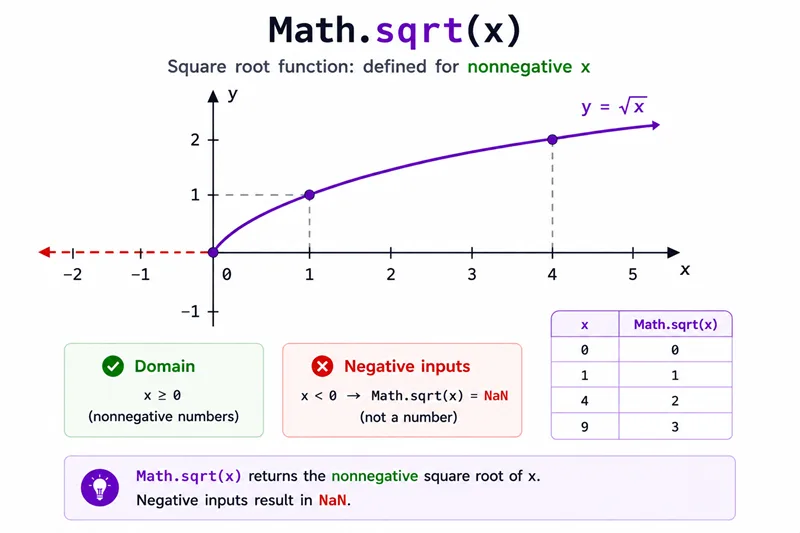
Math.sqrt(x)The input should be zero or a positive number for a real-number result.
Method 1: Calculate Square Root
console.log(Math.sqrt(25));
console.log(Math.sqrt(2));You should see 2 lines, in order: 5, 1.4142135623730951.
Method 2: Handle Zero and Negative Numbers
console.log(Math.sqrt(0));
console.log(Math.sqrt(-1));You should see 2 lines, in order: 0, NaN.
Negative numbers return NaN because JavaScript Math.sqrt() returns real-number square roots, not complex numbers.
Method 3: Calculate Distance with Math.sqrt()
const distance = Math.sqrt((4 - 1) ** 2 + (6 - 2) ** 2);

console.log(distance);You should see one line logging 5.
For distance calculations, Math.hypot() is often cleaner, but Math.sqrt() shows the formula directly.
Common Questions About Math.sqrt
How do I calculate square root in JavaScript?
Use Math.sqrt(number). For example, Math.sqrt(25) returns 5.
What happens with Math.sqrt(-1)?
It returns NaN because negative numbers do not have real square roots.
Is Math.sqrt the same as exponent 0.5?
For non-negative numbers, Math.sqrt(x) is equivalent to x ** 0.5, but Math.sqrt() is clearer for square root intent.
Summary
Math.sqrt is for non-negative reals; combine squared deltas with Math.hypot instead of chained sqrt calls when possible.
JavaScript Math.sqrt() calculates the square root of a number. It returns real-number results for zero and positive values, including decimals, and returns NaN for negative inputs. Use it for direct square root calculations and formulas; use Math.hypot() when calculating distances from squared coordinate differences.
