
In JavaScript, dividing two numbers normally returns a floating-point result. However, many real-world calculations require integer division, where the fractional part is discarded and only the whole number (quotient) is returned.
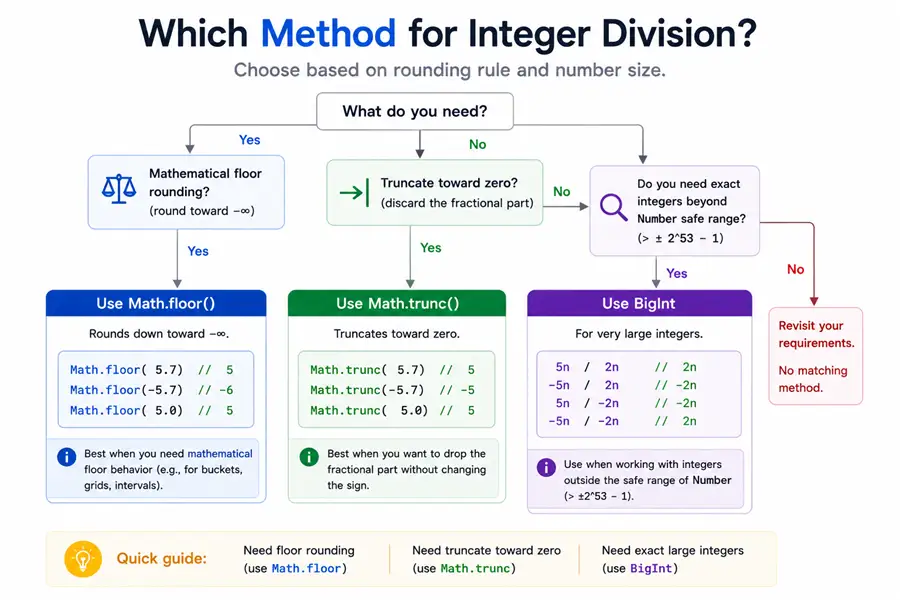
JavaScript does not provide a dedicated integer division operator like some other programming languages. Instead, developers achieve integer division using different techniques such as Math.floor(), Math.trunc(), bitwise operators, or BigInt arithmetic.
Understanding these methods helps when building features like pagination systems, workload distribution, array chunking, and index calculations where decimal results are not useful.
Tested on: Node.js v20.18.2. A short note after each runnable snippet describes what you should see in the console.
Quick Reference: JavaScript Integer Division Methods
| Method | Syntax | Handles Negative Numbers | BigInt Support | Best Use Case |
|---|---|---|---|---|
Math.floor() |
Math.floor(a / b) |
Yes (rounds down) | No | Most commonly used method |
Math.trunc() |
Math.trunc(a / b) |
Yes (removes decimals) | No | Remove fractional part |
| Bitwise NOT | ~~(a / b) |
Yes | No | Fast conversion for small numbers |
parseInt() |
parseInt(a / b) |
Yes | No | Convert division result to integer |
| BigInt division | a / b |
Yes | Yes | Exact integer math for large numbers |
Example quick usage:
Math.floor(34 / 12);   // 2
Math.trunc(34 / 12);   // 2
~~(34 / 12);           // 2
What Is Integer Division in JavaScript
Integer division means dividing two numbers and discarding any remainder or decimal value. Instead of returning a floating number like 2.83, the result is converted to a whole number such as 2.
Example of normal division:
34 / 12Output
2.8333333333333335Example of integer division:
Math.floor(34 / 12)Output
2Why JavaScript Does Not Have an Integer Division Operator
Some programming languages provide a dedicated integer division operator such as:
Python  -> //
Java    -> integer division when both operands are integers
JavaScript uses a single number type (floating-point numbers) for most arithmetic operations. Because of this design, dividing numbers always produces a floating result unless you explicitly convert it to an integer.
Difference Between Floating Division and Integer Division
| Operation | Example | Result |
|---|---|---|
| Normal division | 34 / 12 |
2.8333 |
| Integer division | Math.floor(34 / 12) |
2 |
| Integer division | Math.trunc(34 / 12) |
2 |
Floating division keeps the decimal portion, while integer division removes it.
Divide Numbers Without Remainder in JavaScript
When performing calculations in JavaScript, you may sometimes need to divide numbers and ignore the fractional part of the result. This is known as integer division, where the remainder is discarded and only the quotient is returned.
Since JavaScript always returns a floating-point value when using the / operator, we must use additional methods to remove the decimal portion.
Using Math.floor() for integer division
The Math.floor() method rounds a number down to the nearest integer. By combining it with the division operator, we can achieve integer division.
Example:
const y = 34;
const x = 12;

const quotient = Math.floor(y / x);

console.log(quotient);
Output
2If you also want the remainder, you can use the modulus operator %.
const y = 34;
const x = 12;

const quotient = Math.floor(y / x);
const remainder = y % x;

console.log(`quotient - ${quotient}, remainder - ${remainder}`);
Output
quotient - 2, remainder - 10Using Math.trunc() to remove decimal values
The Math.trunc() method removes the fractional part of a number, effectively returning only the integer portion.
Example:
const y = 34;
const x = 12;

const quotient = Math.trunc(y / x);

console.log(quotient);
Output
2Unlike Math.floor(), Math.trunc() does not round the number down. Instead, it simply removes everything after the decimal point.
JavaScript Integer Division with Negative Numbers
Behavior of Math.floor with negative division
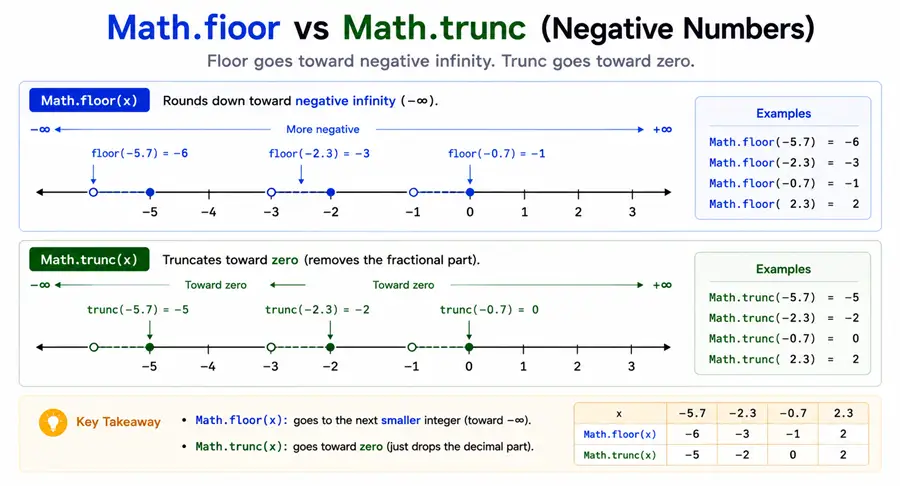
Math.floor() always rounds down toward negative infinity, which means the result may become more negative.
Example:
const y = -34;
const x = 12;

console.log(Math.floor(y / x));
Output
-3This happens because:
-34 / 12 = -2.8333Rounding down gives:
-3Behavior of Math.trunc with negative division
Math.trunc() removes the decimal part without rounding.
Example:
const y = -34;
const x = 12;

console.log(Math.trunc(y / x));
Output
-2Here the decimal portion is simply removed, making Math.trunc() behave differently from Math.floor() for negative values.
Integer Division Using Bitwise Operators in JavaScript
JavaScript bitwise operators convert numbers to 32-bit integers, which can be used as a shortcut to perform integer division.
One commonly used trick is the double NOT operator (~~).
Using the double NOT operator for fast integer conversion
Example:
const y = 34;
const x = 12;

const quotient = ~~(y / x);

console.log(quotient);
Output
2The expression works because bitwise operators force JavaScript to convert the floating result into a 32-bit integer.
Another variation uses the bitwise OR operator:
const quotient = (y / x) | 0;Both methods produce the same integer result.
Limitations of bitwise integer division
Bitwise tricks are fast but come with limitations:
- They only work reliably with 32-bit integers
- Large numbers may produce incorrect results
- They reduce readability for beginners
Because of these reasons, many developers prefer Math.floor() or Math.trunc() in production code.
Integer Division with BigInt in JavaScript
When BigInt division performs integer division automatically
Example:
const a = 34n;
const b = 12n;

const result = a / b;

console.log(result);
Output
2nUnlike normal numbers, BigInt division does not return floating-point results.
Limitations of BigInt arithmetic
Although BigInt is powerful, it has some restrictions:
- BigInt cannot be mixed directly with normal numbers
- Some Math functions do not support BigInt
- It may be slower than regular number operations
Example of invalid operation:
const a = 34n;
const b = 12;

console.log(a / b); // Error
To perform operations, both values must be BigInt.
Integer Division in TypeScript
TypeScript is a superset of JavaScript, which means it follows the same arithmetic behavior as JavaScript. Division operations always return a floating-point number, so integer division must still be performed using techniques such as Math.floor() or Math.trunc().
The advantage TypeScript provides is type safety, which helps ensure that the values being used in calculations are of the correct numeric type.
TypeScript integer division examples
The following example demonstrates integer division in TypeScript using Math.floor().
const totalItems: number = 34;
const itemsPerGroup: number = 12;

const groups: number = Math.floor(totalItems / itemsPerGroup);

console.log(groups);
Output
2You can also use Math.trunc() if you simply want to remove the decimal portion.
const totalItems: number = 34;
const itemsPerGroup: number = 12;

const groups: number = Math.trunc(totalItems / itemsPerGroup);

console.log(groups);
Output
2Both approaches work the same way in TypeScript because they rely on the underlying JavaScript runtime.
Ensuring integer return values
If you want to guarantee that a function always returns an integer result, you can wrap the logic inside a reusable helper function.
Example:
function integerDivide(a: number, b: number): number {
  return Math.floor(a / b);
}

console.log(integerDivide(34, 12));
Output
2Using helper functions can improve code readability and ensure consistent behavior across large applications.
Common Mistakes When Dividing Numbers in JavaScript
While performing division in JavaScript is straightforward, developers often encounter issues when working with floating-point numbers or negative values. Understanding these pitfalls helps avoid incorrect results.
Floating point precision issues
JavaScript uses IEEE-754 floating-point numbers, which means certain decimal calculations can produce unexpected results.
Example:
console.log(0.1 + 0.2);Output
0.30000000000000004This happens because decimal values cannot always be represented precisely in binary form.
When integer division is required, using methods like Math.floor() or Math.trunc() helps eliminate floating-point fractions.
Incorrect results with negative numbers
Different integer conversion methods behave differently with negative numbers.
Example:
console.log(Math.floor(-34 / 12));
console.log(Math.trunc(-34 / 12));
Output
-3
-2Math.floor()rounds down toward negative infinityMath.trunc()simply removes the decimal portion
Choosing the correct method depends on how you want negative values to behave.
Bitwise overflow problems
Bitwise tricks such as ~~(value) or (value | 0) convert numbers to 32-bit signed integers.
Example:
const largeNumber = 2147483648;

console.log(largeNumber | 0);
Output
-2147483648This happens because the value exceeds the 32-bit integer limit. As a result, bitwise methods should only be used when working with relatively small numbers.
For most applications, Math.floor() or Math.trunc() is the safer option.
Summary
JavaScript does not provide a dedicated integer division operator, but several techniques can be used to achieve the same result.
The most commonly used approaches include:
Math.floor()for rounding down division resultsMath.trunc()for removing decimal values- Bitwise operators such as
~~for quick integer conversion BigIntarithmetic for precise large number division
Each method behaves slightly differently, particularly when working with negative numbers or large values. Choosing the correct technique depends on the specific requirements of your application.
In most real-world cases, Math.floor() or Math.trunc() provides the most reliable and readable solution for performing integer division in JavaScript.
Official Documentation
If you want to explore further, the following official resources provide detailed documentation and guides.
- Math Object – JavaScript Documentation (MDN)
- Math.floor() – JavaScript Documentation (MDN)
- Math.trunc() – JavaScript Documentation (MDN)
Frequently Asked Questions
How do you perform integer division in JavaScript?
JavaScript does not have a dedicated integer division operator, but you can divide numbers and remove decimals using methods like Math.floor(), Math.trunc(), or bitwise operators.
How do you divide numbers without remainder in JavaScript?
You can divide numbers without remainder by using Math.floor(a / b) or Math.trunc(a / b) to remove the decimal portion of the result.
What is the difference between Math.floor and Math.trunc in JavaScript?
Math.floor rounds numbers down to the nearest integer, while Math.trunc simply removes the decimal part of a number.
Can JavaScript perform integer division with BigInt?
Yes. When both operands are BigInt values, JavaScript division automatically performs integer division and discards any fractional result.
What is the fastest way to perform integer division in JavaScript?
Bitwise operators such as the double NOT operator (~~) can convert a floating point division result to an integer quickly, but they only work correctly within 32-bit integer limits.
