JWT Authentication in Golang
Generate and Validate JWT Token
package main

import (
    "fmt"
    "time"

    "github.com/golang-jwt/jwt/v4"
)

func main() {
    // Generate token
    token := jwt.NewWithClaims(jwt.SigningMethodHS256, jwt.MapClaims{
        "user": "admin",
        "exp":  time.Now().Add(time.Hour * 1).Unix(),
    })

    tokenString, _ := token.SignedString([]byte("secret"))
    fmt.Println("Token:", tokenString)

    // Validate token
    parsedToken, _ := jwt.Parse(tokenString, func(token *jwt.Token) (interface{}, error) {
        return []byte("secret"), nil
    })

    if parsedToken.Valid {
        fmt.Println("Valid token")
    }
}Explanation:
jwt.NewWithClaimscreates a token with user data (claims)expdefines token expiration timeSignedStringsigns the token using a secret keyjwt.Parsevalidates the token and checks signature
👉 This is the simplest working JWT example in Golang
JWT Flow in REST API (Login → Token → Access)
| Step | Description |
|---|---|
| Login | User sends credentials |
| Token | Server generates JWT token |
| Header | Client sends token in request |
| Middleware | Server validates token |
| Access | Protected API returns data |
Flow Example:
POST /login → returns JWT token
GET /api → send token → access granted
How client sends token:
Authorization: Bearer <your_token>👉 This is how JWT is used in real-world REST APIs
What is JWT Authentication in Golang
JWT (JSON Web Token) authentication is a method of securing APIs by using tokens instead of sessions. After a user logs in, the server generates a token which is sent with every request to access protected resources.
Unlike traditional session-based authentication, JWT is:
- Stateless (no session storage required)
- Scalable (works well in distributed systems)
- Secure (signed and optionally encrypted)
Authentication vs Authorization (Quick Difference)
| Concept | Description |
|---|---|
| Authentication | Verifies user identity (login) |
| Authorization | Grants access to resources |
Example:
- Login with email/password → Authentication
- Access
/api/v1endpoint → Authorization
JWT Structure (Header, Payload, Signature)
A JWT token has three parts separated by dots:
header.payload.signature1. Header
{
  "alg": "HS256",
  "typ": "JWT"
}- Defines algorithm used for signing
2. Payload
{
  "sub": "user@example.com",
  "role": "admin",
  "exp": 1710000000
}- Stores user-related data (claims)
- Includes expiration time (
exp)
3. Signature
HMAC_SHA256(
  secret,
  base64(header) + "." + base64(payload)
)- Ensures token integrity
- Prevents tampering
- JWT payload is not encrypted by default
- Do not store sensitive data inside token
JWT Authentication with Gin (Full Implementation)
Project Setup (Gin + PostgreSQL + JWT)
This project uses Gin (web framework), PostgreSQL (database), and JWT (authentication) to build a secure REST API.
Project structure:
- controller → handles API routes
- middleware → validates JWT tokens
- model → database and user logic
Setup commands:
mkdir jwt-demo && cd jwt-demo
mkdir controller middleware model
touch main.go .env
go mod init example.com/jwt-demo
Install dependencies:
go get -u github.com/gin-gonic/gin
go get -u gorm.io/gorm
go get -u gorm.io/driver/postgres
go get -u github.com/golang-jwt/jwt/v4
go get github.com/joho/godotenv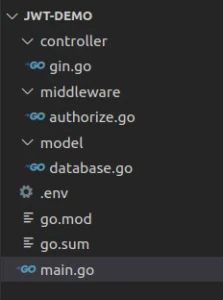
Environment variables (.env):
SECRET=topsecret
DB_HOST=localhost
DB_PORT=5432
DB_USER=postgres
DB_NAME=postgres
DB_PASSWORD=mypassword
Database Setup and User Model (PostgreSQL + GORM)
Next, we configure the database connection and define the user model used for authentication.
Navigate to the model directory and create the file:
cd model && touch database.gomodel/database.go
package model

import (
   "fmt"
   "log"
   "os"

   "github.com/jinzhu/gorm"
   _ "github.com/jinzhu/gorm/dialects/postgres"
   "github.com/joho/godotenv"
   "golang.org/x/crypto/bcrypt"
)

var DB *gorm.DB
var err error

// Load JWT secret from environment
var secretKey = envVariable("SECRET")

// Initialize PostgreSQL database connection
func SetDBClient() {
   var (
       host     = envVariable("DB_HOST")
       port     = envVariable("DB_PORT")
       user     = envVariable("DB_USER")
       dbname   = envVariable("DB_NAME")
       password = envVariable("DB_PASSWORD")
   )

   // Build connection string
   dns := fmt.Sprintf("host=%s port=%s user=%s dbname=%s password=%s sslmode=disable",
       host,
       port,
       user,
       dbname,
       password,
   )

   // Connect to PostgreSQL using GORM
   DB, err = gorm.Open("postgres", dns)

   // Auto-create User table if it does not exist
   DB.AutoMigrate(User{})

   if err != nil {
       fmt.Println(err)
   }

   fmt.Println("Connection to the database is successful")
}

// Read environment variables from .env file
func envVariable(key string) string {
   err := godotenv.Load(".env")
   if err != nil {
       log.Fatalf("Error loading .env file")
   }
   return os.Getenv(key)
}

// User model for authentication
type User struct {
   Email    string `json:"email" gorm:"unique"`
   Password string `json:"password"`
}

// Hash password before saving to database
func (u *User) GeneratePasswordHarsh() error {
   bytes, err := bcrypt.GenerateFromPassword([]byte(u.Password), 14)
   u.Password = string(bytes)
   return err
}

// Validate user password during login
func (u *User) CheckPasswordHarsh(password string) bool {
   err := bcrypt.CompareHashAndPassword([]byte(u.Password), []byte(password))
   return err == nil
}
Explanation:
This file is responsible for:
- Establishing a connection to PostgreSQL using GORM
- Defining the User model used for authentication
- Hashing passwords securely using bcrypt
- Validating user credentials during login
The SetDBClient() function initializes the database connection using environment variables, while AutoMigrate() ensures the required table is created automatically.
The User struct represents application users, and password handling is secured using hashing to prevent storing plain-text credentials.
Signup Handler (User Registration)
package controller

import (
   "net/http"
   "os"
   "time"

   "example.com/jwt-demo/model"
   "github.com/gin-gonic/gin"
   "github.com/golang-jwt/jwt"
)

func Signup(c *gin.Context) {
   var reqUser model.User

   // Bind user input (email + password) from request body
   if err := c.ShouldBind(&reqUser); err != nil {
       c.JSON(http.StatusBadRequest, gin.H{
           "error": err,
       })
       return
   }

   // Check if user already exists in database
   var dbUser model.User
   model.DB.Where("email =?", reqUser.Email).First(&dbUser)
   if dbUser.Email != "" {
       c.JSON(http.StatusBadRequest, gin.H{
           "error": "user with email found, login",
       })
       return
   }

   // Hash user password before saving
   err := reqUser.GeneratePasswordHarsh()
   if err != nil {
       c.JSON(http.StatusInternalServerError, gin.H{
           "error": "unable to hash password",
       })
       return
   }

   // Save new user into database
   res := model.DB.Create(&reqUser)
   if res.Error != nil {
       c.JSON(http.StatusInternalServerError, gin.H{
           "error": "failed to create user",
       })
       return
   }

   // Return created user response
   c.JSON(http.StatusOK, gin.H{
       "user": reqUser,
   })
}
Explanation:
The Signup() handler is responsible for registering new users in the system.
What happens step by step:
-
Bind request data
The request body (email and password) is mapped to theUserstruct usingShouldBind(). -
Check existing user
The database is queried to ensure the email is not already registered. -
Hash password
The password is securely hashed using bcrypt before storing it in the database. -
Store user
The new user is inserted into PostgreSQL using GORM. -
Return response
A success response is sent back to the client with user details.
- No JWT token is generated during signup
- Signup is only for user registration
- Token generation happens during login
Login Handler (Generate JWT Token)
The Login() handler authenticates a user and generates a JWT token for accessing protected routes.
func Login(c *gin.Context) {
   var reqUser model.User

   // Bind user input (email + password)
   if err := c.ShouldBind(&reqUser); err != nil {
       c.JSON(http.StatusBadRequest, gin.H{
           "error": err,
       })
       return
   }

   // Fetch user from database
   var dbUser model.User
   model.DB.Where("email =?", reqUser.Email).First(&dbUser)

   // Check if user exists
   if dbUser.Email == "" {
       c.JSON(http.StatusBadRequest, gin.H{
           "error": "Invalid email or password",
       })
       return
   }

   // Validate password
   if dbUser.CheckPasswordHarsh(reqUser.Password) {

       // Create JWT token with claims
       token := jwt.NewWithClaims(jwt.SigningMethodHS256, jwt.MapClaims{
           "sub": dbUser.Email,                               // user identity
           "exp": time.Now().Add(time.Minute * 10).Unix(),    // expiration time
       })

       // Sign token using secret key
       tokenString, err := token.SignedString([]byte(os.Getenv("SECRET")))
       if err != nil {
           c.JSON(http.StatusBadRequest, gin.H{
               "error": err.Error(),
           })
           return
       }

       // Store token in cookie
       c.SetSameSite(http.SameSiteLaxMode)
       c.SetCookie("Authorization", tokenString, 3600*24*30, "", "", false, true)

       // Return user details
       c.JSON(http.StatusOK, gin.H{
           "user": dbUser,
       })

   } else {
       c.JSON(http.StatusNotFound, gin.H{
           "error": "Invalid email or password",
       })
   }
}
Explanation:
The login process performs both authentication and token generation.
Step-by-step flow:
-
Bind request data
The incoming request (email and password) is mapped to theUserstruct. -
Fetch user from database
The system checks if the user exists using the provided email. -
Validate password
The hashed password stored in the database is compared with user input. -
Generate JWT token
A token is created using:sub→ user identity (email)exp→ token expiration time
-
Sign token
The token is signed using the secret key from the.envfile. -
Store token in cookie
The JWT token is sent to the client as a cookie namedAuthorization. -
Return response
User details are returned after successful login.
- JWT tokens are generated only during login
- Token expiration is controlled using the
expclaim - The token is stored in cookies (you can also use headers in APIs)
Protected API Endpoint (Resources)
This handler returns user data from the database. It will later be protected using JWT middleware so that only authenticated users can access it.
func Resources(c *gin.Context) {
   var users []model.User

   // Fetch all users from database
   res := model.DB.Find(&users)
   if res.Error != nil {
       c.JSON(http.StatusOK, gin.H{
           "message": "error fetching users",
       })
       return
   }

   // Return users as response
   c.JSON(http.StatusOK, gin.H{
       "users": users,
   })
}
Explanation:
- Retrieves all users from PostgreSQL
- Returns data as JSON response
- Will be secured using JWT middleware
Authorization Middleware (Protect Routes)
The middleware validates JWT tokens before allowing access to protected routes. Every incoming request must pass through this middleware.
package middleware

import (
   "fmt"
   "net/http"
   "os"
   "time"

   "example.com/jwt-demo/model"
   "github.com/gin-gonic/gin"
   "github.com/golang-jwt/jwt"
)

func Authorize(c *gin.Context) {

   // Read token from cookie
   tokenString, err := c.Cookie("Authorization")
   if err != nil {
       c.AbortWithStatus(http.StatusUnauthorized)
       return
   }

   // Parse and validate token
   token, err := jwt.Parse(tokenString, func(token *jwt.Token) (interface{}, error) {

       // Ensure correct signing method
       if _, ok := token.Method.(*jwt.SigningMethodHMAC); !ok {
           return nil, fmt.Errorf("unexpected signing method: %v", token.Header["sub"])
       }

       return []byte(os.Getenv("SECRET")), nil
   })

   // Validate token claims
   if claims, ok := token.Claims.(jwt.MapClaims); ok && token.Valid {

       // Check token expiration
       if float64(time.Now().Unix()) > claims["exp"].(float64) {
           c.AbortWithStatus(http.StatusUnauthorized)
           return
       }

       // Fetch user from database using token subject
       var user model.User
       model.DB.Where("email =?", claims["sub"]).First(&user)

       if user.Email == "" {
           c.AbortWithStatus(http.StatusUnauthorized)
           return
       }

       // Store user in context for next handlers
       c.Set("user", user)

       // Continue request flow
       c.Next()

   } else {
       c.AbortWithStatus(http.StatusUnauthorized)
       return
   }
}
Explanation:
The Authorize() middleware ensures that only valid users can access protected routes.
Step-by-step flow:
-
Read token
Extracts JWT token from theAuthorizationcookie. -
Parse token
Validates token signature using the secret key. -
Verify signing method
Ensures the token was created using the expected algorithm (HS256). -
Check expiration
Rejects token if expired. -
Validate user
Extracts user email (sub) from token and verifies it in the database. -
Allow access
Stores user in context and passes control usingc.Next().
Application Entry Point (main.go)
Now that the database, middleware, and controllers are ready, we connect everything in the main.go file. This is the entry point of the application.
main.go
package main

import (
   "fmt"
   "net/http"

   "example.com/jwt-demo/controller"
   "example.com/jwt-demo/middleware"
   "example.com/jwt-demo/model"
   "github.com/gin-gonic/gin"
)

func init() {
   model.SetDBClient()
}
func main() {
   fmt.Println("Welcome to Go authorization with Go")
   r := gin.Default()
   r.GET("/", func(c *gin.Context) {
       c.JSON(http.StatusOK, gin.H{
           "message": "Home router",
       })
   })

   r.POST("/signup", controller.Signup)
   r.POST("/login", controller.Login)
   r.GET("/api/v1", middleware.Authorize, controller.Resources)

   r.Run(":5000")
}Explanation:
The main.go file ties together all components of the application.
-
Initialize database connection
Theinit()function runs beforemain()and sets up the PostgreSQL connection usingSetDBClient(). -
Create Gin router
gin.Default()initializes the HTTP server with default middleware (logger and recovery). -
Define routes
/signup→ registers a new user/login→ authenticates user and generates JWT token/api/v1→ protected route (requires valid JWT)
-
Apply middleware
The/api/v1route is secured usingmiddleware.Authorize, ensuring only authenticated users can access it. -
Start server
The application runs on port5000.
Flow Summary
- User signs up → stored in database
- User logs in → receives JWT token
- Client sends request → middleware validates token
- Access granted to protected route
Testing
To test the JWT token, we will use Postman to signup and login into our application.
We first need to run our application. In your terminal move to the root
folder where main.go file is and run the below command
Example
$ go run main.go
Connection to the database is successful
Welcome to Go authorization with Go
[GIN-debug] [WARNING] Creating an Engine instance with the Logger and Recovery middleware already attached.

[GIN-debug] [WARNING] Running in "debug" mode. Switch to "release" mode in production.
- using env:   export GIN_MODE=release
- using code:  gin.SetMode(gin.ReleaseMode)

[GIN-debug] GET    /                         --> main.main.func1 (3 handlers)
[GIN-debug] POST   /signup                   --> example.com/jwt-demo/controller.Signup (3 handlers)
[GIN-debug] POST   /login                    --> example.com/jwt-demo/controller.Login (3 handlers)
[GIN-debug] GET    /api/v1                   --> example.com/jwt-demo/controller.Resources (4 handlers)
[GIN-debug] [WARNING] You trusted all proxies, this is NOT safe. We recommend you to set a value.
Please check https://pkg.go.dev/github.com/gin-gonic/gin#readme-don-t-trust-all-proxies for details.
[GIN-debug] Listening and serving HTTP on :5000
Signup user
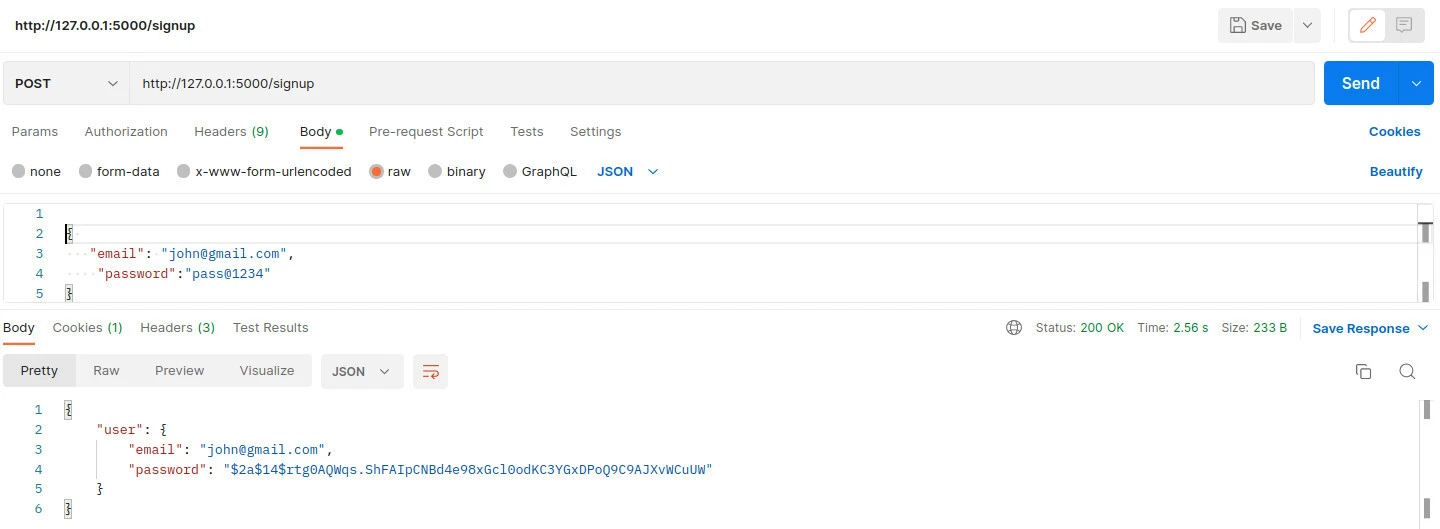
Login User
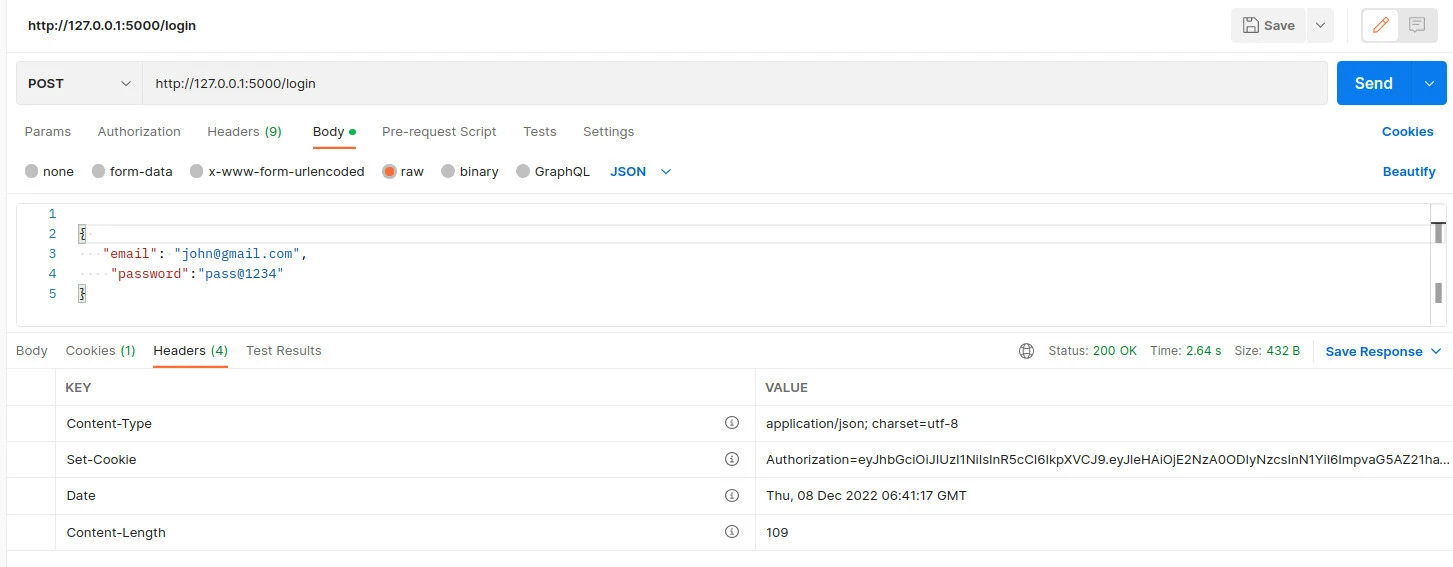
Get resource with token
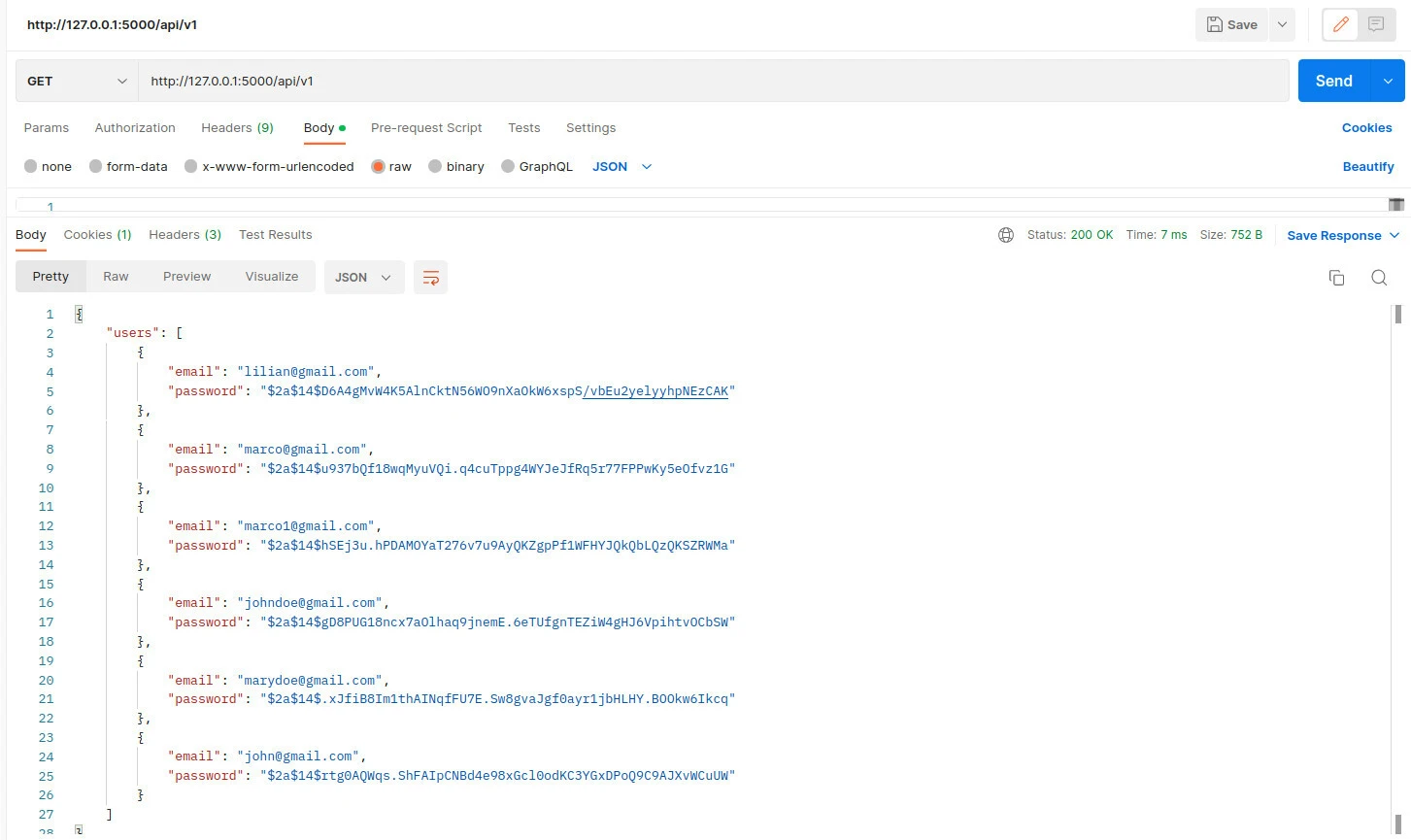
After making this request, if you clear your session and cookies, you will not be able to access data from the resources route.
Get resources without token
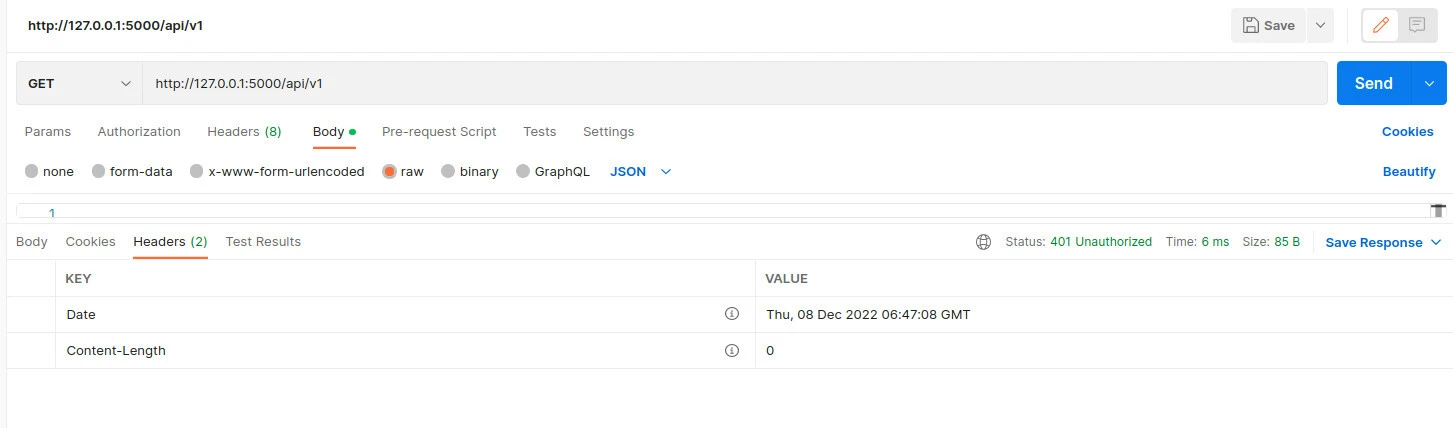
Using JWT in REST API
Send JWT Token in Authorization Header
In real-world REST APIs, JWT tokens are typically sent in the request header instead of cookies.
Authorization Header Format:
Authorization: Bearer <your_token>Example using curl:
Confirm the service responds on localhost with curl; see the curl command for verbose mode, timeouts, and follow-redirect flags.
curl -X GET http://localhost:5000/api/v1 \
  -H "Authorization: Bearer <your_token>"
Read Authorization header in Gin:
authHeader := c.GetHeader("Authorization")
tokenString := strings.TrimPrefix(authHeader, "Bearer ")
Why use Authorization header
- Works well with REST APIs and microservices
- Compatible with frontend and mobile applications
- Avoids cookie-related issues like CSRF
Test API using Postman
You can test your JWT authentication flow using Postman.
Step 1: Signup user
- Method: POST
- URL:
http://localhost:5000/signup - Body (JSON):
{
  "email": "test@example.com",
  "password": "password123"
}
Step 2: Login user
- Method: POST
- URL:
http://localhost:5000/login
After successful login:
- A JWT token is returned as a cookie (
Authorization) - Copy the token if you want to test using headers
Step 3: Access protected route
- Method: GET
- URL:
http://localhost:5000/api/v1
Option 1: Using cookie (current implementation)
- Postman automatically sends cookies
Option 2: Using Authorization header
Authorization: Bearer <your_token>Expected Result
- Valid token → returns user data
- Invalid or missing token → returns
401 Unauthorized
Gin JWT Middleware
Minimal Middleware Example
Below is a simplified version of JWT middleware to help you understand the core logic without database validation.
func JWTMiddleware() gin.HandlerFunc {
    return func(c *gin.Context) {

        // Read token from Authorization header
        authHeader := c.GetHeader("Authorization")
        tokenString := strings.TrimPrefix(authHeader, "Bearer ")

        // Parse and validate token
        token, err := jwt.Parse(tokenString, func(token *jwt.Token) (interface{}, error) {
            return []byte("secret"), nil
        })

        if err != nil || !token.Valid {
            c.AbortWithStatus(http.StatusUnauthorized)
            return
        }

        c.Next()
    }
}
Explanation:
- Reads JWT token from request header
- Validates token signature using secret key
- Blocks request if token is invalid
- Allows request to continue using
c.Next()
👉 This is a minimal version for understanding. Your full implementation already includes database validation.
Common Middleware Mistakes
Missing Authorization header
- If header is not sent, middleware will fail
- Always check header before parsing
Not removing "Bearer " prefix
tokenString := strings.TrimPrefix(authHeader, "Bearer ")- Required to extract actual token
Ignoring token expiration
- Always validate
expclaim - Expired tokens should return
401 Unauthorized
Using wrong secret key
- Token must be signed and verified using the same secret
- Mismatch causes validation failure
Not validating signing method
- Ensure token uses expected algorithm (e.g., HS256)
- Prevents security issues
Advanced Use Cases
Role-Based Authorization using JWT
In real-world applications, JWT tokens can include user roles such as admin, user, or editor. This allows you to control access to specific routes based on roles.
Add role to JWT claims during login:
token := jwt.NewWithClaims(jwt.SigningMethodHS256, jwt.MapClaims{
    "sub":  dbUser.Email,
    "role": "admin",
    "exp":  time.Now().Add(time.Minute * 10).Unix(),
})
Access role inside middleware:
role := claims["role"].(string)Restrict access based on role:
if role != "admin" {
    c.AbortWithStatus(http.StatusForbidden)
    return
}
Use cases:
- Admin-only dashboards
- Role-based API permissions (read/write access)
- Multi-user systems with different privileges
Token Expiry and Refresh Strategy
JWT tokens should have an expiration time to improve security.
Current implementation:
"exp": time.Now().Add(time.Minute * 10).Unix()- Token expires after 10 minutes
- Limits the risk of token misuse
Best practices:
- Use short-lived access tokens (10–15 minutes)
- Use refresh tokens for longer sessions
- Store refresh tokens securely (database or HTTP-only cookies)
Simple refresh flow:
- User logs in and receives an access token
- Access token expires
- Client sends refresh token
- Server issues a new access token
Common Errors and Fixes
Unauthorized: Invalid or Missing Token
This is the most common error when working with JWT authentication.
Possible causes:
- JWT token is not sent in request
- Incorrect Authorization header format
- Token signed with wrong secret key
- Token is malformed
Fix:
- Ensure token is sent correctly:
Authorization: Bearer <your_token>- If using cookies, confirm the
Authorizationcookie exists - Verify the same secret key is used for both signing and validation
Token Expired Error
JWT tokens include an expiration time (exp claim). Once expired, access is denied.
Example:
"exp": time.Now().Add(time.Minute * 10).Unix()Fix:
- Increase expiry time if too short
- Implement refresh token strategy
- Prompt user to log in again
Gin Trusted Proxies Warning
You may see this warning when running the server:
[GIN-debug] You trusted all proxies, this is NOT safe.Fix:
r.SetTrustedProxies(nil)Why this matters:
- Prevents security risks when deploying behind proxies
- Recommended for production environments
Frequently Asked Questions
What is JWT authentication in Golang?
JWT authentication in Golang is a stateless authentication method where users receive a token after login and use it to access protected routes without maintaining server-side sessions.
How do I implement JWT authentication in Gin?
You can implement JWT authentication in Gin by generating tokens during login, storing them in cookies or headers, and validating them using middleware for protected routes.
How do I send JWT token in Golang REST API?
JWT tokens are typically sent in the Authorization header using the Bearer scheme or stored in cookies depending on the application design.
What is gin jwt middleware?
Gin JWT middleware is used to validate tokens before allowing access to protected endpoints by checking token signature, expiration, and user validity.
What is the difference between authentication and authorization?
Authentication verifies user identity while authorization determines what resources a user can access.
Summary
- JWT authentication enables stateless and secure API access in Golang
- Users register using the signup endpoint and authenticate via login
- A JWT token is generated and used to access protected routes
- Middleware validates the token before allowing access
- Tokens can be passed via cookies or Authorization headers
- Proper error handling and token expiry strategies improve security